
Scrape Google Maps Business Listings with Python: Search → Place Details → Reviews (ProxiesAPI)
Google Maps is the internet’s biggest business directory.
If you do outbound (agencies, local SEO, B2B services), a “maps leads” dataset is gold:
- business name
- category
- rating + review count
- phone
- website
- address
- opening hours
- a few recent reviews
In this tutorial, we’ll build a practical pipeline for extracting that data:
- Search (find places for a query like “dentist in Austin TX”)
- Place details (open each listing and capture structured fields)
- Reviews (optional: fetch N most recent reviews)
We’ll do it in a way that’s honest about the tradeoffs:
- Some data is loaded dynamically.
- Google changes markup.
- You may hit consent pages and bot challenges.
So we’ll use a 2-layer approach:
- Playwright to drive the UI and capture the canonical place URL / ID (plus screenshots)
- Python + Requests for the repeatable extraction layer (with retries + ProxiesAPI)
Google surfaces bot checks quickly. ProxiesAPI helps you rotate IPs and stabilize requests so your lead pipeline doesn’t die mid-run.
What we’re scraping (and why it’s tricky)
Google Maps is mostly a client app. A lot of the data you see in the left panel (or place sheet) is populated via internal APIs.
That means you have three options:
- UI automation (Playwright/Selenium): slower but closest to what a user sees
- Network reverse engineering: fast but brittle and can break without warning
- Official Places API: stable but paid + terms
This guide focuses on UI automation + lightweight parsing. It’s the most teachable and tends to survive small changes.
Setup
python -m venv .venv
source .venv/bin/activate
pip install playwright requests python-dotenv
playwright install
Create .env:
PROXIESAPI_KEY="YOUR_KEY"
PROXIESAPI_PROXY_URL="http://user:pass@gateway:port"  # if ProxiesAPI provides a proxy URL
Step 1: Resilient HTTP fetch (with optional ProxiesAPI)
Even if you drive the UI with Playwright, you’ll still want a fetch helper for:
- grabbing the canonical place page HTML
- pulling a lightweight JSON endpoint (if available)
- downloading your own exported artifacts
Here’s a reusable fetch().
import os
import random
import time
from typing import Optional

import requests
from dotenv import load_dotenv

load_dotenv()

PROXY_URL = os.getenv("PROXIESAPI_PROXY_URL")
TIMEOUT = (10, 30)


def make_session() -> requests.Session:
    s = requests.Session()
    s.headers.update({
        "User-Agent": (
            "Mozilla/5.0 (Macintosh; Intel Mac OS X 10_15_7) "
            "AppleWebKit/537.36 (KHTML, like Gecko) "
            "Chrome/123.0.0.0 Safari/537.36"
        ),
        "Accept-Language": "en-US,en;q=0.9",
    })
    return s


def fetch(url: str, session: requests.Session, max_attempts: int = 4) -> str:
    last_exc: Optional[Exception] = None

    for attempt in range(1, max_attempts + 1):
        time.sleep(random.uniform(0.8, 2.0))

        try:
            proxies = None
            if PROXY_URL:
                proxies = {"http": PROXY_URL, "https": PROXY_URL}

            r = session.get(url, timeout=TIMEOUT, proxies=proxies, allow_redirects=True)

            if r.status_code in (403, 429, 500, 502, 503, 504):
                time.sleep(min(10, 1.5 ** attempt) + random.uniform(0, 0.7))
                continue

            r.raise_for_status()
            return r.text

        except Exception as e:
            last_exc = e
            time.sleep(min(10, 1.5 ** attempt) + random.uniform(0, 0.7))

    raise RuntimeError(f"Failed to fetch {url} after {max_attempts} attempts") from last_exc
Step 2: Use Playwright to collect place URLs from a search
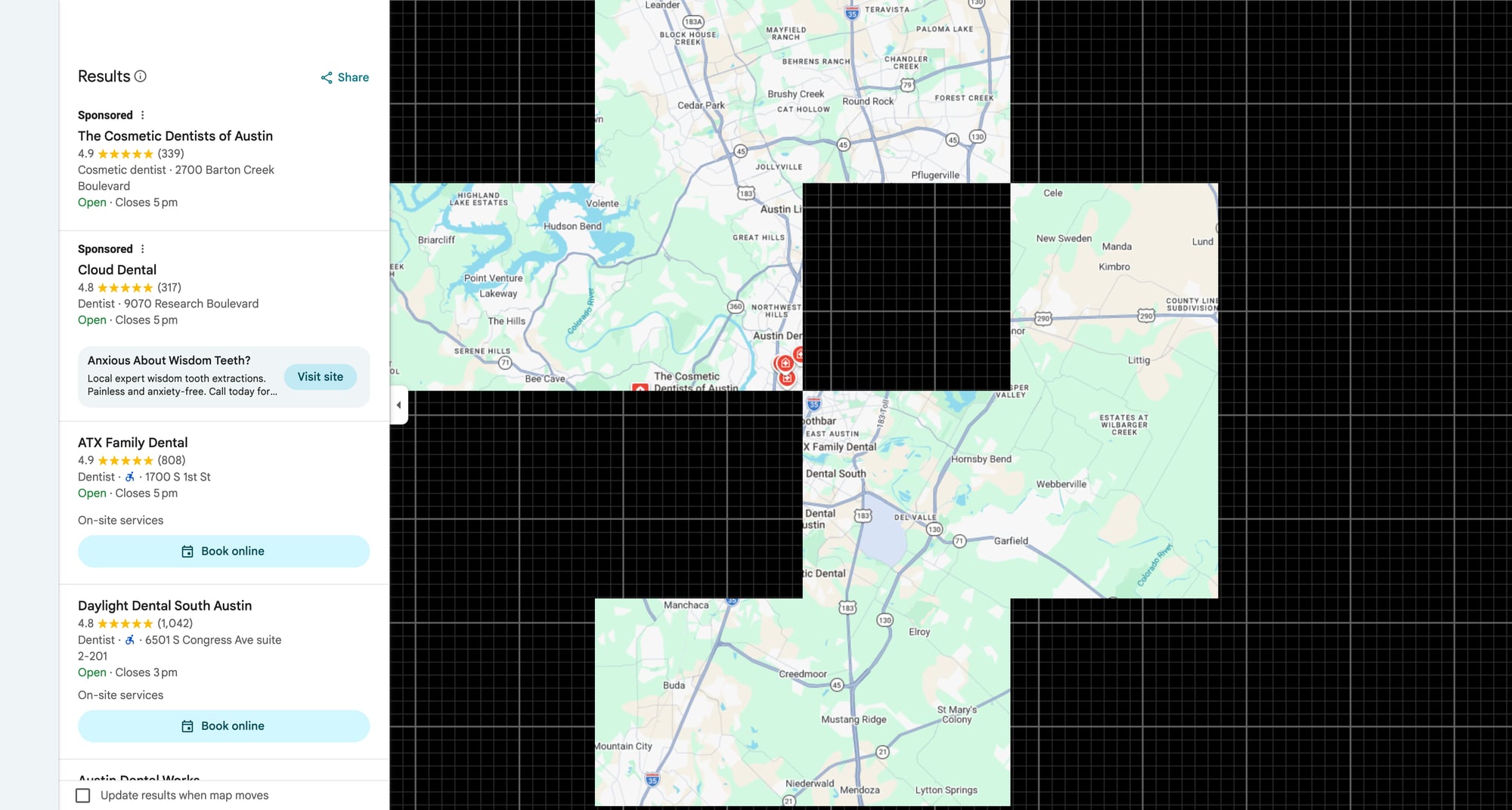
We’ll open Google Maps, run a search, then scroll results and collect place links.
Search URL format (often works):
https://www.google.com/maps/search/<QUERY>
Example:
https://www.google.com/maps/search/dentists+in+austin+tx
Playwright collector
import json
import re
from urllib.parse import quote_plus

from playwright.sync_api import sync_playwright


def maps_search_url(query: str) -> str:
    return f"https://www.google.com/maps/search/{quote_plus(query)}"


def collect_place_urls(query: str, max_places: int = 30) -> list[str]:
    urls: list[str] = []
    seen = set()

    with sync_playwright() as p:
        browser = p.chromium.launch(headless=True)
        page = browser.new_page(viewport={"width": 1280, "height": 720})

        page.goto(maps_search_url(query), wait_until="domcontentloaded")

        # Give the app a moment to hydrate
        page.wait_for_timeout(2500)

        # Scroll the results panel (role/aria labels change; selectors are best verified with a screenshot)
        for _ in range(25):
            # Collect links that look like /maps/place/...
            anchors = page.locator('a[href^="https://www.google.com/maps/place"]')
            for i in range(anchors.count()):
                href = anchors.nth(i).get_attribute("href")
                if not href:
                    continue
                if href in seen:
                    continue
                seen.add(href)
                urls.append(href)
                if len(urls) >= max_places:
                    break
            if len(urls) >= max_places:
                break

            # wheel scroll
            page.mouse.wheel(0, 1800)
            page.wait_for_timeout(1200)

        browser.close()

    return urls


if __name__ == "__main__":
    q = "dentists in austin tx"
    urls = collect_place_urls(q, max_places=20)
    print("collected", len(urls))
    print(urls[:3])
    with open("place_urls.json", "w", encoding="utf-8") as f:
        json.dump(urls, f, indent=2)
Why screenshots matter here
Google Maps’ DOM is complex and changes. The best workflow is:
- open the page manually
- take a screenshot of the results panel and a place panel
- verify the anchor patterns you’re extracting
We’ll do that in the screenshot step later.
Step 3: Extract place details
There are two strategies:
- parse fields directly from the DOM in Playwright (often reliable)
- fetch the canonical place URL HTML and parse (sometimes returns simplified markup)
We’ll use the UI DOM because it’s closest to what users see.
Playwright place detail parser
from dataclasses import dataclass, asdict


@dataclass
class Place:
    name: str | None
    rating: str | None
    reviews: str | None
    category: str | None
    address: str | None
    phone: str | None
    website: str | None
    url: str


def parse_place_panel(page) -> Place:
    # NOTE: These selectors are heuristics. Always verify with a screenshot on your target query.
    name = page.locator("h1").first.text_content()

    rating = None
    rating_el = page.locator('[role="img"][aria-label*="stars"]').first
    if rating_el.count() > 0:
        rating = rating_el.get_attribute("aria-label")

    # Common: category and address appear as buttons in the panel
    category = page.locator('button[jsaction*="pane.rating.category"]').first.text_content()

    address = None
    addr = page.locator('button[data-item-id="address"]').first
    if addr.count() > 0:
        address = addr.text_content()

    phone = None
    ph = page.locator('button[data-item-id="phone"]').first
    if ph.count() > 0:
        phone = ph.text_content()

    website = None
    web = page.locator('a[data-item-id="authority"]').first
    if web.count() > 0:
        website = web.get_attribute("href")

    # review count sometimes appears near rating
    reviews = page.locator('button[jsaction*="pane.rating.moreReviews"]').first.text_content()

    return Place(
        name=(name or "").strip() if name else None,
        rating=(rating or "").strip() if rating else None,
        reviews=(reviews or "").strip() if reviews else None,
        category=(category or "").strip() if category else None,
        address=(address or "").strip() if address else None,
        phone=(phone or "").strip() if phone else None,
        website=(website or "").strip() if website else None,
        url=page.url,
    )
Putting it together: search → open each place → parse
import csv
import time
from playwright.sync_api import sync_playwright


def scrape_places_from_query(query: str, max_places: int = 25) -> list[dict]:
    place_urls = collect_place_urls(query, max_places=max_places)

    out: list[dict] = []

    with sync_playwright() as p:
        browser = p.chromium.launch(headless=True)
        page = browser.new_page(viewport={"width": 1280, "height": 720})

        for url in place_urls:
            page.goto(url, wait_until="domcontentloaded")
            page.wait_for_timeout(2000)

            try:
                place = parse_place_panel(page)
                out.append(asdict(place))
                print("parsed", place.name)
            except Exception as e:
                print("failed", url, e)

            time.sleep(1.0)

        browser.close()

    return out


def write_csv(rows: list[dict], path: str = "maps_leads.csv") -> None:
    if not rows:
        return
    with open(path, "w", newline="", encoding="utf-8") as f:
        w = csv.DictWriter(f, fieldnames=list(rows[0].keys()))
        w.writeheader()
        w.writerows(rows)


if __name__ == "__main__":
    rows = scrape_places_from_query("dentists in austin tx", max_places=20)
    write_csv(rows)
    print("wrote", len(rows))
Step 4 (Optional): Capture a few reviews
Reviews are loaded in a scrollable dialog.
If you want “last 10 reviews” for enrichment, you can:
- click the reviews button
- scroll the dialog
- extract name/date/text
Because selectors vary, consider this a template:
def collect_reviews(page, max_reviews: int = 20) -> list[dict]:
    out = []

    # open reviews
    btn = page.locator('button[jsaction*="pane.rating.moreReviews"]').first
    if btn.count() == 0:
        return out
    btn.click()
    page.wait_for_timeout(1500)

    # scroll and collect review blocks
    for _ in range(15):
        blocks = page.locator('div[role="article"]')
        for i in range(blocks.count()):
            b = blocks.nth(i)
            text = b.text_content() or ""
            text = " ".join(text.split())
            if len(text) < 30:
                continue
            out.append({"text": text})
            if len(out) >= max_reviews:
                return out

        page.mouse.wheel(0, 1400)
        page.wait_for_timeout(900)

    return out
Where ProxiesAPI helps (realistically)
Google Maps is aggressive about bot detection.
If you scale this beyond a handful of queries, you’ll want:
- IP rotation
- retries
- a way to recover from intermittent blocks
That’s where ProxiesAPI fits: not as a magic bypass, but as a reliability layer when your pipeline is doing many requests.
QA checklist
- For a single query, you can collect at least 10 place URLs
- Opening place URLs yields a place panel (not consent/bot interstitial)
- Parsed rows have name + address for at least 70% of places
- Your crawler uses pacing (no tight loops)
- You saved screenshots for selector verification
Next upgrades
- Add dedupe: same place can appear across searches
- Store to SQLite and enrich incrementally
- Introduce job queueing (one city/query per worker)
- Consider the official API if you need stable long-term production use
Google surfaces bot checks quickly. ProxiesAPI helps you rotate IPs and stabilize requests so your lead pipeline doesn’t die mid-run.