
Scrape Marktplaats Search Results (Listings) with Python + ProxiesAPI
Marktplaats search pages are valuable because they’re already “normalized”:
- one page contains many listings
- each listing has a title + price
- seller/location metadata is often present
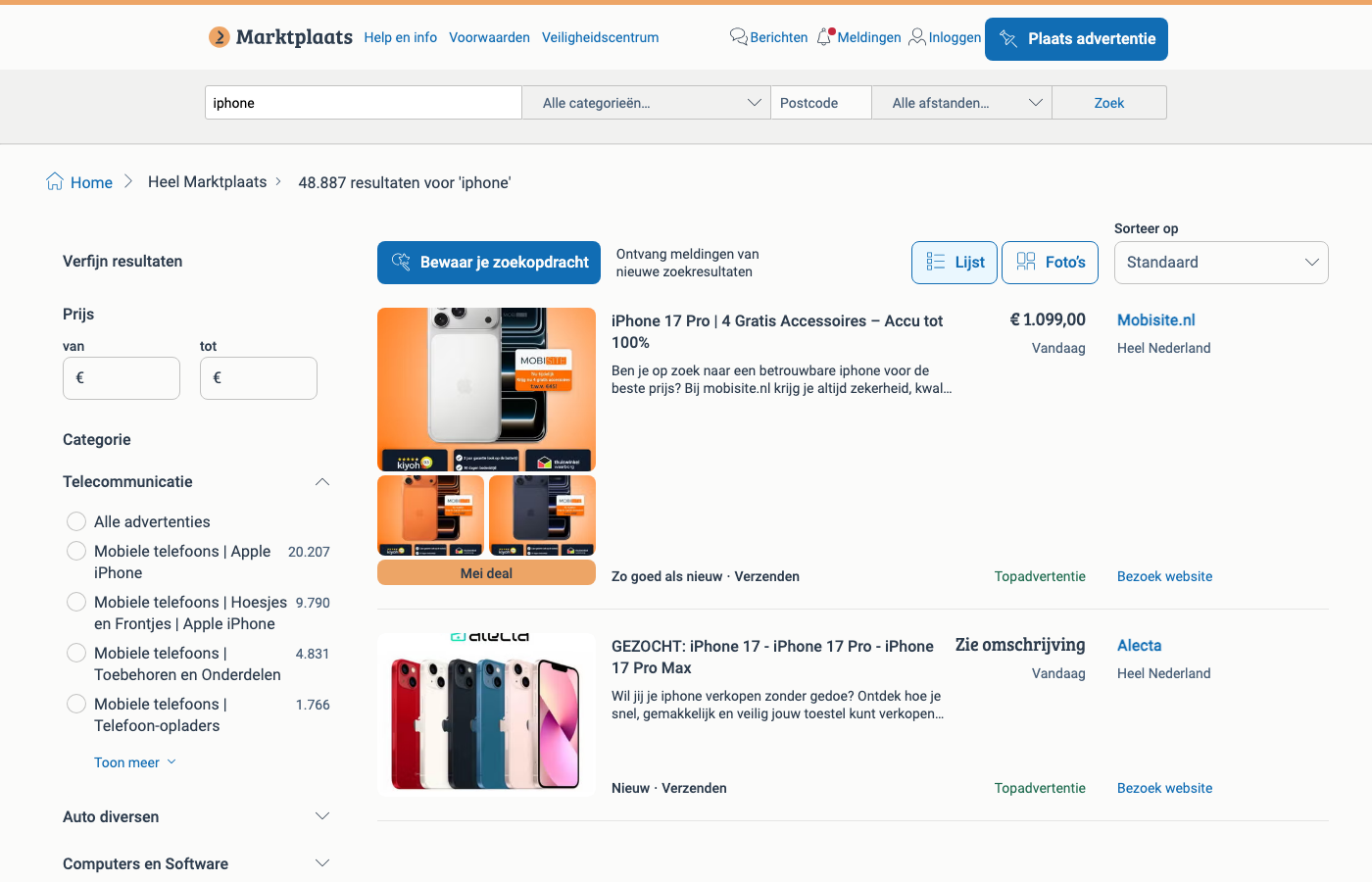
In this tutorial we’ll build a search results scraper in Python that extracts:
- listing title
- price (string, as shown)
- location (when present)
- listing URL
…then exports a clean CSV.
Marketplace listing pages are high-signal and high-traffic — they throttle aggressively when you scale. ProxiesAPI gives you a consistent fetch layer so your extraction logic stays focused on parsing, not networking failures.
What we’re scraping (Marktplaats structure)
For a simple query like “iphone”, the canonical search URL looks like:
https://www.marktplaats.nl/q/iphone/
Marktplaats is a modern React app, but the results list is server-rendered (you can see listing HTML in the page source). That means you can often scrape it without a full browser renderer.
Listings typically appear as repeated blocks with:
- an
a[href^="/v/"]cover link - a title element (strong text)
- a price element (often an
h5) - a location label (often
data-testid="location-label")
Setup
python -m venv .venv
source .venv/bin/activate
pip install requests beautifulsoup4 lxml
ProxiesAPI: a clean fetch layer
import os
import time
import random
import urllib.parse
import requests

PROXIESAPI_KEY = os.environ.get("PROXIESAPI_KEY", "")
TIMEOUT = (10, 40)

session = requests.Session()


def proxiesapi_url(target_url: str) -> str:
    if not PROXIESAPI_KEY:
        raise RuntimeError("Set PROXIESAPI_KEY in your environment")

    return (
        "http://api.proxiesapi.com/?auth_key="
        + urllib.parse.quote(PROXIESAPI_KEY, safe="")
        + "&url="
        + urllib.parse.quote(target_url, safe="")
    )


def fetch(url: str, *, use_proxiesapi: bool = True, max_retries: int = 4) -> str:
    last_err = None

    for attempt in range(1, max_retries + 1):
        try:
            final_url = proxiesapi_url(url) if use_proxiesapi else url
            r = session.get(
                final_url,
                timeout=TIMEOUT,
                headers={
                    "User-Agent": (
                        "Mozilla/5.0 (Macintosh; Intel Mac OS X 10_15_7) "
                        "AppleWebKit/537.36 (KHTML, like Gecko) "
                        "Chrome/123.0 Safari/537.36"
                    ),
                    "Accept-Language": "nl-NL,nl;q=0.9,en;q=0.8",
                },
            )
            r.raise_for_status()
            html = r.text
            if not html or len(html) < 2000:
                raise RuntimeError(f"Suspiciously small HTML ({len(html)} bytes)")
            return html
        except Exception as e:
            last_err = e
            time.sleep(min(10, (2 ** (attempt - 1))) + random.random())

    raise RuntimeError(f"Fetch failed after {max_retries} attempts: {last_err}")
Step 1: Parse listing blocks
Marktplaats uses hashed CSS module classnames, so rely on stable base classes and attributes:
- listing wrapper:
div.hz-Listing-item-wrapper-new - cover link:
a[href^="/v/"] - title:
span.hz-Text--bodyLargeStrong(fallback tospan.hz-Text--bodyRegularStrong) - price:
h5.hz-Title--title5 - location:
[data-testid="location-label"]
from bs4 import BeautifulSoup
from urllib.parse import urljoin

BASE = "https://www.marktplaats.nl"


def text_or_none(el) -> str | None:
    if not el:
        return None
    t = el.get_text(" ", strip=True)
    return t if t else None


def parse_marktplaats_search(html: str) -> list[dict]:
    soup = BeautifulSoup(html, "lxml")
    blocks = soup.select("div.hz-Listing-item-wrapper-new")

    out = []
    for block in blocks:
        a = block.select_one('a[href^="/v/"]')
        if not a:
            continue

        href = a.get("href")
        url = urljoin(BASE, href) if href else None

        title = text_or_none(
            block.select_one("span.hz-Text--bodyLargeStrong")
            or block.select_one("span.hz-Text--bodyRegularStrong")
        )
        price = text_or_none(block.select_one("h5.hz-Title--title5"))
        location = text_or_none(block.select_one('[data-testid="location-label"]'))

        out.append({
            "title": title,
            "price": price,
            "location": location,
            "url": url,
        })

    seen = set()
    uniq = []
    for row in out:
        if not row["url"] or row["url"] in seen:
            continue
        seen.add(row["url"])
        uniq.append(row)

    return uniq
Step 2: Scrape one query and export CSV
import csv
from urllib.parse import quote


def search_url(query: str) -> str:
    return f"https://www.marktplaats.nl/q/{quote(query)}/"


def export_csv(rows: list[dict], path: str) -> None:
    if not rows:
        raise RuntimeError("No rows to export")
    fieldnames = list(rows[0].keys())
    with open(path, "w", newline="", encoding="utf-8") as f:
        w = csv.DictWriter(f, fieldnames=fieldnames)
        w.writeheader()
        w.writerows(rows)


if __name__ == "__main__":
    url = search_url("iphone")
    html = fetch(url, use_proxiesapi=True)
    rows = parse_marktplaats_search(html)
    export_csv(rows, "marktplaats-search.csv")
    print(f"exported {len(rows)} rows")
Practical advice for scaling
- throttle and add jitter (don’t hit search pages every second)
- cache aggressively (search pages don’t need refetching constantly)
- treat prices as strings (formats vary:
€ 1.099,00, “Bieden”, “N.o.t.k.”) - keep selectors short + high-signal; add fallbacks rather than long hashed classes
Where ProxiesAPI fits
With marketplaces, parsing is usually the easy part — keeping fetches consistent as volume grows is the hard part.
If you keep your code split into fetch → parse → export, ProxiesAPI stays a small change in the fetch layer.
Marketplace listing pages are high-signal and high-traffic — they throttle aggressively when you scale. ProxiesAPI gives you a consistent fetch layer so your extraction logic stays focused on parsing, not networking failures.