
Scrape Google Scholar Search Results with Python (Titles, Authors, Citations)
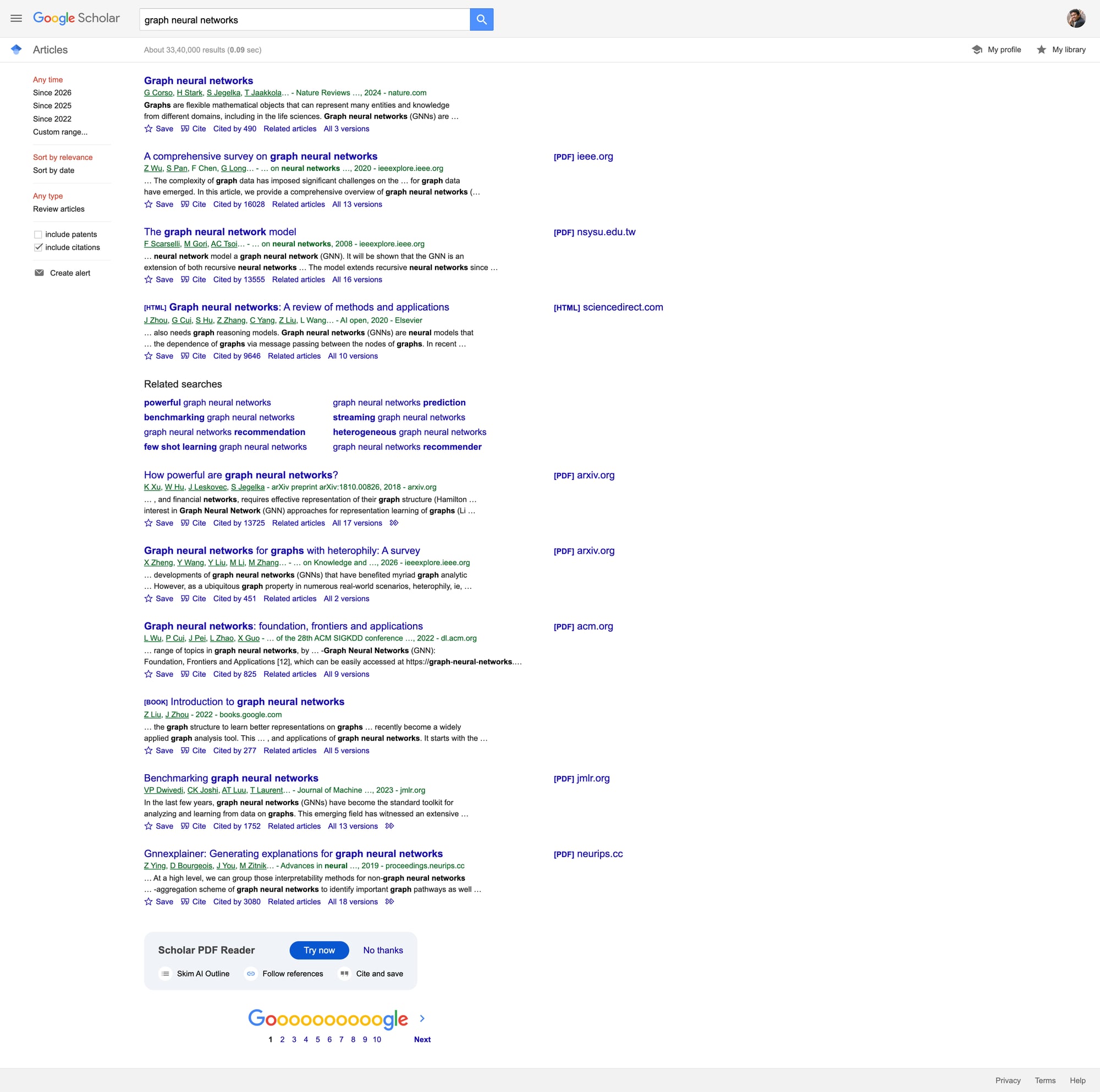
Google Scholar is one of the best free sources for academic metadata:
- paper title + link
- author list
- venue + year (often)
- citation count
- “Related articles” / “All versions” links
It’s also a high-friction scraping target: requests can start returning captchas or blocks quickly when you paginate or run many queries.
This tutorial focuses on a realistic goal:
- scrape a small number of result pages per query
- extract structured fields (title, authors, year guess, citations)
- export to CSV/JSON
- add a resilient fetch layer with retries and optional ProxiesAPI routing
Search targets are sensitive to repeated automated requests. ProxiesAPI can reduce failure rates and help keep scheduled data collection stable as your query volume grows.
Ethical + practical caveat
For ongoing academic search at scale, the best option is usually:
- a licensed dataset, or
- publisher APIs, or
- a third-party SERP provider
If you still need to collect a limited dataset from Scholar HTML, keep it modest:
- low page depth (e.g. 1–3 pages)
- slow request rate
- caching
Setup
python -m venv .venv
source .venv/bin/activate
pip install requests beautifulsoup4 lxml pandas
Step 1: A resilient fetcher (timeouts + retries + proxy toggle)
from __future__ import annotations

import os
import random
import time
from dataclasses import dataclass

import requests

TIMEOUT = (10, 30)

DEFAULT_HEADERS = {
    "User-Agent": (
        "Mozilla/5.0 (Macintosh; Intel Mac OS X 10_15_7) "
        "AppleWebKit/537.36 (KHTML, like Gecko) "
        "Chrome/123.0.0.0 Safari/537.36"
    ),
    "Accept": "text/html,application/xhtml+xml,application/xml;q=0.9,*/*;q=0.8",
    "Accept-Language": "en-US,en;q=0.9",
}


@dataclass
class FetchConfig:
    use_proxiesapi: bool = True
    proxiesapi_endpoint: str | None = None
    max_retries: int = 4
    min_sleep: float = 1.0
    max_sleep: float = 2.2


class Fetcher:
    def __init__(self, cfg: FetchConfig):
        self.cfg = cfg
        self.s = requests.Session()
        self.s.headers.update(DEFAULT_HEADERS)

    def _sleep_jitter(self):
        time.sleep(random.uniform(self.cfg.min_sleep, self.cfg.max_sleep))

    def get(self, url: str) -> str:
        last_err = None
        for attempt in range(1, self.cfg.max_retries + 1):
            try:
                self._sleep_jitter()

                proxies = None
                if self.cfg.use_proxiesapi and self.cfg.proxiesapi_endpoint:
                    proxies = {
                        "http": self.cfg.proxiesapi_endpoint,
                        "https": self.cfg.proxiesapi_endpoint,
                    }

                r = self.s.get(url, timeout=TIMEOUT, proxies=proxies)

                # Scholar can return 429/503 or interstitials.
                if r.status_code in (403, 429, 500, 503):
                    raise requests.HTTPError(f"HTTP {r.status_code} for {url}", response=r)

                r.raise_for_status()
                return r.text
            except Exception as e:
                last_err = e
                time.sleep(1.3 ** attempt)

        raise RuntimeError(f"Failed after retries: {url}") from last_err


cfg = FetchConfig(
    use_proxiesapi=True,
    proxiesapi_endpoint=os.getenv("PROXIESAPI_PROXY_URL"),
)
fetcher = Fetcher(cfg)
Step 2: Scholar URLs (search + pagination)
Scholar uses /scholar with query params.
Base:
https://scholar.google.com/scholar?q=deep+learning
Pagination is typically controlled via start:
- page 1:
start=0 - page 2:
start=10 - page 3:
start=20
We’ll crawl pages using start = page_index * 10.
Step 3: Parse result cards (title, authors, citations)
A Scholar result card is usually under a container like .gs_r.
Key patterns:
- title:
h3.gs_rt - authors/venue/year:
.gs_a - snippet:
.gs_rs - citation link: link text like
Cited by 123
We’ll keep selectors tight but not brittle.
import re
from bs4 import BeautifulSoup


def parse_int(text: str) -> int | None:
    m = re.search(r"(\d+)", text or "")
    return int(m.group(1)) if m else None


def guess_year(text: str) -> int | None:
    # Common: "... - 2019 - ..."
    m = re.search(r"\b(19\d{2}|20\d{2})\b", text or "")
    return int(m.group(1)) if m else None


def parse_scholar_page(html: str) -> list[dict]:
    soup = BeautifulSoup(html, "lxml")

    rows: list[dict] = []

    for card in soup.select("div.gs_r"):
        title_el = card.select_one("h3.gs_rt")
        title_a = title_el.select_one("a") if title_el else None

        title = None
        url = None
        if title_a:
            title = title_a.get_text(" ", strip=True)
            url = title_a.get("href")
        elif title_el:
            # Sometimes title is not a link
            title = title_el.get_text(" ", strip=True)

        meta = card.select_one("div.gs_a")
        meta_text = meta.get_text(" ", strip=True) if meta else ""

        snippet = card.select_one("div.gs_rs")
        snippet_text = snippet.get_text(" ", strip=True) if snippet else ""

        cited_by = 0
        cited_by_url = None
        for a in card.select("a"):
            t = a.get_text(" ", strip=True)
            if t.lower().startswith("cited by"):
                cited_by = parse_int(t) or 0
                cited_by_url = a.get("href")
                break

        rows.append({
            "title": title,
            "url": url,
            "authors_venue": meta_text or None,
            "year": guess_year(meta_text),
            "snippet": snippet_text or None,
            "cited_by": cited_by,
            "cited_by_url": cited_by_url,
        })

    return rows
Step 4: Crawl N pages for a query
from urllib.parse import urlencode

BASE = "https://scholar.google.com"


def scholar_search_url(query: str, start: int = 0) -> str:
    qs = urlencode({"q": query, "start": start})
    return f"{BASE}/scholar?{qs}"


def crawl_query(query: str, pages: int = 3) -> list[dict]:
    out: list[dict] = []
    seen = set()

    for p in range(pages):
        start = p * 10
        url = scholar_search_url(query, start=start)
        html = fetcher.get(url)
        batch = parse_scholar_page(html)

        # de-dupe by title+url
        for row in batch:
            key = (row.get("title"), row.get("url"))
            if key in seen:
                continue
            seen.add(key)
            out.append(row)

        print(f"page {p+1}/{pages}: batch {len(batch)} total {len(out)}")

    return out


rows = crawl_query("graph neural networks", pages=2)
print("rows", len(rows))
print(rows[0])
If you start getting blocks, reduce pages, increase delays, and consider routing through ProxiesAPI.
Step 5: Export to CSV + JSON
import json
import pandas as pd

pd.DataFrame(rows).to_csv("scholar_results.csv", index=False)

with open("scholar_results.json", "w", encoding="utf-8") as f:
    json.dump(rows, f, ensure_ascii=False, indent=2)

print("wrote scholar_results.csv + scholar_results.json")
Common issues (and what to do)
1) You get a captcha or unusual HTML
Symptoms:
- result cards are missing (
div.gs_rcount is 0) - page contains “unusual traffic” messaging
What to do:
- slow down (increase
min_sleep/max_sleep) - reduce pages per query
- add caching
- try a proxy route (ProxiesAPI)
2) Your fields are incomplete
Scholar markup varies; sometimes citations links aren’t present.
Treat every field as optional, and build downstream logic that tolerates None.
Where ProxiesAPI fits (honestly)
Scraping search result pages is one of the first places you’ll see:
- bursty 429s
- temporary 503s
- inconsistent responses across runs
ProxiesAPI helps by giving you a configurable proxy layer you can enable when reliability matters.
Keep your “fetcher” isolated, and your scraper stays maintainable when you change how requests are routed.
Search targets are sensitive to repeated automated requests. ProxiesAPI can reduce failure rates and help keep scheduled data collection stable as your query volume grows.