
Scrape Government Contract Opportunities from SAM.gov (Python + ProxiesAPI)
SAM.gov is the U.S. government’s official portal for federal contract opportunities.
In this guide we’ll build a practical SAM.gov scraper in Python that:
- starts from a search URL (you control the filters)
- extracts opportunity cards from results pages
- paginates safely
- opens each opportunity detail page for extra fields
- exports a clean dataset (CSV + JSONL)
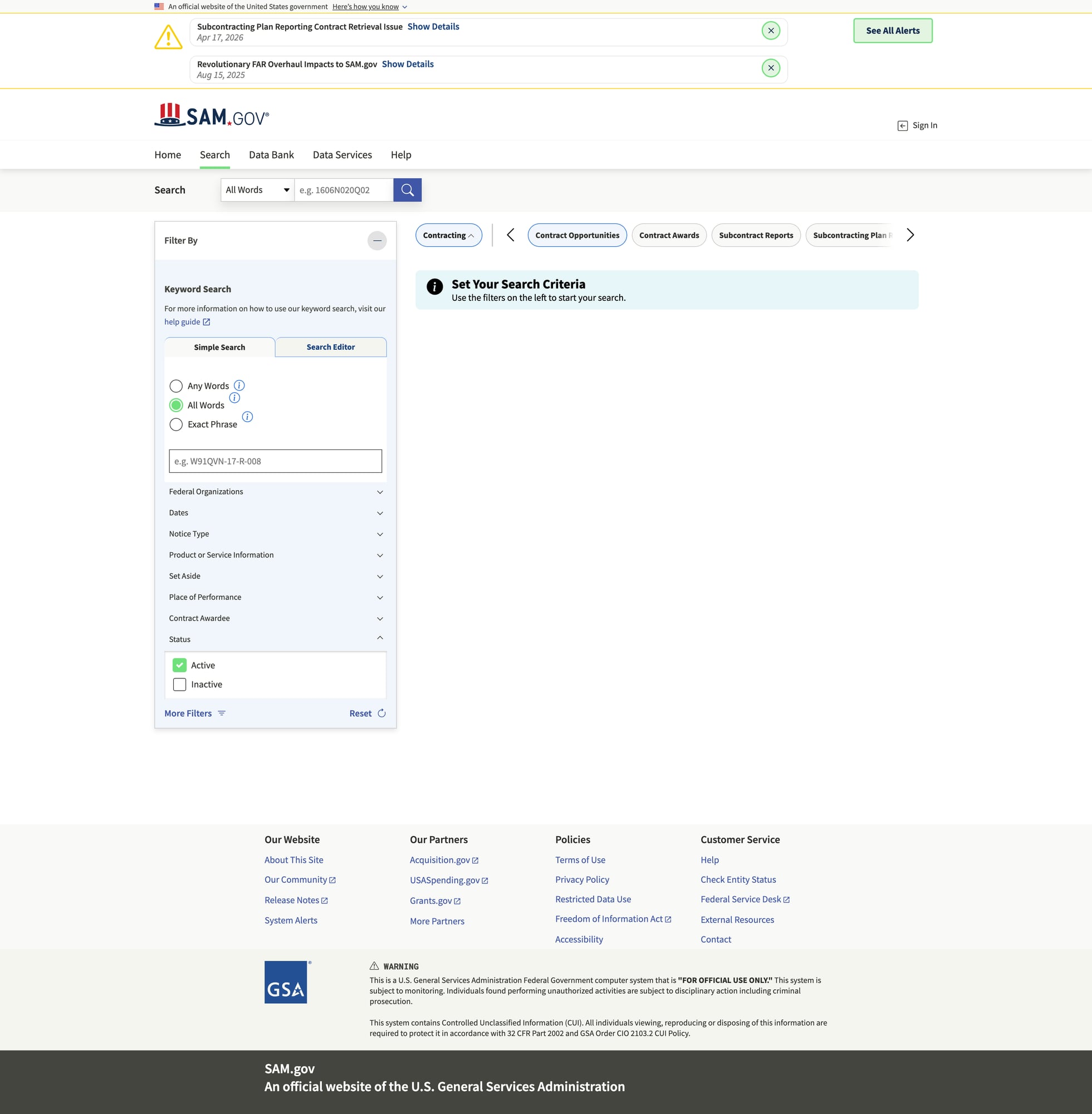
- captures a screenshot of results (for proof / debugging)
SAM.gov is a high-value target, and high-value targets tend to rate-limit. ProxiesAPI helps keep pagination + detail fetches stable when you monitor many categories and run daily.
A note on SAM.gov (and a better alternative)
Before you scrape, check whether SAM.gov offers an official API for the data you need.
If an official API exists and meets your requirements, use it. Scraping is best when:
- the API doesn’t expose a field you need
- you need the UI-only view
- you want to verify data via rendered pages
This tutorial focuses on scraping HTML responsibly and defensively.
Setup
python3 -m venv .venv
source .venv/bin/activate
pip install requests beautifulsoup4 lxml tenacity pandas
Step 1: Build an HTTP client with retries + optional ProxiesAPI proxy
We’ll reuse the same pattern as other guides: a fetch() function that:
- uses timeouts
- retries on transient failures
- optionally routes via ProxiesAPI
import os
import random
import time

import requests
from tenacity import retry, stop_after_attempt, wait_exponential, retry_if_exception_type

BASE = "https://sam.gov"
TIMEOUT = (10, 45)

USER_AGENTS = [
    "Mozilla/5.0 (Macintosh; Intel Mac OS X 10_15_7) AppleWebKit/537.36 (KHTML, like Gecko) Chrome/124.0 Safari/537.36",
    "Mozilla/5.0 (Windows NT 10.0; Win64; x64) AppleWebKit/537.36 (KHTML, like Gecko) Chrome/124.0 Safari/537.36",
]


class FetchError(Exception):
    pass


def proxiesapi_proxies() -> dict | None:
    proxy_url = os.getenv("PROXIESAPI_PROXY_URL")
    if not proxy_url:
        return None
    return {"http": proxy_url, "https": proxy_url}


session = requests.Session()


@retry(
    reraise=True,
    stop=stop_after_attempt(6),
    wait=wait_exponential(multiplier=1, min=1, max=30),
    retry=retry_if_exception_type((requests.RequestException, FetchError)),
)
def fetch(url: str, *, use_proxy: bool = False) -> str:
    headers = {
        "user-agent": random.choice(USER_AGENTS),
        "accept": "text/html,application/xhtml+xml,application/xml;q=0.9,*/*;q=0.8",
        "accept-language": "en-US,en;q=0.9",
    }
    proxies = proxiesapi_proxies() if use_proxy else None

    r = session.get(url, headers=headers, timeout=TIMEOUT, proxies=proxies)

    if r.status_code in (403, 429):
        raise FetchError(f"blocked/throttled: {r.status_code}")

    r.raise_for_status()

    # Polite jitter
    time.sleep(0.2 + random.random() * 0.4)

    return r.text
Step 2: Choose your search URL (filters first)
SAM.gov search URLs can get long, because they encode filters.
The easiest workflow:
- Open SAM.gov in your browser
- Go to Search → Contract Opportunities
- Apply your filters (NAICS, place of performance, set-aside, etc.)
- Copy the resulting URL from the address bar
That URL becomes the seed for the scraper.
Example seed (replace with your own):
https://sam.gov/search/?index=opp
Step 3: Parse result cards + extract detail URLs
SAM.gov is a modern app; the HTML can be heavy. Often you can still extract data from:
- anchor links to opportunity details
- visible card text
- sometimes embedded JSON state
We’ll implement a conservative parser:
import re
from urllib.parse import urljoin, urlparse
from bs4 import BeautifulSoup


def abs_url(href: str) -> str:
    return href if href.startswith("http") else urljoin(BASE, href)


def clean_text(x: str) -> str:
    return re.sub(r"\s+", " ", (x or "").strip())


def parse_results_page(html: str) -> tuple[list[dict], str | None]:
    soup = BeautifulSoup(html, "lxml")

    # Find links that look like opportunity detail pages.
    # This will evolve — inspect your current markup and tighten as needed.
    links = []
    for a in soup.select("a[href]"):
        href = a.get("href")
        if not href:
            continue
        if "/opp/" in href or "opportunity" in href:
            url = abs_url(href)
            links.append(url)

    # De-dupe while preserving order
    seen = set()
    detail_urls = []
    for u in links:
        if u in seen:
            continue
        seen.add(u)
        detail_urls.append(u)

    items = []
    for u in detail_urls:
        items.append({
            "detail_url": u,
        })

    # Pagination: look for a Next link
    next_url = None
    next_a = soup.select_one("a[rel='next'], a[aria-label*='Next']")
    if next_a and next_a.get("href"):
        next_url = abs_url(next_a.get("href"))

    return items, next_url
This isn’t perfect (SAM.gov markup changes), but it gives you a starting point.
In practice you’ll refine selectors by:
- opening DevTools → selecting a card → copying a stable CSS path
- narrowing to a container like
mainor the results list - extracting visible fields (title, notice id, due date) from the same card element
Step 4: Parse a detail page (best-effort)
Detail pages often contain the fields you actually want:
- title
- solicitation / notice id
- posted date
- response deadline
- agency
- classification (NAICS)
We’ll do a robust best-effort parse:
def parse_detail_page(html: str) -> dict:
    soup = BeautifulSoup(html, "lxml")

    title = None
    h1 = soup.select_one("h1")
    if h1:
        title = clean_text(h1.get_text(" ", strip=True))

    # Try extract key/value tables
    fields = {}
    for row in soup.select("table tr"):
        th = row.select_one("th")
        td = row.select_one("td")
        if not th or not td:
            continue
        k = clean_text(th.get_text(" ", strip=True)).lower()
        v = clean_text(td.get_text(" ", strip=True))
        if k and v:
            fields[k] = v

    return {
        "title": title,
        "fields": fields,
    }
If you discover embedded JSON state on the page (often in script tags), parsing that can be more stable than scraping visible text.
Step 5: Crawl results → paginate → fetch details → export
import json
from dataclasses import dataclass


@dataclass
class CrawlConfig:
    start_url: str
    max_pages: int = 5
    max_items: int = 100
    use_proxy: bool = True


def crawl_search(cfg: CrawlConfig) -> list[dict]:
    out = []
    next_url = cfg.start_url
    page = 0

    while next_url and page < cfg.max_pages and len(out) < cfg.max_items:
        page += 1
        html = fetch(next_url, use_proxy=cfg.use_proxy)
        items, new_next = parse_results_page(html)

        for it in items:
            it["search_url"] = next_url
            out.append(it)
            if len(out) >= cfg.max_items:
                break

        print(f"page={page} items={len(items)} total={len(out)}")
        next_url = new_next

    return out


def enrich_details(rows: list[dict], *, use_proxy: bool = True) -> list[dict]:
    enriched = []

    for i, r in enumerate(rows, 1):
        url = r["detail_url"]
        try:
            html = fetch(url, use_proxy=use_proxy)
            detail = parse_detail_page(html)
        except Exception as e:
            detail = {"error": str(e)}

        enriched.append({**r, **detail})

        if i % 10 == 0:
            print(f"enriched {i}/{len(rows)}")

    return enriched


if __name__ == "__main__":
    seed = "https://sam.gov/search/?index=opp"  # Replace with your filtered search URL

    cfg = CrawlConfig(start_url=seed, max_pages=3, max_items=50, use_proxy=True)

    rows = crawl_search(cfg)
    rows = enrich_details(rows, use_proxy=cfg.use_proxy)

    with open("samgov_opportunities.jsonl", "w", encoding="utf-8") as f:
        for r in rows:
            f.write(json.dumps(r, ensure_ascii=False) + "\n")

    print("wrote samgov_opportunities.jsonl", len(rows))
Export to CSV
import pandas as pd

df = pd.json_normalize(rows)
df.to_csv("samgov_opportunities.csv", index=False)
print("wrote samgov_opportunities.csv", len(df))
Screenshot step (mandatory proof)
For A-track tutorials, keep a screenshot of the target site in the post’s image folder:
public/images/posts/scrape-government-contract-opportunities-from-sam-gov-python-proxiesapi/samgov-results.jpg
Two practical ways:
-
Manual: open your seed search URL in a browser and screenshot the results.
-
Automated (Playwright):
from playwright.sync_api import sync_playwright


def screenshot(url: str, out_path: str):
    with sync_playwright() as p:
        browser = p.chromium.launch(headless=True)
        page = browser.new_page(viewport={"width": 1280, "height": 720})
        page.goto(url, wait_until="domcontentloaded", timeout=60000)
        page.wait_for_timeout(2000)
        page.screenshot(path=out_path, full_page=True)
        browser.close()


if __name__ == "__main__":
    screenshot(
        "https://sam.gov/search/?index=opp",
        "samgov-results.jpg",
    )
If SAM.gov is inconsistent from your IP, run Playwright through ProxiesAPI proxy settings.
QA checklist
- Your seed URL returns results in a browser
- Parser extracts at least ~10 detail URLs from page 1
- Pagination works (or you manually provide page URLs)
- Detail parsing fills in some fields
- Dataset exports to JSONL/CSV
- Screenshot exists in the post image folder
Next upgrades
- parse embedded JSON for stable fields (notice id, dates)
- add a “delta mode” (only new/updated opportunities)
- persist to SQLite + run daily via cron
- add structured logging for failures (blocked, timeout, parsing)
SAM.gov is a high-value target, and high-value targets tend to rate-limit. ProxiesAPI helps keep pagination + detail fetches stable when you monitor many categories and run daily.