
Scrape Hacker News Jobs Posts with Python + ProxiesAPI
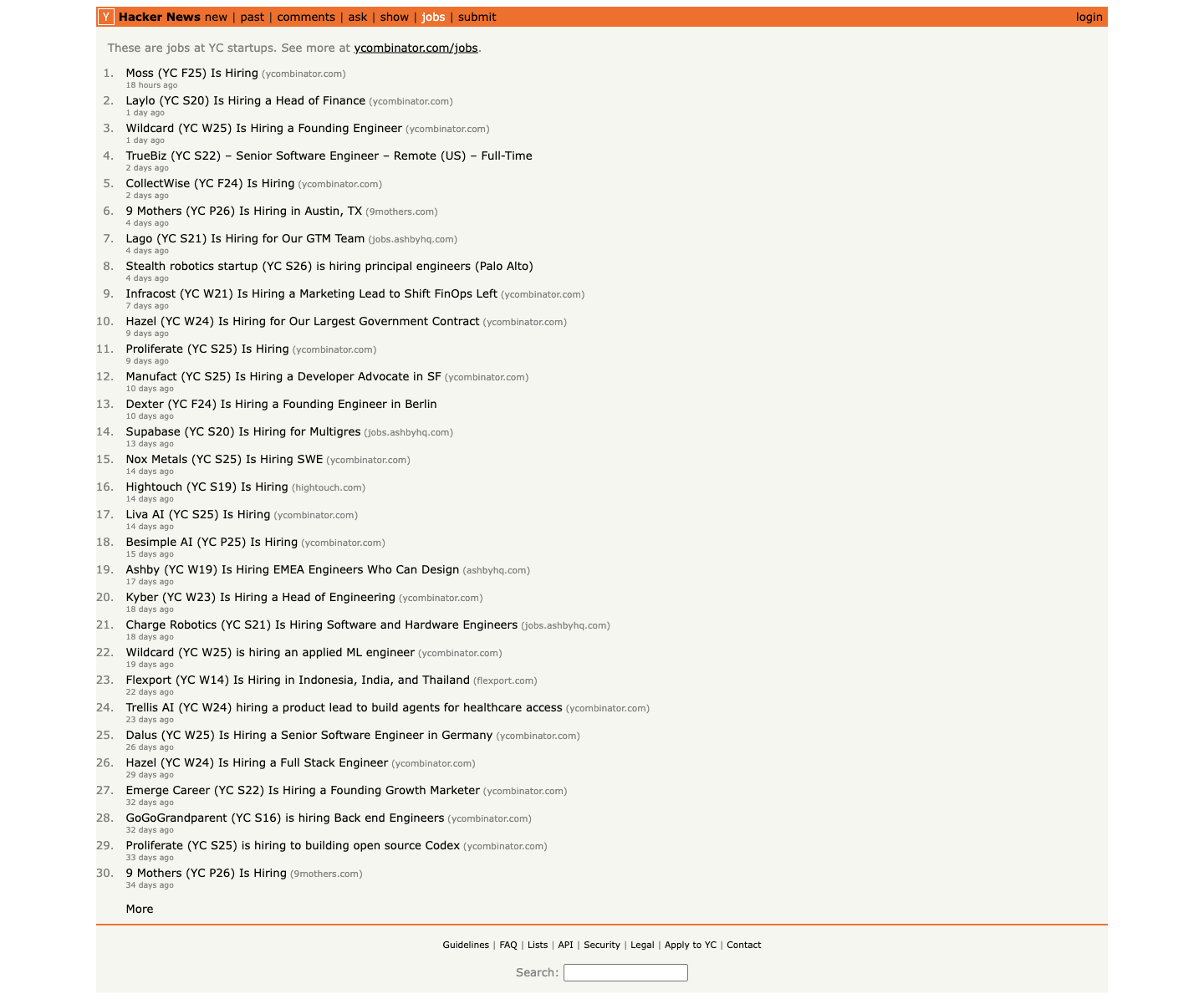
Hacker News Jobs is one of the cleanest hiring feeds on the public web. Every row is visible in server-rendered HTML, pagination is explicit, and the page changes often enough to be useful if you are building a startup-jobs tracker.
In this guide we will scrape the live jobs feed into a dataset with:
- job title
- company
- outbound job URL
- site/domain label
- Hacker News item URL
- age string
We will also keep the request layer ProxiesAPI-ready so you can reuse the same parser when your crawl grows into company detail pages.
HN itself is lightweight, but hiring monitors usually spill into company career pages and ATS hosts. ProxiesAPI gives you a cleaner fetch layer once that wider crawl starts hitting rate limits or bot checks.
What we are scraping
The Jobs feed lives here:
https://news.ycombinator.com/jobs- next page:
https://news.ycombinator.com/jobs?next=...&n=31
The current HTML is simple:
- each post row is
tr.athing.submission - the title link is
span.titleline > a - the site label is
span.sitestr - the following row contains the age link inside
td.subtext - pagination uses
a.morelink[rel="next"]
Quick sanity check:
curl -L -s https://news.ycombinator.com/jobs | head -n 20
If you see rows containing tr class="athing submission", you are on the right page.
Setup
python3 -m venv .venv
source .venv/bin/activate
pip install requests beautifulsoup4 lxml pandas
Step 1: Build a fetch layer with optional ProxiesAPI
HN itself rarely needs a proxy, but using the wrapper now saves time later.
from __future__ import annotations

import os
import random
import time
from urllib.parse import quote

import requests

BASE = "https://news.ycombinator.com"
TIMEOUT = (10, 30)
PROXIESAPI_KEY = os.getenv("PROXIESAPI_KEY", "").strip()

session = requests.Session()
session.headers.update(
    {
        "User-Agent": (
            "Mozilla/5.0 (Macintosh; Intel Mac OS X 10_15_7) "
            "AppleWebKit/537.36 (KHTML, like Gecko) "
            "Chrome/137.0.0.0 Safari/537.36"
        ),
        "Accept-Language": "en-US,en;q=0.9",
    }
)


def proxiesapi_url(target_url: str) -> str:
    if not PROXIESAPI_KEY:
        return target_url
    return (
        "https://api.proxiesapi.com/?auth_key="
        + quote(PROXIESAPI_KEY, safe="")
        + "&url="
        + quote(target_url, safe="")
    )


def fetch(url: str, max_retries: int = 4) -> str:
    last_exc = None

    for attempt in range(1, max_retries + 1):
        try:
            time.sleep(random.uniform(0.2, 0.8))
            response = session.get(proxiesapi_url(url), timeout=TIMEOUT)
            response.raise_for_status()
            html = response.text or ""
            if "athing submission" not in html:
                raise RuntimeError("expected jobs rows not found")
            return html
        except Exception as exc:
            last_exc = exc
            time.sleep(min(8, 2 ** (attempt - 1)))

    raise RuntimeError(f"failed to fetch {url}: {last_exc}")
Step 2: Parse one jobs row
Each HN jobs entry spans two rows:
- the submission row with the title and optional outbound link
- the following row with the age and item link
We will also derive a rough company name from the title because most postings start with the company label.
import re
from urllib.parse import urljoin, urlparse

from bs4 import BeautifulSoup, Tag


def clean(text: str | None) -> str | None:
    if not text:
        return None
    text = re.sub(r"\s+", " ", text).strip()
    return text or None


def guess_company(title: str | None) -> str | None:
    if not title:
        return None

    for token in [" is hiring", " Is Hiring", " – ", " - ", " — "]:
        idx = title.find(token)
        if idx > 0:
            return clean(title[:idx])

    match = re.match(r"^(.*?)\s+\(", title)
    if match:
        return clean(match.group(1))

    return clean(title)


def parse_job_row(row: Tag) -> dict | None:
    job_id = row.get("id")
    title_a = row.select_one("span.titleline > a")
    if not title_a:
        return None

    title = clean(title_a.get_text(" ", strip=True))
    href = title_a.get("href")
    job_url = urljoin(BASE + "/", href) if href else None

    subtext_row = row.find_next_sibling("tr")
    subtext = subtext_row.select_one("td.subtext") if subtext_row else None

    age = None
    item_url = None
    if subtext:
        age_a = subtext.select_one("span.age a")
        if age_a:
            age = clean(age_a.get_text(" ", strip=True))
            item_href = age_a.get("href")
            item_url = urljoin(BASE + "/", item_href) if item_href else None

    site = clean(row.select_one("span.sitestr").get_text(" ", strip=True) if row.select_one("span.sitestr") else None)

    return {
        "id": job_id,
        "title": title,
        "company": guess_company(title),
        "job_url": job_url,
        "site": site,
        "domain": urlparse(job_url).netloc if job_url else None,
        "age": age,
        "item_url": item_url or (f"{BASE}/item?id={job_id}" if job_id else None),
    }
Step 3: Parse a page and follow pagination
def parse_jobs_page(html: str) -> tuple[list[dict], str | None]:
    soup = BeautifulSoup(html, "lxml")

    jobs = []
    for row in soup.select("tr.athing.submission"):
        parsed = parse_job_row(row)
        if parsed:
            jobs.append(parsed)

    next_link = soup.select_one('a.morelink[rel="next"]')
    next_url = urljoin(BASE + "/", next_link.get("href")) if next_link else None
    return jobs, next_url


def crawl_jobs(start_url: str = f"{BASE}/jobs", max_pages: int = 3) -> list[dict]:
    out = []
    seen = set()
    url = start_url
    pages = 0

    while url and pages < max_pages:
        pages += 1
        html = fetch(url)
        batch, url = parse_jobs_page(html)

        for row in batch:
            key = row["id"] or row["job_url"] or row["title"]
            if key in seen:
                continue
            seen.add(key)
            out.append(row)

        print(f"page={pages} batch={len(batch)} total={len(out)}")

    return out
Typical output:
page=1 batch=30 total=30
page=2 batch=30 total=60
page=3 batch=30 total=90
Step 4: Export a clean CSV
import json
from pathlib import Path

import pandas as pd


def save_outputs(rows: list[dict], out_dir: str = "out") -> None:
    path = Path(out_dir)
    path.mkdir(parents=True, exist_ok=True)

    pd.DataFrame(rows).to_csv(path / "hn_jobs.csv", index=False)

    with open(path / "hn_jobs.json", "w", encoding="utf-8") as f:
        json.dump(rows, f, ensure_ascii=False, indent=2)


if __name__ == "__main__":
    jobs = crawl_jobs(max_pages=2)
    save_outputs(jobs)
    print(jobs[0])
Example record:
{
  'id': '48865332',
  'title': 'Moss (YC F25) Is Hiring',
  'company': 'Moss',
  'job_url': 'https://www.ycombinator.com/companies/moss/jobs/52LnqLQ-software-engineer-sdk',
  'site': 'ycombinator.com',
  'domain': 'www.ycombinator.com',
  'age': '18 hours ago',
  'item_url': 'https://news.ycombinator.com/item?id=48865332'
}
Why this structure works well
HN Jobs is friendly because you do not need a headless browser just to get the primary listing data. That means:
- lower infrastructure cost
- fewer moving parts
- faster refresh cycles if you poll the feed often
The tricky part is not the HTML. It is what happens after the feed:
- company career pages live on many different domains
- some rows link straight to YC company jobs pages
- others link to ATS hosts like Ashby, Greenhouse, or Lever
That is where ProxiesAPI becomes useful. Keep the HN parser exactly as-is, then route the follow-on detail fetches through the proxy layer.
Practical extensions
- add a
fetched_attimestamp so you can diff new rows between runs - follow
job_urlpages and extract location, salary, or stack - store hashes of
title + company + job_urlto avoid duplicate alerts - post new roles into Slack, Discord, or Telegram once they appear
If you want a lightweight founder-jobs monitor, HN Jobs is one of the best starting points because the HTML is stable and the signal quality is high.
HN itself is lightweight, but hiring monitors usually spill into company career pages and ATS hosts. ProxiesAPI gives you a cleaner fetch layer once that wider crawl starts hitting rate limits or bot checks.