
Scrape Idealista Property Listings with Python
Idealista is one of the most useful public real-estate datasets in Europe, but it is not a beginner-friendly scrape.
You usually want it for:
- property market tracking
- lead generation and enrichment
- monitoring new listings in a neighborhood
- building internal price comps
The catch is that Idealista aggressively defends its search pages. In practice, that means you should design the scraper in two layers:
- a parser that knows how to read listing cards
- a fetch layer that can swap between direct requests, a proxy/unblocker, or browser automation when traffic gets challenged
In this guide, we will scrape:
- listing title
- listing URL
- cover image
- price
- currency
- location text
- property details such as beds / square meters
- short description
- tags such as "luxury" or "sea views"
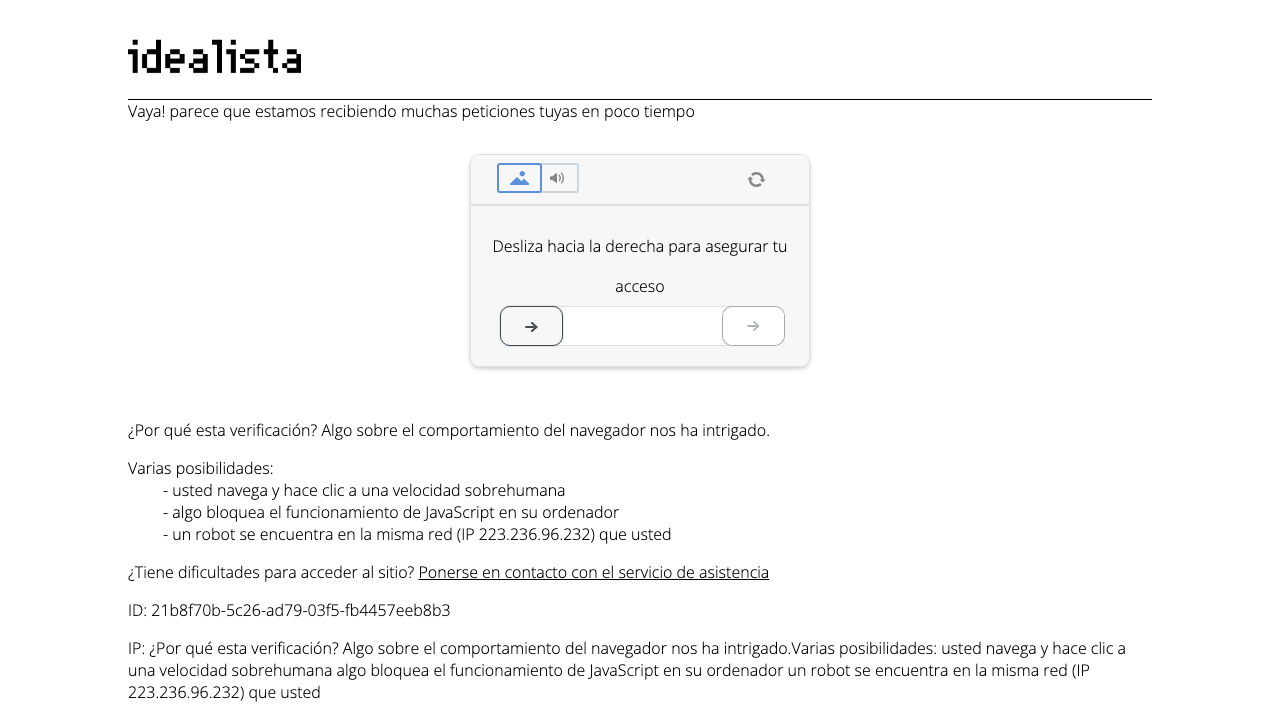
Idealista is quick to challenge repetitive traffic. A ProxiesAPI-backed fetch layer gives you a cleaner way to rotate requests and keep your parser focused on real listing pages instead of verification walls.
What makes Idealista tricky
Idealista search pages are still very parser-friendly once you have the HTML, but reaching that HTML reliably is the hard part.
Common failure modes:
- a "please enable JS" style interstitial
- a slider or bot-verification screen
- geo-sensitive behavior
- different HTML depending on language or country
That is why this tutorial keeps the parsing logic pure and makes the network layer replaceable.
Install the dependencies
python3 -m venv .venv
source .venv/bin/activate
pip install httpx parsel
We will use:
httpxfor fast HTTP requestsparselfor CSS/XPath extraction
Step 1: Build a fetch layer that can route through ProxiesAPI
Do not bury anti-block behavior inside your parser. Keep it in one place.
from __future__ import annotations

import os
import random
import time
from typing import Optional

import httpx

HEADERS = {
    "user-agent": (
        "Mozilla/5.0 (Macintosh; Intel Mac OS X 10_15_7) "
        "AppleWebKit/537.36 (KHTML, like Gecko) "
        "Chrome/126.0.0.0 Safari/537.36"
    ),
    "accept": "text/html,application/xhtml+xml,application/xml;q=0.9,*/*;q=0.8",
    "accept-language": "en-US,en;q=0.9",
}

TIMEOUT = httpx.Timeout(30.0, connect=15.0)
BLOCK_MARKERS = [
    "enable js",
    "disable any ad blocker",
    "captcha",
    "verify you are human",
    "desliza hacia la derecha",
]


def looks_blocked(html: str) -> bool:
    lowered = html.lower()
    return any(marker in lowered for marker in BLOCK_MARKERS)


def backoff(attempt: int) -> None:
    time.sleep(min(2 ** attempt, 20) + random.uniform(0.2, 0.8))


def fetch_html(url: str, proxiesapi_template: Optional[str] = None, retries: int = 3) -> str:
    target = proxiesapi_template.format(url=url) if proxiesapi_template else url

    with httpx.Client(headers=HEADERS, follow_redirects=True, timeout=TIMEOUT) as client:
        last_error = None
        for attempt in range(retries + 1):
            try:
                response = client.get(target)
                response.raise_for_status()
                html = response.text
                if looks_blocked(html):
                    raise RuntimeError("Idealista returned a verification page")
                return html
            except Exception as exc:
                last_error = exc
                if attempt == retries:
                    break
                backoff(attempt)

    raise RuntimeError(f"Failed to fetch {url}: {last_error}")


if __name__ == "__main__":
    template = os.getenv("PROXIESAPI_URL_TEMPLATE")
    html = fetch_html(
        "https://www.idealista.com/en/venta-viviendas/marbella-malaga/con-chalets/",
        proxiesapi_template=template,
    )
    print(html[:500])
Why this integration pattern is better than hardcoding an endpoint
Different ProxiesAPI accounts are often configured in one of two styles:
- a target-URL template such as
https://...&url={url} - a traditional proxy passed through the HTTP client
The parser below does not care which one you use.
Step 2: Parse one Idealista search page
Idealista listing cards are usually grouped under article.item, which makes the page much easier to parse than the anti-bot reputation suggests.
from __future__ import annotations

from urllib.parse import urljoin

from parsel import Selector


def clean_text(value: str | None) -> str | None:
    if not value:
        return None
    return " ".join(value.split())


def parse_search_page(html: str, base_url: str = "https://www.idealista.com") -> list[dict]:
    sel = Selector(text=html)
    listings = []

    for card in sel.css("section.items-list article.item"):
        # Skip promoted or ad units when they carry ad text blocks.
        if card.css("p.adv_txt"):
            continue

        relative_url = card.css("a.item-link::attr(href)").get()
        title = clean_text(card.css("a.item-link::attr(title)").get())
        price_text = clean_text(card.css("span.item-price::text").get())
        currency = clean_text(card.css("span.item-price span::text").get())
        location = clean_text(card.css("p.item-location::text, p.highlight-phrase::text").get())
        description = clean_text(card.css("div.item-description p::text").get())
        details = [clean_text(x) for x in card.css("div.item-detail-char span::text").getall()]
        details = [x for x in details if x]
        tags = [clean_text(x) for x in card.css("div.listing-tags-container span::text").getall()]
        tags = [x for x in tags if x]

        listings.append(
            {
                "title": title,
                "url": urljoin(base_url, relative_url) if relative_url else None,
                "image": card.css("img::attr(src), img::attr(data-src)").get(),
                "price_text": price_text,
                "currency": currency,
                "location": location,
                "details": details,
                "description": description,
                "tags": tags,
            }
        )

    return listings
What these selectors capture well
| Field | Selector |
|---|---|
| title | a.item-link::attr(title) |
| listing URL | a.item-link::attr(href) |
| price | span.item-price::text |
| details | div.item-detail-char span::text |
| tags | div.listing-tags-container span::text |
If Idealista changes a class name, the parser breaks in one place instead of throughout your whole script.
Step 3: Add pagination
Idealista search results are commonly paginated with pagina-{n}.htm.
import math
import re

from parsel import Selector


def extract_total_pages(html: str) -> int:
    sel = Selector(text=html)
    heading = sel.css("h1#h1-container::text").get("") or ""

    # Example shapes vary by locale, so keep the regex loose.
    match = re.search(r"([\d,\.]+)", heading)
    total_results = int(match.group(1).replace(",", "").replace(".", "")) if match else 30
    return max(1, min(math.ceil(total_results / 30), 60))


def scrape_search_results(search_url: str, max_pages: int = 3, proxiesapi_template: str | None = None) -> list[dict]:
    first_html = fetch_html(search_url, proxiesapi_template=proxiesapi_template)
    total_pages = min(extract_total_pages(first_html), max_pages)

    all_rows = parse_search_page(first_html)

    for page_num in range(2, total_pages + 1):
        page_url = f"{search_url.rstrip('/')}/pagina-{page_num}.htm"
        html = fetch_html(page_url, proxiesapi_template=proxiesapi_template)
        all_rows.extend(parse_search_page(html))
        time.sleep(random.uniform(2.0, 4.5))

    return all_rows
That short sleep matters. When teams say "scraping stopped working," the real cause is often request shape and pacing, not parsing.
Step 4: Export clean JSON or CSV
import csv
import json


def write_json(rows: list[dict], path: str) -> None:
    with open(path, "w", encoding="utf-8") as fh:
        json.dump(rows, fh, indent=2, ensure_ascii=False)


def write_csv(rows: list[dict], path: str) -> None:
    fieldnames = ["title", "url", "image", "price_text", "currency", "location", "details", "description", "tags"]
    with open(path, "w", newline="", encoding="utf-8") as fh:
        writer = csv.DictWriter(fh, fieldnames=fieldnames)
        writer.writeheader()
        for row in rows:
            writer.writerow(
                {
                    **row,
                    "details": " | ".join(row["details"]),
                    "tags": " | ".join(row["tags"]),
                }
            )
Run the full scrape:
if __name__ == "__main__":
    rows = scrape_search_results(
        "https://www.idealista.com/en/venta-viviendas/marbella-malaga/con-chalets/",
        max_pages=2,
        proxiesapi_template=os.getenv("PROXIESAPI_URL_TEMPLATE"),
    )
    print(f"scraped {len(rows)} listings")
    write_json(rows, "idealista_listings.json")
    write_csv(rows, "idealista_listings.csv")
Handling block pages without poisoning your dataset
The worst scraper bug is not a crash. It is silently saving junk.
Add these checks before parsing:
- HTML length is unexpectedly tiny
- page title contains verification language
- no
article.itemcards found on a page that should contain listings - too many consecutive retries from the same route
A good production pattern is:
- try direct fetch
- if block detected, retry through ProxiesAPI
- if that still fails, queue the URL for browser capture later
That way you do not spend browser resources on every request.
When to use browser automation instead of HTML parsing
Use a browser only when one of these is true:
- you need to clear a challenge page
- you need network requests that only appear after client-side hydration
- you need screenshots or visual verification
For bulk search-result scraping, parsed HTML is cheaper and easier to maintain.
Final thoughts
Idealista is a classic example of a target where parsing is easy but collection is hard. Once you separate those concerns, the project becomes much more manageable.
The parser in this guide is intentionally boring:
- stable selectors
- explicit block detection
- replaceable ProxiesAPI fetch layer
- JSON/CSV export you can hand to analytics or ops
That is exactly what you want for a scraper that needs to run tomorrow, not just today.
Idealista is quick to challenge repetitive traffic. A ProxiesAPI-backed fetch layer gives you a cleaner way to rotate requests and keep your parser focused on real listing pages instead of verification walls.