
Scrape Rightmove Sold Prices
Rightmove is one of the richest public sources of UK property market signals.
If you’re building:
- a pricing model (hedonics / comparables)
- an investor dashboard
- a “sold near me” alerting system
- a valuation data product
…you usually need sold price records as a clean dataset.
In this guide we’ll build a repeatable scraper that:
- crawls Rightmove Sold Prices search results (pagination)
- extracts listing cards into a normalized schema
- follows each listing to extract details (address, sold price, date, property type, etc.)
- exports CSV + JSONL so you can load into Postgres/BigQuery
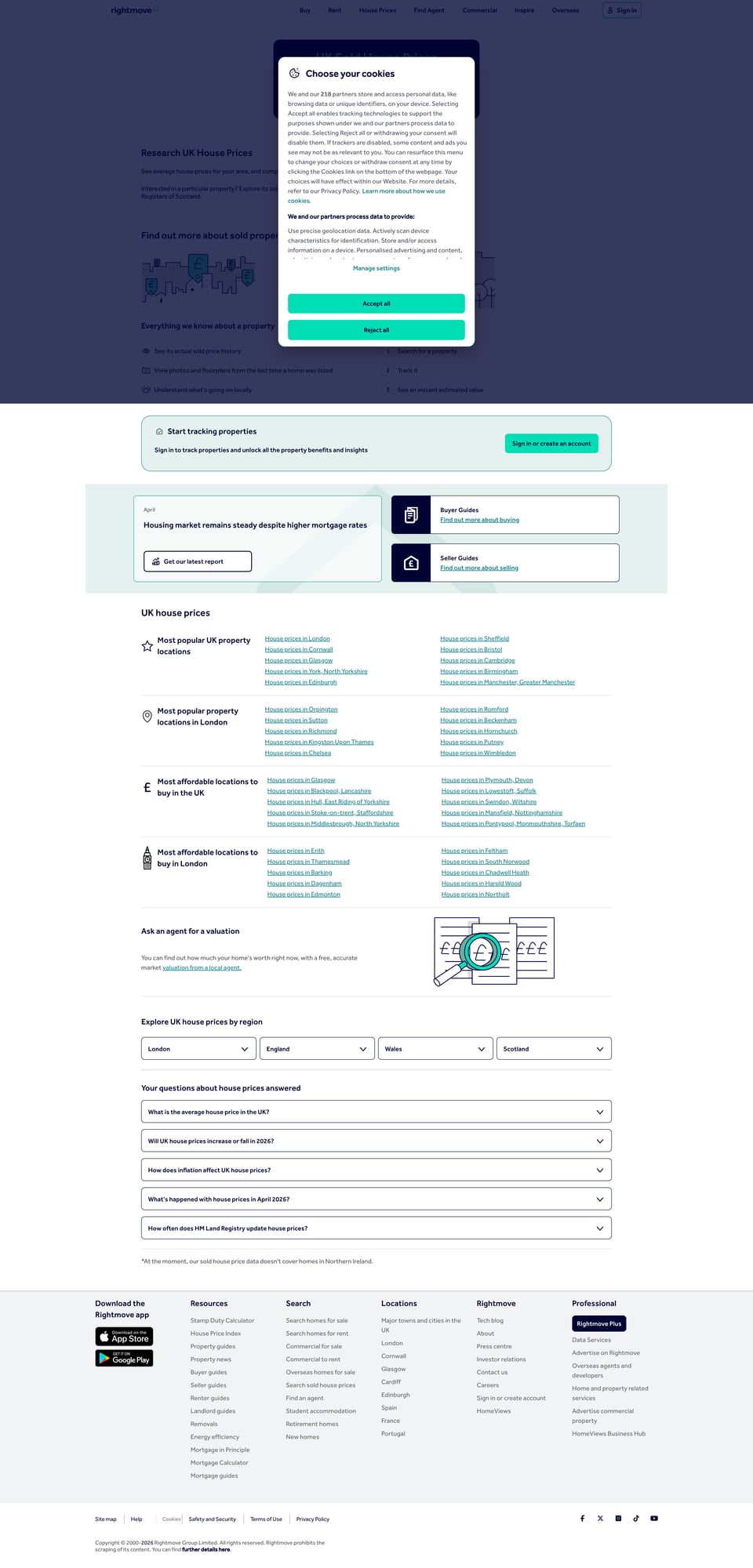
- includes a screenshot of the target site for documentation
Note: Websites change. The selectors below match the “Sold Prices” result pages at the time of writing. In the rendered HTML, Rightmove exposes
a[data-testid="propertyCard"]cards andselect[data-testid="yearFilter"]/select[data-testid="propertyTypeFilter"]filters, which gives us better anchors than opaque CSS classes.
Rightmove can be temperamental at scale (rate limits, blocks, intermittent 403s). ProxiesAPI gives you a stable proxy + retry layer so your dataset jobs finish reliably.
What we’re scraping (page types)
Rightmove Sold Prices typically has:
- Search results pages (many listings)
- contain listing cards (price, address, basic attributes)
- have pagination / “next” controls
- Listing detail pages
- contain richer attributes (sold date, tenure, property type, sometimes coordinates)
Our crawler will follow the classic pattern:
- Fetch results page 1
- Parse listing URLs + basic attributes
- For each listing URL, fetch details and enrich
- Move to next results page
Setup (Python)
python -m venv .venv
source .venv/bin/activate
pip install requests beautifulsoup4 lxml tenacity pandas
We’ll use:
requestsfor HTTPBeautifulSoup(lxml)for robust HTML parsingtenacityfor retries with backoffpandasfor easy CSV export
A reliable fetch layer (timeouts + headers + retries)
A lot of Rightmove pain is not “parsing”, it’s network stability.
We’ll set:
- connect/read timeouts
- realistic headers
- retries for 429/5xx/temporary blocks
from __future__ import annotations

import random
import time
from dataclasses import dataclass
from typing import Iterable

import requests
from bs4 import BeautifulSoup
from tenacity import retry, stop_after_attempt, wait_exponential

TIMEOUT = (10, 40)  # (connect, read)

USER_AGENTS = [
    # keep a small rotating set
    "Mozilla/5.0 (Macintosh; Intel Mac OS X 10_15_7) AppleWebKit/605.1.15 (KHTML, like Gecko) Version/17.1 Safari/605.1.15",
    "Mozilla/5.0 (Windows NT 10.0; Win64; x64) AppleWebKit/537.36 (KHTML, like Gecko) Chrome/124.0.0.0 Safari/537.36",
    "Mozilla/5.0 (X11; Linux x86_64) AppleWebKit/537.36 (KHTML, like Gecko) Chrome/124.0.0.0 Safari/537.36",
]


def build_session() -> requests.Session:
    s = requests.Session()
    s.headers.update(
        {
            "Accept": "text/html,application/xhtml+xml,application/xml;q=0.9,*/*;q=0.8",
            "Accept-Language": "en-GB,en;q=0.9",
            "Cache-Control": "no-cache",
            "Pragma": "no-cache",
            "Upgrade-Insecure-Requests": "1",
        }
    )
    return s


@retry(wait=wait_exponential(multiplier=1, min=2, max=20), stop=stop_after_attempt(6))
def fetch_html(session: requests.Session, url: str, *, proxies: dict | None = None) -> str:
    # rotate user-agent per request
    session.headers["User-Agent"] = random.choice(USER_AGENTS)

    r = session.get(url, timeout=TIMEOUT, proxies=proxies)

    # Rightmove sometimes returns 403/429 when unhappy.
    if r.status_code in (403, 429, 500, 502, 503, 504):
        raise requests.HTTPError(f"HTTP {r.status_code} for {url}")

    r.raise_for_status()
    return r.text


def soupify(html: str) -> BeautifulSoup:
    return BeautifulSoup(html, "lxml")
Where ProxiesAPI fits
If you already have ProxiesAPI configured, you typically point requests at an HTTP proxy.
You can wire that into the proxies dict:
PROXIES = {
    "http": "http://YOUR_PROXIESAPI_PROXY",
    "https": "http://YOUR_PROXIESAPI_PROXY",
}

html = fetch_html(session, url, proxies=PROXIES)
Keep it honest: ProxiesAPI isn’t a “magic bypass”, it’s a reliability layer (better IP pool, fewer dead-ends, more consistent success rates as volume grows).
Step 1: Identify the listing cards (inspect once, scrape forever)
Open a Sold Prices results page in your browser, right-click a listing card, and Inspect.
You’re looking for stable anchors like:
- a result container element you can select repeatedly
- a link to the detail page (
<a href="/property/...">) - price/address fields
On a current sold-prices page such as https://www.rightmove.co.uk/house-prices/london.html, each visible result is an anchor with data-testid="propertyCard". We can parse those cards directly and only use regexes for the free-text bits such as prices and dates.
Step 2: Parse a results page (URLs + basic fields)
import re
from urllib.parse import urljoin

BASE = "https://www.rightmove.co.uk"


@dataclass
class ListingStub:
    url: str
    price_text: str | None
    address: str | None
    bedrooms: int | None
    property_type: str | None


def clean_text(s: str | None) -> str | None:
    if not s:
        return None
    s = re.sub(r"\s+", " ", s).strip()
    return s or None


def parse_int(s: str | None) -> int | None:
    if not s:
        return None
    m = re.search(r"(\d+)", s)
    return int(m.group(1)) if m else None


def parse_results_page(html: str) -> list[ListingStub]:
    soup = soupify(html)

    stubs: list[ListingStub] = []

    for card in soup.select('a[data-testid="propertyCard"]'):
        href = card.get("href") or ""
        url = urljoin(BASE, href)
        text = clean_text(card.get_text(" ", strip=True))

        # Heuristic extraction (Rightmove cards change; avoid overfitting)
        price_text = None
        m_price = re.search(r"£[\d,]+", text or "")
        if m_price:
            price_text = m_price.group(0)

        title_el = card.select_one("h2")
        address = clean_text(title_el.get_text(" ", strip=True) if title_el else None)

        bedrooms = None
        m_bed = re.search(r"(\d+)\s*bed", (text or "").lower())
        if m_bed:
            bedrooms = int(m_bed.group(1))

        property_type = None
        m_type = re.search(
            r"\b(flat|apartment|detached|semi detached|terraced|maisonette|bungalow)\b",
            (text or "").lower(),
        )
        if m_type:
            property_type = m_type.group(1)

        stubs.append(
            ListingStub(
                url=url,
                price_text=price_text,
                address=address,
                bedrooms=bedrooms,
                property_type=property_type,
            )
        )

    # de-dupe by URL
    uniq = {}
    for s in stubs:
        uniq[s.url] = s

    return list(uniq.values())
This parser is intentionally not “perfect”. The goal is:
- get reliable detail URLs
- capture some cheap card-level fields
- do the real extraction on the detail page
Step 3: Find pagination (next page URL)
Rightmove pagination markup can change. A robust approach:
- look for an
<a>that contains “Next” - fall back to query parameters if the URL format is consistent
from urllib.parse import urlparse, parse_qs, urlencode, urlunparse


def find_next_page(html: str, current_url: str) -> str | None:
    soup = soupify(html)

    # 1) Try explicit "Next" link
    for a in soup.select('a[href]'):
        label = a.get_text(" ", strip=True).lower()
        if label in ("next", "next page", "next >", ">"):
            href = a.get("href")
            if href:
                return urljoin(BASE, href)

    # 2) Fallback: increment a common "index"-style query param if present
    # Rightmove search URLs often carry an index offset. If your URL has one,
    # you can increment it here.
    u = urlparse(current_url)
    qs = parse_qs(u.query)

    if "index" in qs:
        try:
            idx = int(qs["index"][0])
        except Exception:
            return None
        qs["index"] = [str(idx + 24)]  # typical page size is 24
        new_query = urlencode(qs, doseq=True)
        return urlunparse(u._replace(query=new_query))

    return None
Step 4: Parse a listing detail page (sold price + date + address)
The detail page is where you want accuracy.
Common patterns to look for:
- a headline that contains the address
- “Sold price” and “Sold date” labels
- key-value sections (“Property type”, “Tenure”, “Bedrooms”)
Here’s a generic “label/value” extractor you can adapt quickly when markup shifts.
@dataclass
class ListingDetail:
    url: str
    address: str | None
    sold_price: int | None
    sold_date: str | None
    property_type: str | None
    tenure: str | None
    bedrooms: int | None


def money_to_int(s: str | None) -> int | None:
    if not s:
        return None
    s = s.replace(",", "")
    m = re.search(r"£\s*(\d+)", s)
    return int(m.group(1)) if m else None


def extract_kv_text(soup: BeautifulSoup) -> dict[str, str]:
    # Very generic: find rows that look like "Label Value"
    out: dict[str, str] = {}

    for el in soup.select("*"):
        t = el.get_text(" ", strip=True)
        if not t or len(t) > 120:
            continue

        # try to match a few known labels
        for label in ["Sold price", "Sold date", "Property type", "Tenure", "Bedrooms"]:
            if t.lower().startswith(label.lower()):
                val = t[len(label) :].strip(" :\u00a0")
                if val:
                    out[label] = val

    return out


def parse_listing_detail(html: str, url: str) -> ListingDetail:
    soup = soupify(html)

    # Address heuristic: use first h1 if present
    h1 = soup.select_one("h1")
    address = clean_text(h1.get_text(" ", strip=True) if h1 else None)

    kv = extract_kv_text(soup)

    sold_price = money_to_int(kv.get("Sold price"))
    sold_date = clean_text(kv.get("Sold date"))
    property_type = clean_text(kv.get("Property type"))
    tenure = clean_text(kv.get("Tenure"))
    bedrooms = parse_int(kv.get("Bedrooms"))

    return ListingDetail(
        url=url,
        address=address,
        sold_price=sold_price,
        sold_date=sold_date,
        property_type=property_type,
        tenure=tenure,
        bedrooms=bedrooms,
    )
If the “label/value” approach doesn’t pick up the values on your page, don’t fight it — inspect the exact elements for those labels and add targeted selectors.
Step 5: Crawl N pages and build a dataset
This is the dataset-builder loop:
- fetch results page
- parse listing URLs
- fetch details for each listing
- sleep between requests
- stop when you hit page limit or no next page
import json
from datetime import datetime

import pandas as pd


def crawl_rightmove_sold(
    start_url: str,
    *,
    max_pages: int = 5,
    sleep_s: float = 1.2,
    proxies: dict | None = None,
) -> list[dict]:
    session = build_session()

    page_url = start_url
    seen = set()
    rows: list[dict] = []

    for page in range(1, max_pages + 1):
        html = fetch_html(session, page_url, proxies=proxies)
        stubs = parse_results_page(html)

        print(f"page {page}: found {len(stubs)} listing urls")

        for stub in stubs:
            if stub.url in seen:
                continue
            seen.add(stub.url)

            # be polite + reduce burstiness
            time.sleep(sleep_s + random.random() * 0.6)

            try:
                detail_html = fetch_html(session, stub.url, proxies=proxies)
                detail = parse_listing_detail(detail_html, stub.url)
            except Exception as e:
                # keep the run moving; you can re-try failed URLs later
                detail = ListingDetail(
                    url=stub.url,
                    address=None,
                    sold_price=None,
                    sold_date=None,
                    property_type=None,
                    tenure=None,
                    bedrooms=stub.bedrooms,
                )

            rows.append(
                {
                    "url": detail.url,
                    "address": detail.address,
                    "sold_price": detail.sold_price,
                    "sold_date": detail.sold_date,
                    "property_type": detail.property_type,
                    "tenure": detail.tenure,
                    "bedrooms": detail.bedrooms,
                    "scraped_at": datetime.utcnow().isoformat() + "Z",
                }
            )

        next_url = find_next_page(html, page_url)
        if not next_url:
            print("no next page found; stopping")
            break
        page_url = next_url

    return rows


if __name__ == "__main__":
    # Replace with a Rightmove Sold Prices search URL for your target area.
    START = "https://www.rightmove.co.uk/house-prices.html"

    # If using ProxiesAPI:
    # PROXIES = {"http": "http://YOUR_PROXIESAPI_PROXY", "https": "http://YOUR_PROXIESAPI_PROXY"}
    PROXIES = None

    data = crawl_rightmove_sold(START, max_pages=3, proxies=PROXIES)

    print("rows:", len(data))

    # JSONL (stream-friendly)
    with open("rightmove_sold.jsonl", "w", encoding="utf-8") as f:
        for row in data:
            f.write(json.dumps(row, ensure_ascii=False) + "\n")

    # CSV
    df = pd.DataFrame(data)
    df.to_csv("rightmove_sold.csv", index=False)

    print("wrote rightmove_sold.jsonl + rightmove_sold.csv")
Practical anti-block checklist (Rightmove)
- Use realistic headers and rotate UA (we do)
- Add jittered sleeps between requests (we do)
- Retry 403/429/5xx with exponential backoff (we do)
- Crawl in two phases (results → details) so you can resume
- Keep a “failed_urls.txt” file and re-run failures later
If you need higher volume (hundreds of pages / thousands of listings), move the network layer to ProxiesAPI and add concurrency carefully (e.g., 4–8 workers).
QA checklist
- You can fetch results HTML without getting stuck on challenges
-
parse_results_page()returns a stable set of detail URLs - Detail parsing returns some sold prices and sold dates
- Exports write valid JSONL/CSV
Next upgrades
- Store to SQLite/Postgres with de-duplication on URL
- Add geocoding (postcode → lat/lng) for mapping
- Build incremental updates (only scrape new sold records)
- Add per-area jobs (London boroughs, counties, etc.)
Rightmove can be temperamental at scale (rate limits, blocks, intermittent 403s). ProxiesAPI gives you a stable proxy + retry layer so your dataset jobs finish reliably.