
Scrape IMDb TV Series Episodes + Ratings (ProxiesAPI + Python)
IMDb is a great example of a “looks simple, gets messy” scrape:
- the episode list is paginated by season
- the page payload is rich (episode numbers, titles, air dates, ratings)
- but plain requests.get() can return 202 / empty bodies or inconsistent HTML depending on your IP
In this tutorial we’ll build a practical scraper that:
- fetches the Episodes page for a TV series (by IMDb title id like tt0903747)
- crawls all seasons
- extracts a clean table of episodes + ratings
- exports to CSV (and optional JSON)
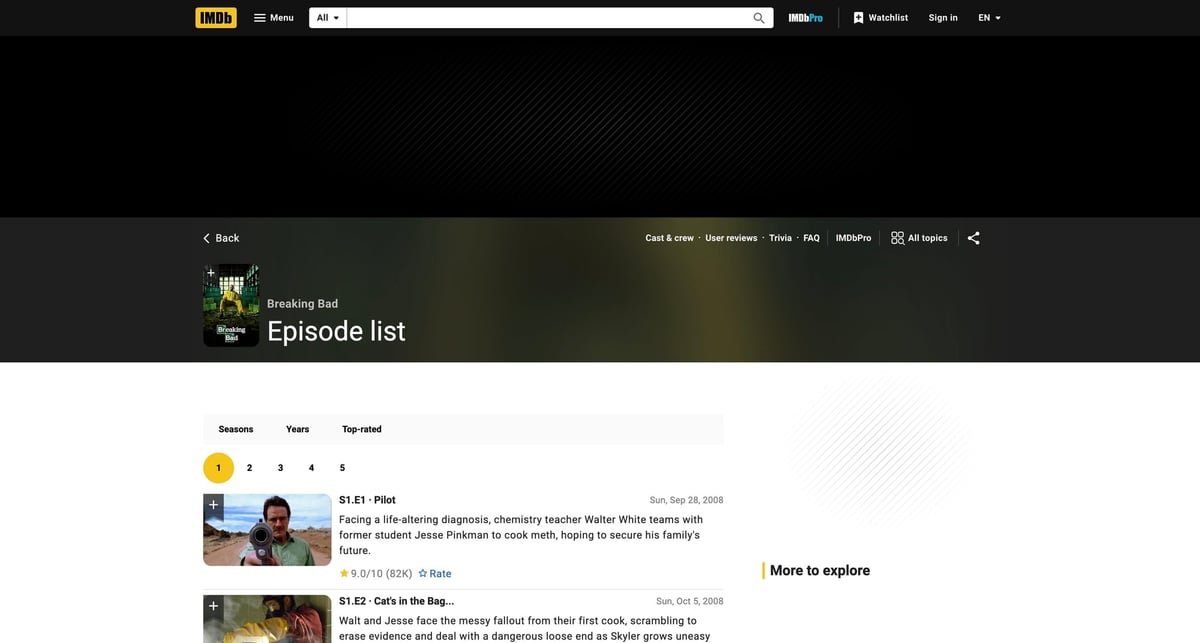
Mandatory screenshot (this is the page we’ll scrape):
IMDb can be inconsistent across IPs and sessions. ProxiesAPI fits as a fetch-layer wrapper so retries and rotation are one small change — not a rewrite.
What we’re scraping (URL structure)
IMDb TV series have an Episodes page:
- base: https://www.imdb.com/title/TITLE_ID/episodes
- per-season: https://www.imdb.com/title/TITLE_ID/episodes?season=1
Example (Breaking Bad):
Setup
python3 -m venv .venv
source .venv/bin/activate
pip install requests beautifulsoup4 lxml pandas
We’ll use:
- requests for HTTP
- BeautifulSoup(lxml) for HTML parsing and extracting the JSON payload
- pandas for a clean CSV export
ProxiesAPI: a clean fetch layer (honest)
When you scale beyond “a few pages”, your biggest failures are usually:
- throttling / soft-blocks
- inconsistent responses by IP
- transient network errors
ProxiesAPI doesn’t write selectors for you, and it won’t magically bypass every defense.
What it does well is make your fetch layer more stable and consistent.
ProxiesAPI works by fetching the target URL through their endpoint:
http://api.proxiesapi.com/?auth_key=YOUR_KEY&url=https://example.com
Here’s a reusable fetcher with retries/backoff. Everything else stays normal Python.
import os
import time
import random
import urllib.parse
import requests

PROXIESAPI_KEY = os.environ.get("PROXIESAPI_KEY", "")
TIMEOUT = (10, 40)  # connect, read

session = requests.Session()


def proxiesapi_url(target_url: str) -> str:
    if not PROXIESAPI_KEY:
        raise RuntimeError("Set PROXIESAPI_KEY in your environment")

    return (
        "http://api.proxiesapi.com/?auth_key="
        + urllib.parse.quote(PROXIESAPI_KEY, safe="")
        + "&url="
        + urllib.parse.quote(target_url, safe="")
    )


def fetch(url: str, *, use_proxiesapi: bool = True, max_retries: int = 4) -> str:
    last_err = None

    for attempt in range(1, max_retries + 1):
        try:
            final_url = proxiesapi_url(url) if use_proxiesapi else url
            r = session.get(
                final_url,
                timeout=TIMEOUT,
                headers={
                    "User-Agent": (
                        "Mozilla/5.0 (Macintosh; Intel Mac OS X 10_15_7) "
                        "AppleWebKit/537.36 (KHTML, like Gecko) "
                        "Chrome/123.0 Safari/537.36"
                    ),
                    "Accept-Language": "en-US,en;q=0.9",
                },
            )
            r.raise_for_status()

            html = r.text or ""
            if len(html) < 2000:
                raise RuntimeError(f"Suspiciously small HTML ({len(html)} bytes)")

            return html

        except Exception as e:
            last_err = e
            sleep_s = min(12, (2 ** (attempt - 1))) + random.random()
            time.sleep(sleep_s)

    raise RuntimeError(f"Fetch failed after {max_retries} attempts: {last_err}")
Step 1: Pull the per-season pages
IMDb’s episodes list is easier to handle one season at a time:
- season 1 page
- season 2 page
- …
We’ll build:
- a season_url() helper
- a parse_episodes_from_season_page() extractor
- a crawl_title() orchestrator that returns a flat dataset
Step 2: Extract the page payload (avoid brittle selectors)
On many modern sites, the most stable source of truth is a JSON payload embedded in HTML.
IMDb pages often include a Next.js JSON blob in:
We’ll extract that blob (if present), then walk it to find episode records.
import json
import re
from bs4 import BeautifulSoup


def extract_next_data(html: str) -> dict | None:
    soup = BeautifulSoup(html, "lxml")
    node = soup.select_one('script#__NEXT_DATA__[type="application/json"]')
    if not node or not node.string:
        return None
    try:
        return json.loads(node.string)
    except json.JSONDecodeError:
        m = re.search(
            r'<script[^>]+id="__NEXT_DATA__"[^>]*>(.*?)</script>',
            html,
            re.S | re.I,
        )
        return json.loads(m.group(1)) if m else None
Now, because IMDb’s internal schema changes, we’ll use a generic walker:
from typing import Any


def walk(obj: Any):
    if isinstance(obj, dict):
        yield obj
        for v in obj.values():
            yield from walk(v)
    elif isinstance(obj, list):
        for v in obj:
            yield from walk(v)


def to_text(v: Any) -> str | None:
    if v is None:
        return None
    if isinstance(v, str):
        return v.strip() or None
    if isinstance(v, dict):
        t = v.get("text")
        if isinstance(t, str):
            return t.strip() or None
    return None


def to_float(v: Any) -> float | None:
    try:
        return float(v)
    except Exception:
        return None


def normalize_episode(d: dict) -> dict | None:
    title = None
    if isinstance(d.get("titleText"), dict):
        title = to_text(d.get("titleText"))
    elif isinstance(d.get("titleText"), str):
        title = d.get("titleText").strip()
    elif isinstance(d.get("name"), str):
        title = d.get("name").strip()

    season = d.get("seasonNumber") or d.get("season")
    episode = d.get("episodeNumber") or d.get("episode")

    rating = None
    if isinstance(d.get("aggregateRating"), dict):
        rating = to_float(d["aggregateRating"].get("ratingValue"))
    elif isinstance(d.get("rating"), dict):
        rating = to_float(d["rating"].get("ratingValue") or d["rating"].get("value"))
    elif "ratingValue" in d:
        rating = to_float(d.get("ratingValue"))

    air_date = None
    if isinstance(d.get("releaseDate"), str):
        air_date = d.get("releaseDate")
    elif isinstance(d.get("airDate"), str):
        air_date = d.get("airDate")

    if title and (season or episode or rating is not None):
        return {
            "season": int(season) if str(season).isdigit() else season,
            "episode": int(episode) if str(episode).isdigit() else episode,
            "title": title,
            "air_date": air_date,
            "rating": rating,
        }
    return None
Step 3: Parse one season page into episodes
def parse_episodes_from_season_page(html: str) -> list[dict]:
    data = extract_next_data(html)
    if not data:
        raise RuntimeError(
            "IMDb page payload not found. Try using ProxiesAPI, or fetch in a browser once to confirm HTML."
        )

    episodes = []
    seen = set()

    for d in walk(data):
        ep = normalize_episode(d)
        if not ep:
            continue

        key = (ep.get("season"), ep.get("episode"), ep.get("title"))
        if key in seen:
            continue
        seen.add(key)
        episodes.append(ep)

    return episodes
Step 4: Crawl all seasons for a title id
import time
import random
from urllib.parse import urlencode


def season_url(title_id: str, season: int) -> str:
    base = f"https://www.imdb.com/title/{title_id}/episodes"
    return base + "?" + urlencode({"season": season})


def crawl_title(title_id: str, *, max_seasons: int = 50, use_proxiesapi: bool = True) -> list[dict]:
    all_rows = []

    for season in range(1, max_seasons + 1):
        url = season_url(title_id, season)
        html = fetch(url, use_proxiesapi=use_proxiesapi)
        rows = parse_episodes_from_season_page(html)

        if not rows:
            break

        for r in rows:
            r["title_id"] = title_id
            r["season"] = r.get("season") or season
        all_rows.extend(rows)

        time.sleep(1.0 + random.random())

    all_rows.sort(key=lambda r: (r.get("season") or 0, r.get("episode") or 0, r.get("title") or ""))
    return all_rows
Step 5: Export to CSV (and JSON)
import json
import pandas as pd


def export(rows: list[dict], csv_path: str, json_path: str | None = None) -> None:
    df = pd.DataFrame(rows)
    df.to_csv(csv_path, index=False)

    if json_path:
        with open(json_path, "w", encoding="utf-8") as f:
            json.dump(rows, f, ensure_ascii=False, indent=2)


if __name__ == "__main__":
    rows = crawl_title("tt0903747", use_proxiesapi=True)
    print("episodes:", len(rows))
    print(rows[:2])
    export(rows, "imdb_episodes.csv", "imdb_episodes.json")
Where ProxiesAPI fits (and where it doesn’t)
ProxiesAPI helps you keep the crawl stable when you scale:
- reduce failures from inconsistent IP reputation
- make retries less painful
- keep your scraper architecture simple (wrap the URL; keep parsing code unchanged)
But be honest:
- you still need correct extraction logic
- you still need to respect a target’s terms and rate limits
- some targets will require more than IP rotation (login flows, JS-only rendering, CAPTCHAs)
Treat ProxiesAPI as a boring networking primitive — and invest the rest of your effort in parsing and QA.
IMDb can be inconsistent across IPs and sessions. ProxiesAPI fits as a fetch-layer wrapper so retries and rotation are one small change — not a rewrite.