
Scrape Numbeo Quality of Life Index by City with Python
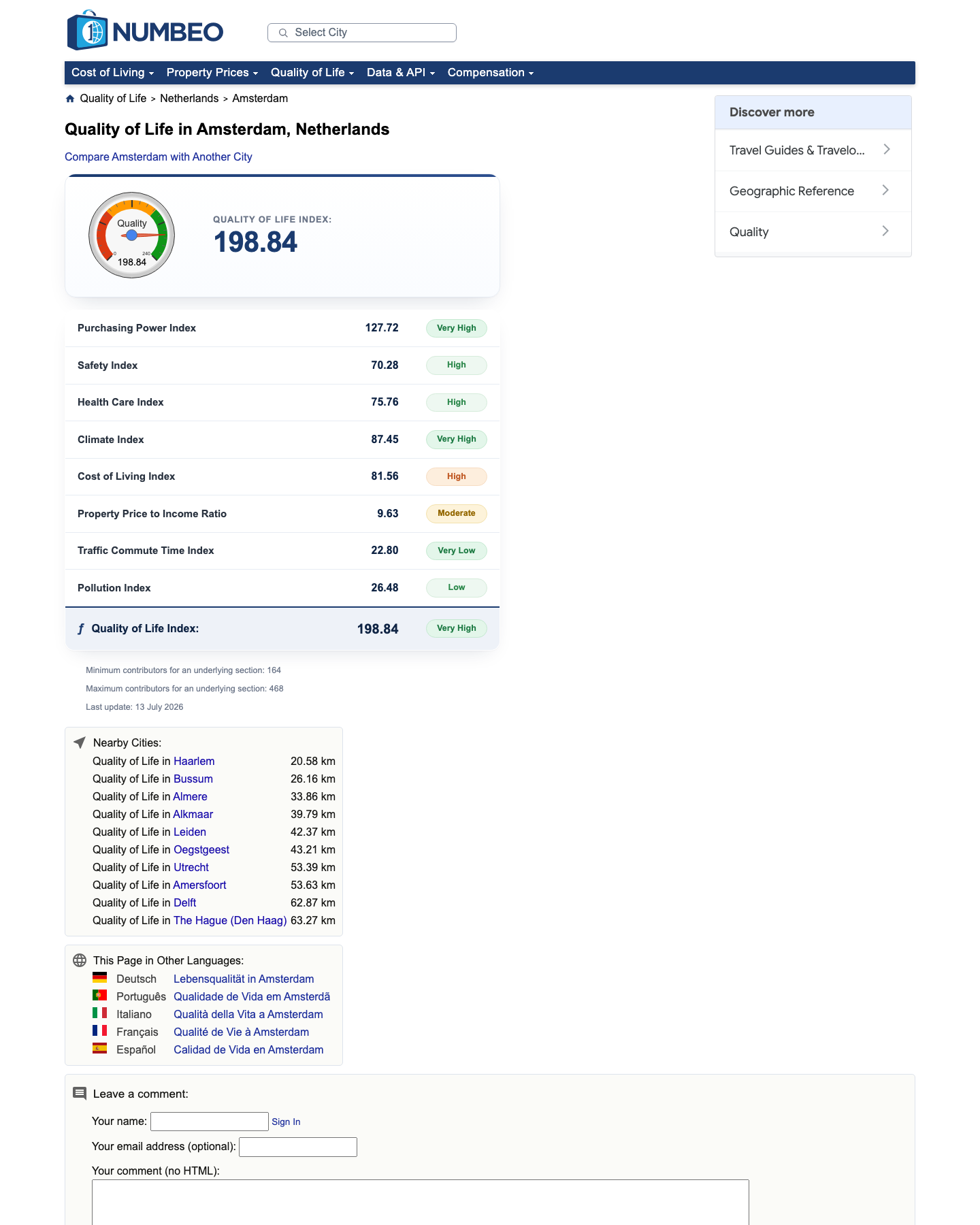
Numbeo's quality-of-life pages are useful when you need a compact city benchmark for relocation tools, market research, or dashboards. The good news is that the main metrics are still rendered in regular HTML, which makes this a much friendlier scrape than a typical modern consumer site.
In this guide we'll build a Python scraper that:
- fetches city pages from Numbeo's quality-of-life section
- extracts the headline score and the breakdown table
- normalizes metrics such as safety, climate, traffic, and pollution
- exports a clean CSV/JSON dataset
- supports optional ProxiesAPI routing for larger crawls
Numbeo pages are lightweight, but multi-city crawls still need retries, pacing, and a stable proxy layer. ProxiesAPI helps keep those batch jobs steady as you scale.
What we're scraping
Numbeo city URLs follow a predictable pattern:
https://www.numbeo.com/quality-of-life/in/Amsterdamhttps://www.numbeo.com/quality-of-life/in/Singaporehttps://www.numbeo.com/quality-of-life/in/Lisbon
On the live page, the key pieces are easy to confirm:
- the city heading is in
h1 - the headline score is inside
table.table_indices - the component scores sit in
table.qol-breakdown
Quick sanity check:
curl -sL "https://www.numbeo.com/quality-of-life/in/Amsterdam" | rg -n "table_indices|qol-breakdown|Quality of Life"
At the time of writing, that returns the exact table names we use below.
Install dependencies
python -m venv .venv
source .venv/bin/activate
pip install requests beautifulsoup4 lxml pandas
Step 1: Build a fetch layer with optional ProxiesAPI support
import csv
import json
import os
import random
import re
import time
from pathlib import Path
from urllib.parse import quote

import requests
from bs4 import BeautifulSoup

PROXIESAPI_KEY = os.getenv("PROXIESAPI_KEY")
PROXIESAPI_ENDPOINT = "https://api.proxiesapi.com/"
TIMEOUT = (15, 45)

session = requests.Session()
session.headers.update(
    {
        "User-Agent": (
            "Mozilla/5.0 (Macintosh; Intel Mac OS X 10_15_7) "
            "AppleWebKit/537.36 (KHTML, like Gecko) "
            "Chrome/126.0.0.0 Safari/537.36"
        ),
        "Accept": "text/html,application/xhtml+xml,application/xml;q=0.9,*/*;q=0.8",
        "Accept-Language": "en-US,en;q=0.9",
    }
)


def proxied_url(target_url: str) -> str:
    if not PROXIESAPI_KEY:
        return target_url
    return f"{PROXIESAPI_ENDPOINT}?auth_key={quote(PROXIESAPI_KEY)}&url={quote(target_url, safe='')}"


def fetch_html(url: str, retries: int = 4) -> str:
    last_error = None
    for attempt in range(1, retries + 1):
        try:
            time.sleep(random.uniform(0.3, 1.0))
            response = session.get(proxied_url(url), timeout=TIMEOUT)
            response.raise_for_status()
            return response.text
        except Exception as exc:
            last_error = exc
            if attempt == retries:
                break
            time.sleep((2 ** attempt) + random.uniform(0.0, 0.5))
    raise RuntimeError(f"Failed to fetch {url}: {last_error}")
If you leave PROXIESAPI_KEY unset, the same code uses direct requests. That makes local testing simple.
Step 2: Parse the headline score and the breakdown table
Numbeo's quality-of-life page is mostly a table scrape. The two selectors that matter are:
table.table_indices trtable.qol-breakdown tr
def clean_text(value: str | None) -> str | None:
    if value is None:
        return None
    return re.sub(r"\s+", " ", value).strip() or None


def parse_float(value: str | None) -> float | None:
    if not value:
        return None
    numeric = re.sub(r"[^0-9.\-]", "", value)
    return float(numeric) if numeric else None


def parse_city_page(html: str, url: str) -> dict:
    soup = BeautifulSoup(html, "lxml")

    heading = clean_text(soup.select_one("h1").get_text(" ", strip=True))

    headline_score = None
    for row in soup.select("table.table_indices tr"):
        cells = row.select("td")
        if len(cells) != 2:
            continue
        label = clean_text(cells[0].get_text(" ", strip=True))
        raw_value = clean_text(cells[1].get_text(" ", strip=True))
        if label and "Quality of Life Index" in label:
            headline_score = parse_float(raw_value)
            break

    metrics = {}
    for row in soup.select("table.qol-breakdown tr"):
        cells = row.select("td")
        if len(cells) < 2:
            continue
        label = clean_text(cells[0].get_text(" ", strip=True))
        raw_value = clean_text(cells[1].get_text(" ", strip=True))
        if not label:
            continue
        metric_key = (
            label.lower()
            .replace("index", "")
            .replace("%", "pct")
            .replace("/", " ")
            .strip()
        )
        metric_key = re.sub(r"[^a-z0-9]+", "_", metric_key).strip("_")
        metrics[metric_key] = parse_float(raw_value)

    return {
        "url": url,
        "heading": heading,
        "quality_of_life_index": headline_score,
        **metrics,
    }
That gives you a flat record instead of raw HTML fragments, which is what you want for analysis.
Step 3: Turn city names into crawl targets
BASE = "https://www.numbeo.com/quality-of-life/in/"


def city_url(city: str) -> str:
    slug = quote(city.replace(" ", "-"))
    return f"{BASE}{slug}"


def scrape_cities(cities: list[str]) -> list[dict]:
    rows = []
    for city in cities:
        url = city_url(city)
        html = fetch_html(url)
        row = parse_city_page(html, url)
        row["city"] = city
        rows.append(row)
        print(f"scraped {city}: {row['quality_of_life_index']}")
    return rows
Example run:
cities = ["Amsterdam", "Lisbon", "Singapore", "Toronto"]
rows = scrape_cities(cities)
print(json.dumps(rows[0], indent=2))
Typical output looks like:
{
  "url": "https://www.numbeo.com/quality-of-life/in/Amsterdam",
  "heading": "Quality of Life in Amsterdam, Netherlands",
  "quality_of_life_index": 205.2,
  "purchasing_power": 111.4,
  "safety": 72.8,
  "health_care": 79.9,
  "climate": 87.3,
  "cost_of_living": 66.1,
  "property_price_to_income_ratio": 7.4,
  "traffic_commute_time": 31.7,
  "pollution": 29.0,
  "city": "Amsterdam"
}
The exact numbers will move over time. The structure is what matters.
Step 4: Export to CSV and JSON
def export_rows(rows: list[dict], out_dir: str = "output") -> None:
    path = Path(out_dir)
    path.mkdir(parents=True, exist_ok=True)

    with (path / "numbeo_quality_of_life.json").open("w", encoding="utf-8") as f:
        json.dump(rows, f, indent=2, ensure_ascii=False)

    fieldnames = sorted({key for row in rows for key in row.keys()})
    with (path / "numbeo_quality_of_life.csv").open("w", newline="", encoding="utf-8") as f:
        writer = csv.DictWriter(f, fieldnames=fieldnames)
        writer.writeheader()
        writer.writerows(rows)
Then wire it together:
if __name__ == "__main__":
    cities = ["Amsterdam", "Singapore", "Prague", "Valencia", "Warsaw"]
    rows = scrape_cities(cities)
    export_rows(rows)
Practical notes
- Pace your crawl. Numbeo pages are lightweight, but hammering many cities back-to-back is still unnecessary.
- Keep selectors narrow.
table.table_indicesandtable.qol-breakdownare much safer than generictable. - Normalize your metric names early. It will save you pain when loading the data into pandas, DuckDB, or a BI tool.
- Expect score drift. Numbeo's values are user-contributed and can change between runs.
If you need wider coverage, add city discovery from ranking pages first, then feed those URLs into the same parser. That's usually cleaner than trying to scrape every section page separately.
When to add ProxiesAPI
For a handful of cities, direct requests may be enough. ProxiesAPI becomes useful when you start doing things like:
- refreshing hundreds of city pages on a schedule
- running multiple regional datasets in parallel
- mixing Numbeo with tougher sites in the same pipeline
- needing one consistent request layer across all scrapers
The scraper above works both ways, so you can start simple and switch on the proxy layer only when the crawl size justifies it.
Numbeo pages are lightweight, but multi-city crawls still need retries, pacing, and a stable proxy layer. ProxiesAPI helps keep those batch jobs steady as you scale.