
Scrape Rightmove Sold Prices (Second Angle): Price History Dataset Builder
Rightmove sold prices are one of the most useful public datasets for UK property analysis.
If you’re building anything in proptech—valuation models, neighborhood dashboards, lead scoring, market trend reports—the shape of the problem is always the same:
- collect sold listings across many postcodes/areas
- normalize and de-duplicate
- refresh regularly (incremental updates)
- keep it reliable under rate limits and transient blocks
This guide shows a practical “dataset builder” approach.
You’ll end up with:
- a crawler that paginates sold listings for an area
- a normalized record schema
- a SQLite database to dedupe + support incremental runs
- an exporter to CSV
Rightmove is a high-value dataset and a high-friction target. ProxiesAPI helps keep your crawl stable as you paginate, refresh areas, and run nightly incremental updates.
What we’re scraping (and why it’s tricky)
Rightmove pages can vary based on:
- geo / consent flows
- A/B tests
- anti-bot measures
So we’ll use two principles:
- Screenshot-first: capture the pages you’re targeting so selector changes are easy to debug.
- Stability-first: retries, timeouts, dedupe, and incremental updates.
This tutorial focuses on HTML parsing patterns. If you find the content is loaded via XHR in your region, you can adapt the “fetch + parse + store” pipeline to that endpoint too.
Setup
python -m venv .venv
source .venv/bin/activate
pip install requests beautifulsoup4 lxml tenacity python-dotenv
Create .env:
PROXIESAPI_KEY=your_api_key_here
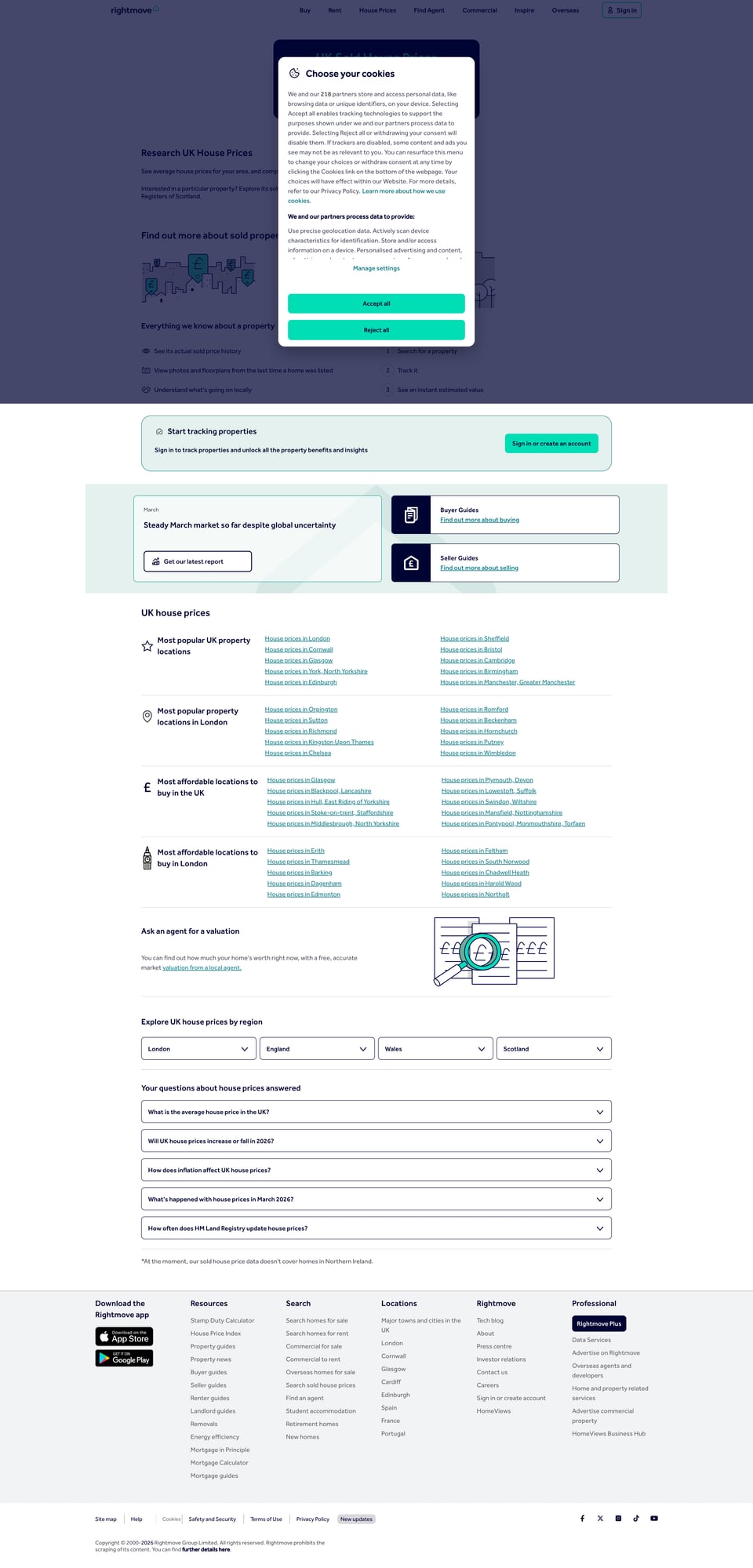
Step 1: Pick an area URL and take a screenshot
Rightmove sold listings are usually discoverable via the UI:
- search an area (postcode/town)
- filter to Sold STC / Sold Prices
Save a screenshot of the sold-price listing page.
We’ll store it at:
public/images/posts/<slug>/rightmove-sold-flow.jpg
(We’ll capture this in the publish step using the browser tool.)
Step 2: A robust ProxiesAPI fetch function
import os
import time
import random
from urllib.parse import quote

import requests
from tenacity import retry, stop_after_attempt, wait_exponential, retry_if_exception_type


class TransientHTTPError(RuntimeError):
    pass


def proxiesapi_url(target_url: str, api_key: str) -> str:
    return f"https://api.proxiesapi.com/?auth_key={api_key}&url={quote(target_url, safe='')}"


@retry(
    reraise=True,
    stop=stop_after_attempt(6),
    wait=wait_exponential(multiplier=1, min=1, max=20),
    retry=retry_if_exception_type((requests.RequestException, TransientHTTPError)),
)
def fetch_html(url: str, api_key: str, session: requests.Session | None = None) -> str:
    s = session or requests.Session()

    time.sleep(random.uniform(0.3, 0.9))

    headers = {
        "User-Agent": (
            "Mozilla/5.0 (Macintosh; Intel Mac OS X 10_15_7) "
            "AppleWebKit/537.36 (KHTML, like Gecko) "
            "Chrome/123.0 Safari/537.36"
        ),
        "Accept": "text/html,application/xhtml+xml,application/xml;q=0.9,*/*;q=0.8",
        "Accept-Language": "en-GB,en;q=0.9",
    }

    gateway = proxiesapi_url(url, api_key)
    r = s.get(gateway, headers=headers, timeout=(10, 40))

    if r.status_code in (403, 408, 429, 500, 502, 503, 504):
        raise TransientHTTPError(f"Transient status {r.status_code}")

    r.raise_for_status()
    return r.text
Step 3: Extract sold listings from the HTML
Rightmove’s markup changes, so we’ll design for resilience:
- don’t rely on “generated” classnames
- prefer embedded JSON blocks when present
- fall back to HTML scanning
Option A: Parse embedded JSON (preferred)
Many listing pages embed a JSON blob (often in a <script> tag) containing listing cards.
Here’s a helper that searches for large JSON objects and then extracts listing-like entries.
import json
import re
from bs4 import BeautifulSoup


def find_json_blobs(html: str) -> list[dict]:
    blobs = []
    for m in re.finditer(r"<script[^>]*>(.*?)</script>", html, flags=re.S | re.I):
        body = m.group(1).strip()
        if len(body) < 2000:
            continue

        # Try direct JSON
        try:
            j = json.loads(body)
            if isinstance(j, dict):
                blobs.append(j)
        except Exception:
            pass

    return blobs


def normalize_price(price_text: str | None) -> int | None:
    if not price_text:
        return None
    m = re.search(r"([0-9][0-9,]*)", price_text.replace("£", ""))
    return int(m.group(1).replace(",", "")) if m else None


def extract_listings_best_effort(html: str) -> list[dict]:
    soup = BeautifulSoup(html, "lxml")

    # 1) Try JSON blobs
    for blob in find_json_blobs(html):
        # This is intentionally heuristic—Rightmove blob schema can vary.
        # We look for any dicts containing keys that smell like a property card.
        stack = [blob]
        while stack:
            cur = stack.pop()
            if isinstance(cur, dict):
                keys = set(cur.keys())
                if {"price", "displayAddress"}.issubset(keys) or {"displayAddress", "propertyUrl"}.issubset(keys):
                    price = cur.get("price")
                    if isinstance(price, dict):
                        price_text = price.get("displayPrices", [{}])[0].get("displayPrice") if price.get("displayPrices") else None
                    else:
                        price_text = None

                    listings = {
                        "address": cur.get("displayAddress"),
                        "price_text": price_text,
                        "price_gbp": normalize_price(price_text),
                        "property_url": cur.get("propertyUrl") or cur.get("property_url"),
                        "id": cur.get("id") or cur.get("propertyId"),
                    }
                    # only keep if we have something meaningful
                    if listings.get("address") and (listings.get("property_url") or listings.get("id")):
                        return [listings]  # a minimal proof; we’ll rely on HTML fallback for full pages

                for v in cur.values():
                    if isinstance(v, (dict, list)):
                        stack.append(v)
            elif isinstance(cur, list):
                stack.extend(cur)

    # 2) HTML fallback: find card links
    out = []
    for a in soup.select("a[href]"):
        href = a.get("href")
        if not href:
            continue
        if "property-for-sale" in href or "properties" in href or "property" in href:
            text = a.get_text(" ", strip=True)
            if not text:
                continue
            out.append({"link_text": text, "href": href})

    return out
This shows the pattern: attempt JSON first, then fall back.
In your real run, you’ll likely adapt this extractor to the exact blob key structure you see in your screenshot/HTML.
Step 4: Store in SQLite for dedupe + incremental updates
The simplest way to do incremental dataset building is SQLite.
We’ll store a normalized table keyed by a stable identifier (property URL or listing ID).
import sqlite3
from datetime import datetime


def init_db(path: str = "rightmove_sold.db") -> sqlite3.Connection:
    conn = sqlite3.connect(path)
    conn.execute(
        """
        CREATE TABLE IF NOT EXISTS sold_listings (
            id TEXT PRIMARY KEY,
            address TEXT,
            price_gbp INTEGER,
            price_text TEXT,
            property_url TEXT,
            first_seen TEXT,
            last_seen TEXT
        )
        """
    )
    return conn


def upsert_listing(conn: sqlite3.Connection, row: dict):
    now = datetime.utcnow().isoformat()
    lid = row.get("id") or row.get("property_url")
    if not lid:
        return

    conn.execute(
        """
        INSERT INTO sold_listings (id, address, price_gbp, price_text, property_url, first_seen, last_seen)
        VALUES (?, ?, ?, ?, ?, ?, ?)
        ON CONFLICT(id) DO UPDATE SET
          address=excluded.address,
          price_gbp=excluded.price_gbp,
          price_text=excluded.price_text,
          property_url=excluded.property_url,
          last_seen=excluded.last_seen
        """,
        (
            lid,
            row.get("address"),
            row.get("price_gbp"),
            row.get("price_text"),
            row.get("property_url"),
            now,
            now,
        ),
    )
    conn.commit()
Why this works
- First run: inserts everything.
- Next run: updates
last_seenand any changed fields. - You can later detect deltas (new listings since yesterday) via
first_seen.
Step 5: Pagination strategy
Rightmove listing pages typically support pagination.
Your exact pagination parameters may be:
- a
?index=offset - a
?page=number - an internal path segment
Use your browser’s address bar while paging to learn the URL pattern.
Then implement:
from urllib.parse import urlencode, urlparse, parse_qs, urlunparse


def with_query(url: str, **params) -> str:
    u = urlparse(url)
    q = parse_qs(u.query)
    for k, v in params.items():
        q[k] = [str(v)]
    new_q = urlencode({k: v[0] for k, v in q.items()})
    return urlunparse((u.scheme, u.netloc, u.path, u.params, new_q, u.fragment))


def crawl_pages(base_url: str, pages: int, api_key: str):
    session = requests.Session()
    for p in range(1, pages + 1):
        url = with_query(base_url, page=p)
        html = fetch_html(url, api_key, session=session)
        yield p, html
Adjust page to whatever parameter your screenshot reveals.
Step 6: Full runnable dataset builder
Putting it together:
import os
import csv


def build_dataset(area_url: str, pages: int = 3, db_path: str = "rightmove_sold.db"):
    api_key = os.environ.get("PROXIESAPI_KEY")
    assert api_key, "Missing PROXIESAPI_KEY"

    conn = init_db(db_path)

    for p, html in crawl_pages(area_url, pages=pages, api_key=api_key):
        listings = extract_listings_best_effort(html)
        print("page", p, "items", len(listings))

        for row in listings:
            # if you're using the JSON extractor, ensure `id` or `property_url` exists
            upsert_listing(conn, row)

    print("done")


def export_csv(db_path: str = "rightmove_sold.db", out_path: str = "rightmove_sold.csv"):
    conn = sqlite3.connect(db_path)
    cur = conn.execute(
        "SELECT id, address, price_gbp, price_text, property_url, first_seen, last_seen FROM sold_listings"
    )

    with open(out_path, "w", newline="", encoding="utf-8") as f:
        w = csv.writer(f)
        w.writerow(["id", "address", "price_gbp", "price_text", "property_url", "first_seen", "last_seen"])
        for row in cur:
            w.writerow(row)

    print("wrote", out_path)


if __name__ == "__main__":
    # Replace with a real sold-price area URL you captured in your screenshot
    AREA_URL = "https://www.rightmove.co.uk/house-prices.html"

    build_dataset(AREA_URL, pages=2)
    export_csv()
Practical advice: keep the dataset clean
A solid “price history dataset builder” lives on boring details:
- Normalize addresses (casefold, strip punctuation, keep postcode separately)
- Store raw + normalized fields
- Keep
first_seen/last_seentimestamps - De-dupe early using URL or a stable listing ID
- Write small incremental runs (nightly) rather than giant re-crawls
Where ProxiesAPI fits (honestly)
Rightmove can be unreliable without a stability layer.
ProxiesAPI helps by:
- smoothing out transient 403/429 spikes
- improving success rates on long pagination runs
- giving you a consistent network interface while you iterate on parsing
It won’t remove the need for good engineering—timeouts, retries, dedupe—but it makes those efforts pay off at scale.
Rightmove is a high-value dataset and a high-friction target. ProxiesAPI helps keep your crawl stable as you paginate, refresh areas, and run nightly incremental updates.