
Scrape Numbeo City Cost-of-Living Comparisons (2-City Diff Tables) with Python
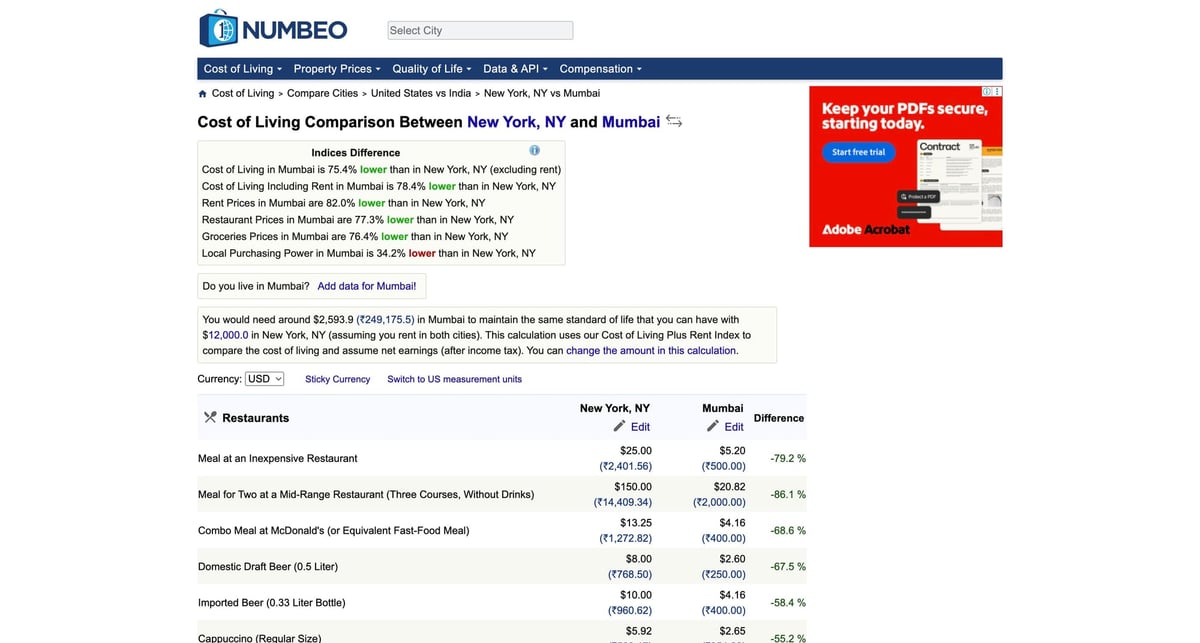
Numbeo comparison pages are a gift: they already present a clean, city vs city diff table you can turn into a dataset for dashboards.
In this guide we build a scraper that:
- generates the correct Numbeo compare URL for any two city and country pairs
- fetches HTML via ProxiesAPI so you can scale to many comparisons
- parses the main table into structured rows
- exports JSON and CSV
Numbeo pages are generally lightweight, but repeated fetches across many city pairs can trigger throttling. ProxiesAPI helps keep collection runs reliable while you focus on parsing and analytics.
What we are scraping (URL structure)
City comparison lives at:
https://www.numbeo.com/cost-of-living/compare_cities.jsp
It takes parameters like:
- country1, city1
- country2, city2
Setup
python3 -m venv .venv
source .venv/bin/activate
pip install requests beautifulsoup4 lxml
Step 1: Fetch helper (ProxiesAPI)
import random
import time
from urllib.parse import quote_plus

import requests

TIMEOUT = (10, 60)


def proxiesapi_url(target_url: str, api_key: str) -> str:
    return f"http://api.proxiesapi.com/?key={quote_plus(api_key)}&url={quote_plus(target_url)}"


def looks_blocked(html: str) -> bool:
    t = (html or "").lower()
    return any(m in t for m in ["captcha", "access denied", "unusual traffic"])


def fetch_html(target_url: str, api_key: str, *, max_attempts: int = 6) -> str:
    session = requests.Session()
    headers = {
        "User-Agent": (
            "Mozilla/5.0 (Macintosh; Intel Mac OS X 10_15_7) "
            "AppleWebKit/537.36 (KHTML, like Gecko) "
            "Chrome/124.0.0.0 Safari/537.36"
        ),
        "Accept-Language": "en-US,en;q=0.9",
    }

    last_err = None
    for attempt in range(1, max_attempts + 1):
        try:
            r = session.get(proxiesapi_url(target_url, api_key), headers=headers, timeout=TIMEOUT)
            if r.status_code >= 400:
                raise requests.HTTPError(f"HTTP {r.status_code}")

            html = r.text or ""
            if looks_blocked(html):
                raise RuntimeError("blocked or captcha detected")
            return html

        except Exception as e:
            last_err = e
            time.sleep(min(40, 2 ** attempt) + random.random())

    raise RuntimeError(f"fetch failed: {last_err}")
Step 2: Build a compare URL for two cities
from urllib.parse import urlencode


def compare_url(*, country1: str, city1: str, country2: str, city2: str) -> str:
    base = "https://www.numbeo.com/cost-of-living/compare_cities.jsp"
    qs = urlencode({"country1": country1, "city1": city1, "country2": country2, "city2": city2})
    return f"{base}?{qs}"
Step 3: Parse the comparison table into rows
We will find the largest table on the page and treat it as the main comparison table.
import re
from bs4 import BeautifulSoup


def normalize_ws(s: str) -> str:
    return re.sub(r"\\s+", " ", (s or "").strip())


def parse_numbeo_compare(html: str) -> dict:
    soup = BeautifulSoup(html, "lxml")

    h1 = soup.select_one("h1")
    title = normalize_ws(h1.get_text(" ", strip=True) if h1 else "")

    tables = soup.select("table")
    best = None
    best_rows = 0
    for t in tables:
        rows = t.select("tr")
        if len(rows) > best_rows:
            best = t
            best_rows = len(rows)

    if not best:
        raise RuntimeError("no table found")

    rows_out: list[dict] = []
    for tr in best.select("tr"):
        tds = tr.find_all(["td", "th"])
        if len(tds) < 3:
            continue

        cols = [normalize_ws(td.get_text(" ", strip=True)) for td in tds]
        if (cols[0] or "").lower() in {"item", "items"}:
            continue

        item = cols[0] or None
        if not item:
            continue

        rows_out.append(
            {
                "item": item,
                "city1": cols[1] if len(cols) > 1 else None,
                "city2": cols[2] if len(cols) > 2 else None,
                "diff": cols[3] if len(cols) > 3 else None,
            }
        )

    return {"title": title, "rows": rows_out}
Step 4: Run it and export JSON and CSV
import csv
import json
import os


def write_csv(rows: list[dict], path: str) -> None:
    if not rows:
        return
    os.makedirs(os.path.dirname(path) or ".", exist_ok=True)
    with open(path, "w", newline="", encoding="utf-8") as f:
        w = csv.DictWriter(f, fieldnames=list(rows[0].keys()))
        w.writeheader()
        w.writerows(rows)


def main() -> None:
    api_key = os.environ.get("PROXIESAPI_KEY")
    if not api_key:
        raise SystemExit("Set PROXIESAPI_KEY in your environment")

    url = compare_url(country1="United States", city1="New York, NY", country2="India", city2="Mumbai")
    html = fetch_html(url, api_key)
    data = parse_numbeo_compare(html)

    print("rows:", len(data["rows"]))

    with open("numbeo-compare.json", "w", encoding="utf-8") as f:
        json.dump(data, f, ensure_ascii=False, indent=2)

    write_csv(data["rows"], "numbeo-compare.csv")


if __name__ == "__main__":
    main()
Scaling to many city pairs
Once you trust the parser for one pair, batch it:
- keep a list of city pairs you care about
- fetch and parse each pair
- store results keyed by (country1, city1, country2, city2, item)
At scale, fetch reliability becomes the bottleneck. That is exactly where ProxiesAPI helps: stable fetch first, parsing second.
Numbeo pages are generally lightweight, but repeated fetches across many city pairs can trigger throttling. ProxiesAPI helps keep collection runs reliable while you focus on parsing and analytics.