
Scrape Numbeo Crime Index by City with Python + ProxiesAPI
Numbeo's crime rankings page is already halfway to being a dataset.
You do not need browser automation or OCR. The page exposes a real HTML table with:
- rank
- city
- crime index
- safety index
That makes it useful for relocation research, risk dashboards, travel content, and city comparison products.
In this tutorial we will pull the live rankings page, parse the crime table, export clean rows, and create a small comparison view for selected cities.
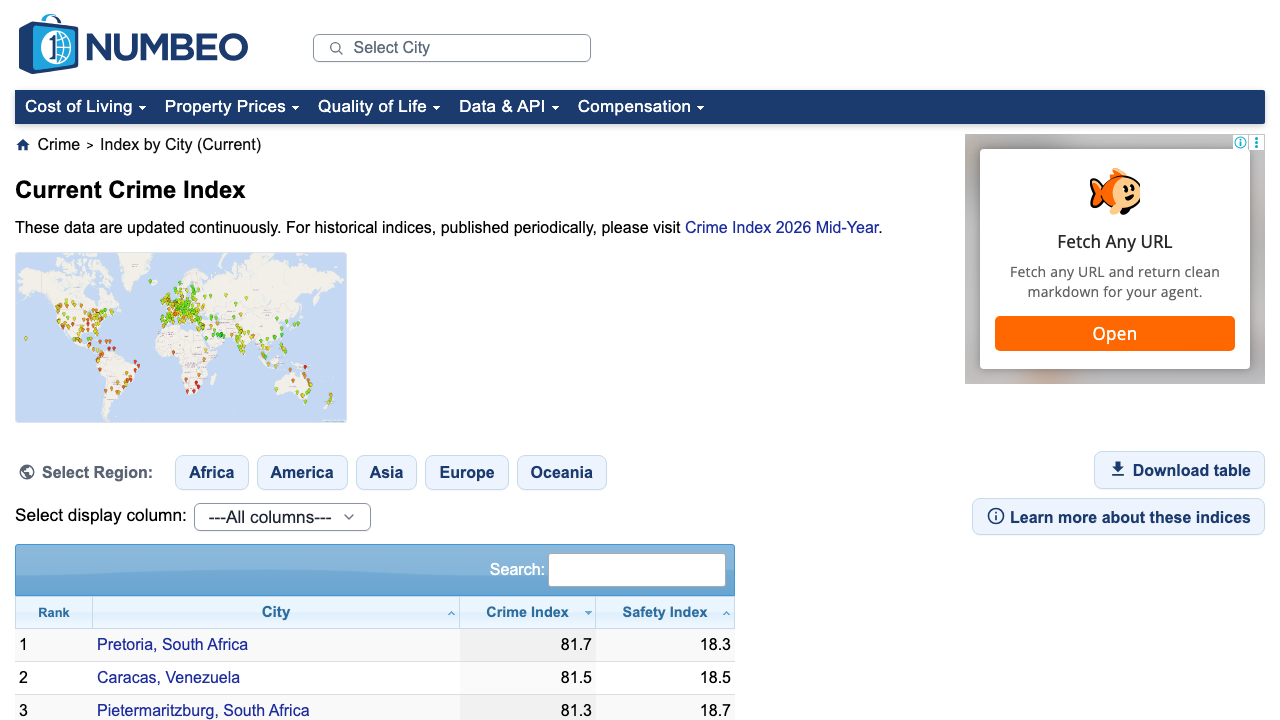
Numbeo rankings are table-heavy and easy to parse, but repeated collection across many pages still benefits from retries, pacing, and a proxy layer you can switch on without rewriting the scraper.
What we are scraping
The live rankings URL is:
https://www.numbeo.com/crime/rankings_current.jsp
At the time of writing, the main table is:
table#t2
And the important columns are:
RankCityCrime IndexSafety Index
That is exactly the kind of structure you want for a scraper: explicit headers and predictable rows.
Setup
python3 -m venv .venv
source .venv/bin/activate
pip install requests beautifulsoup4 lxml pandas
Step 1: Fetch the rankings page with optional ProxiesAPI
from __future__ import annotations

import os
import random
import time
from typing import Optional

import requests

RANKINGS_URL = "https://www.numbeo.com/crime/rankings_current.jsp"
TIMEOUT = (10, 30)
PROXIESAPI_PROXY_URL = os.getenv("PROXIESAPI_PROXY_URL")

session = requests.Session()
session.headers.update(
    {
        "User-Agent": (
            "Mozilla/5.0 (Macintosh; Intel Mac OS X 10_15_7) "
            "AppleWebKit/537.36 (KHTML, like Gecko) "
            "Chrome/126.0.0.0 Safari/537.36"
        ),
        "Accept-Language": "en-US,en;q=0.9",
    }
)


def proxy_config() -> Optional[dict[str, str]]:
    if not PROXIESAPI_PROXY_URL:
        return None
    return {"http": PROXIESAPI_PROXY_URL, "https": PROXIESAPI_PROXY_URL}


def fetch(url: str, *, max_retries: int = 4) -> str:
    last_error = None

    for attempt in range(1, max_retries + 1):
        try:
            response = session.get(
                url,
                timeout=TIMEOUT,
                proxies=proxy_config(),
            )
            if response.status_code in (429, 500, 502, 503, 504):
                raise requests.HTTPError(f"retryable status {response.status_code}")
            response.raise_for_status()
            return response.text
        except Exception as exc:  # noqa: BLE001
            last_error = exc
            time.sleep(min(10, attempt * 2) + random.random())

    raise RuntimeError(f"failed to fetch {url}: {last_error}")
For a single manual run, direct requests are usually enough. ProxiesAPI matters more when this becomes a scheduled data source.
Step 2: Parse the crime rankings table
The table is not hidden behind JavaScript. We can read it directly from table#t2.
import re
from bs4 import BeautifulSoup


def clean(text: str | None) -> str | None:
    if not text:
        return None
    value = re.sub(r"\s+", " ", text).strip()
    return value or None


def to_float(text: str | None) -> float | None:
    if not text:
        return None
    try:
        return float(text.replace(",", ""))
    except ValueError:
        return None


def parse_rankings(html: str) -> list[dict]:
    soup = BeautifulSoup(html, "lxml")
    table = soup.select_one("table#t2")
    if table is None:
        raise RuntimeError("Numbeo rankings table #t2 not found")

    rows: list[dict] = []
    for tr in table.select("tbody tr"):
        cells = [clean(td.get_text(" ", strip=True)) for td in tr.select("td")]
        if len(cells) < 4:
            continue

        rank_text, city, crime_text, safety_text = cells[:4]

        rows.append(
            {
                "rank": int(rank_text) if rank_text and rank_text.isdigit() else None,
                "city": city,
                "crime_index": to_float(crime_text),
                "safety_index": to_float(safety_text),
                "crime_index_text": crime_text,
                "safety_index_text": safety_text,
            }
        )

    return rows
If the page layout changes later, the first thing to re-check is whether the main table still uses id="t2".
Step 3: Create comparison-ready rows
Raw rankings are useful, but most downstream workflows want comparison slices: "show me these five cities" or "which cities have the biggest gap between crime and safety?"
import pandas as pd


def build_dataframe(rows: list[dict]) -> pd.DataFrame:
    df = pd.DataFrame(rows)
    if df.empty:
        return df

    df["crime_minus_safety"] = df["crime_index"] - df["safety_index"]
    return df.sort_values("rank", ascending=True, na_position="last")


def compare_cities(df: pd.DataFrame, city_names: list[str]) -> pd.DataFrame:
    wanted = {name.lower() for name in city_names}
    mask = df["city"].str.lower().isin(wanted)
    return df.loc[mask, ["rank", "city", "crime_index", "safety_index", "crime_minus_safety"]]
That gives you structured rows you can drop into a dashboard immediately.
Step 4: Export JSON and CSV
import json


def export_outputs(df: pd.DataFrame) -> None:
    df.to_csv("numbeo_crime_rankings.csv", index=False)

    payload = df.to_dict(orient="records")
    with open("numbeo_crime_rankings.json", "w", encoding="utf-8") as f:
        json.dump(payload, f, ensure_ascii=False, indent=2)


if __name__ == "__main__":
    html = fetch(RANKINGS_URL)
    rows = parse_rankings(html)
    df = build_dataframe(rows)
    export_outputs(df)

    print(df.head(10).to_string(index=False))

    sample = compare_cities(df, ["Pretoria, South Africa", "Caracas, Venezuela", "Doha, Qatar"])
    print(sample.to_string(index=False))
Example output shape:
 rank                      city  crime_index  safety_index  crime_minus_safety
    1 Pretoria, South Africa         81.7          18.3                63.4
    2      Caracas, Venezuela         81.5          18.5                63.0
    3 Pietermaritzburg, South Africa 81.3          18.7                62.6
Practical notes
- Numbeo rankings move over time. Save the scrape date with your exported files if you plan to compare snapshots.
- Keep the numeric fields as floats. It is tempting to leave everything as text, but that makes sorting and analysis annoying later.
- Do not scrape the same page in a tight loop. The table is public, but polite request spacing still matters.
- If you later add city detail pages, keep them as a second dataset instead of overloading the rankings schema.
Where ProxiesAPI fits
This page is lightweight enough that you can prototype without any proxy layer.
ProxiesAPI becomes useful when you start:
- collecting rankings on a schedule
- combining crime data with cost-of-living and rent pages
- building regional snapshots across many Numbeo endpoints
Again, the point is not magic. The point is keeping the fetch layer stable while the parsing logic stays simple.
Wrap-up
Numbeo crime rankings are a good scraping target because the page already looks like a spreadsheet:
- one stable URL
- one clear table
- one clean schema
Fetch the page, parse table#t2, export the rows, and you have a city-risk dataset you can actually use.
Numbeo rankings are table-heavy and easy to parse, but repeated collection across many pages still benefits from retries, pacing, and a proxy layer you can switch on without rewriting the scraper.