
Scrape Numbeo Rent Prices and Cost Breakdown by City
Numbeo is a great source for city-level living-cost research because the useful numbers are visible directly in HTML tables. If you want a relocation dashboard, cost-of-living newsletter, or rent comparison dataset, you can start with the public city pages and export the rows yourself.
In this guide we will scrape:
- rent rows such as one-bedroom and three-bedroom apartment prices
- section labels like Restaurants, Markets, Transportation, and Rent Per Month
- min/max range values when Numbeo exposes them
- multiple cities into one normalized CSV
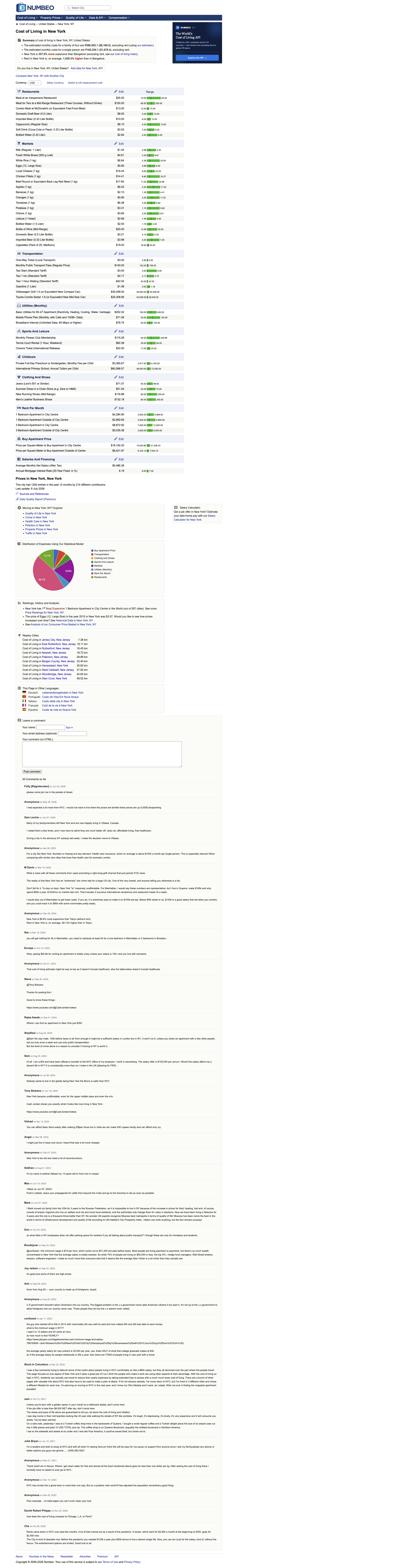
Numbeo pages are mostly parseable HTML tables. ProxiesAPI is useful once you start hitting many city pages, historical views, or comparison endpoints in one run.
What we are scraping
City pages follow a predictable pattern:
https://www.numbeo.com/cost-of-living/in/New-Yorkhttps://www.numbeo.com/cost-of-living/in/Austinhttps://www.numbeo.com/cost-of-living/in/Berlin
The current page structure is useful because each category table is server-rendered:
- tables use
table.data_wide_table.new_bar_table - the section title sits in
th .category_title - row labels are in the first
td - prices are usually in
td.priceValue - range bounds live in
span.barTextLeftandspan.barTextRight
That means you can build a scraper with requests + BeautifulSoup and avoid browser automation for the core extraction.
Setup
python3 -m venv .venv
source .venv/bin/activate
pip install requests beautifulsoup4 lxml pandas
Step 1: Fetch a city page
from __future__ import annotations

import os
import random
import re
import time
from urllib.parse import quote

import requests

BASE = "https://www.numbeo.com"
TIMEOUT = (10, 30)
PROXIESAPI_KEY = os.getenv("PROXIESAPI_KEY", "").strip()

session = requests.Session()
session.headers.update(
    {
        "User-Agent": (
            "Mozilla/5.0 (Macintosh; Intel Mac OS X 10_15_7) "
            "AppleWebKit/537.36 (KHTML, like Gecko) "
            "Chrome/137.0.0.0 Safari/537.36"
        ),
        "Accept-Language": "en-US,en;q=0.9",
    }
)


def proxied_url(target_url: str) -> str:
    if not PROXIESAPI_KEY:
        return target_url
    return (
        "https://api.proxiesapi.com/?auth_key="
        + quote(PROXIESAPI_KEY, safe="")
        + "&url="
        + quote(target_url, safe="")
    )


def city_url(city: str) -> str:
    return f"{BASE}/cost-of-living/in/{quote(city)}"


def fetch(url: str) -> str:
    time.sleep(random.uniform(0.3, 0.9))
    response = session.get(proxied_url(url), timeout=TIMEOUT)
    response.raise_for_status()
    html = response.text or ""
    if "data_wide_table" not in html:
        raise RuntimeError("expected Numbeo data tables not found")
    return html
Step 2: Parse every category table
Numbeo packs a lot into one table:
- item label
- current value
- low/high range
- alternating highlight classes that are safe to ignore
This parser keeps the structure flat and reusable.
from bs4 import BeautifulSoup


def clean(text: str | None) -> str | None:
    if not text:
        return None
    text = re.sub(r"\s+", " ", text).strip()
    return text or None


def parse_number(text: str | None) -> float | None:
    if not text:
        return None
    cleaned = re.sub(r"[^0-9.,-]", "", text).replace(",", "")
    try:
        return float(cleaned)
    except ValueError:
        return None


def parse_city_page(city: str, html: str) -> list[dict]:
    soup = BeautifulSoup(html, "lxml")
    rows: list[dict] = []

    for table in soup.select("table.data_wide_table.new_bar_table"):
        heading = clean(
            table.select_one("th .category_title").get_text(" ", strip=True)
            if table.select_one("th .category_title")
            else None
        )
        if not heading:
            continue

        for tr in table.select("tr")[1:]:
            tds = tr.select("td")
            if len(tds) < 2:
                continue

            item = clean(tds[0].get_text(" ", strip=True))
            value_text = clean(tds[1].get_text(" ", strip=True))
            low_text = clean(tr.select_one("span.barTextLeft").get_text(" ", strip=True) if tr.select_one("span.barTextLeft") else None)
            high_text = clean(tr.select_one("span.barTextRight").get_text(" ", strip=True) if tr.select_one("span.barTextRight") else None)

            if not item or not value_text:
                continue

            rows.append(
                {
                    "city": city,
                    "section": heading,
                    "item": item,
                    "value_raw": value_text,
                    "value_numeric": parse_number(value_text),
                    "range_low": parse_number(low_text),
                    "range_high": parse_number(high_text),
                }
            )

    return rows
Step 3: Filter to rent rows and compare cities
The full dataset is useful, but the proposal specifically called for rent prices and a cost breakdown by city. We can keep both:
- a full flat table of all rows
- a filtered rent summary
RENT_PATTERNS = (
    "Apartment (1 bedroom) in City Centre",
    "Apartment (1 bedroom) Outside of Centre",
    "Apartment (3 bedrooms) in City Centre",
    "Apartment (3 bedrooms) Outside of Centre",
)


def rent_rows(rows: list[dict]) -> list[dict]:
    return [row for row in rows if row["item"] in RENT_PATTERNS]


def crawl_cities(cities: list[str]) -> list[dict]:
    all_rows = []
    for city in cities:
        html = fetch(city_url(city))
        parsed = parse_city_page(city, html)
        print(f"{city}: {len(parsed)} rows")
        all_rows.extend(parsed)
    return all_rows
Step 4: Export CSV files
import pandas as pd
from pathlib import Path


def save_outputs(rows: list[dict], out_dir: str = "out") -> None:
    out = Path(out_dir)
    out.mkdir(parents=True, exist_ok=True)

    df = pd.DataFrame(rows)
    df.to_csv(out / "numbeo_city_costs.csv", index=False)

    rent_df = df[df["item"].isin(RENT_PATTERNS)].copy()
    rent_df.to_csv(out / "numbeo_rent_rows.csv", index=False)

    pivot = rent_df.pivot(index="city", columns="item", values="value_numeric")
    pivot.to_csv(out / "numbeo_rent_comparison.csv")


if __name__ == "__main__":
    cities = ["New York", "Austin", "Berlin"]
    rows = crawl_cities(cities)
    save_outputs(rows)
    print(rent_rows(rows)[:4])
Typical output:
New York: 55 rows
Austin: 55 rows
Berlin: 55 rows
Why this parser is practical
Numbeo is useful because you can collect both broad and narrow views from the same page:
- broad view: the entire living-cost basket for a city
- narrow view: apartment rent, groceries, or transport only
That makes it easy to create:
- rent comparison tables
- relocation cost estimators
- periodic cost-of-living snapshots
- alerting for unusual jumps in a target city
The main thing to avoid is overfitting to inline styles. The stable parts are the semantic table patterns:
| What to trust | Why |
|---|---|
table.data_wide_table.new_bar_table | repeated across sections |
.category_title | labels the section cleanly |
td.priceValue | usually holds the current value |
.barTextLeft / .barTextRight | exposes the range bounds |
Practical extensions
- scrape a larger city list from your own seed file
- add a
snapshot_datecolumn and store daily or weekly snapshots - compute median rent changes city-over-city
- filter for sections like Restaurants or Utilities if you want a full relocation scorecard
For an operator building city comparison products, Numbeo is one of the better HTML-table targets on the web because the page already looks like a dataset. Your job is mainly to normalize it.
Numbeo pages are mostly parseable HTML tables. ProxiesAPI is useful once you start hitting many city pages, historical views, or comparison endpoints in one run.