
Scrape Podcast Data from Apple Podcasts with Python (Charts + Show Metadata)
Apple Podcasts is a strong source for discovery data.
If you build podcast analytics, media research workflows, or simple "what is trending" dashboards, you usually want three things:
- current chart rankings
- show-level metadata like title and publisher
- episode links you can follow later for deeper enrichment
In this guide we will build a practical Apple Podcasts scraper in Python that starts from a chart page, extracts ranked shows, and then enriches each show with metadata from its detail page.
The focus here is not fancy infrastructure. It is getting a clean dataset you can run again tomorrow without rewriting everything.
Apple chart pages are easy to test once and annoyingly inconsistent when you scale across countries or run them every day. ProxiesAPI gives you a drop-in request layer so retries and rotation are easier to manage.
What we are scraping
The main public surface is the chart page:
https://podcasts.apple.com/us/charts
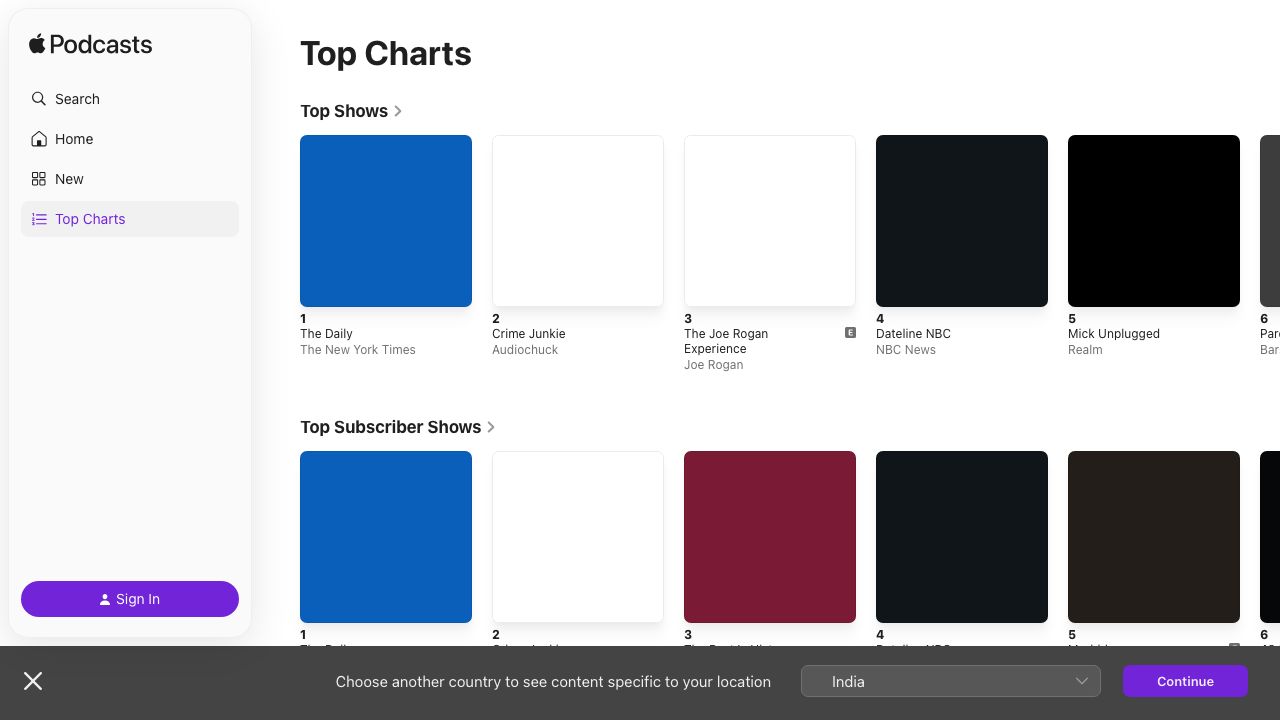
From there, Apple exposes ranked cards that link to show pages. A show page usually gives you:
- show title
- publisher
- description
- category context
- links for episodes or related pages
The useful pattern is:
- fetch one chart URL
- collect ranked show URLs
- extract the stable Apple ID from each URL
- fetch each show page
- store both the rank snapshot and the show metadata
That separation matters because chart rank changes fast, while show metadata changes slowly.
Setup
python3 -m venv .venv
source .venv/bin/activate
pip install requests beautifulsoup4 lxml
We will use:
requestsfor HTTPBeautifulSoupfor parsinglxmlbecause it is fast and forgiving
Step 1: Create one fetch helper
Keep all HTTP behavior in one place. That is where you set timeouts, retries, and optional proxy routing.
import os
import time
import requests

TIMEOUT = (10, 30)

session = requests.Session()
session.headers.update({
    "User-Agent": (
        "Mozilla/5.0 (Macintosh; Intel Mac OS X 10_15_7) "
        "AppleWebKit/537.36 (KHTML, like Gecko) "
        "Chrome/126.0.0.0 Safari/537.36"
    ),
    "Accept": "text/html,application/xhtml+xml,application/xml;q=0.9,*/*;q=0.8",
    "Accept-Language": "en-US,en;q=0.9",
})

PROXIESAPI_PROXY_URL = os.getenv("PROXIESAPI_PROXY_URL")


def fetch_html(url: str, retries: int = 4) -> str:
    proxies = None
    if PROXIESAPI_PROXY_URL:
        proxies = {
            "http": PROXIESAPI_PROXY_URL,
            "https": PROXIESAPI_PROXY_URL,
        }

    last_err = None
    for attempt in range(1, retries + 1):
        try:
            response = session.get(url, timeout=TIMEOUT, proxies=proxies)
            if response.status_code in (403, 429, 500, 502, 503, 504):
                raise requests.HTTPError(f"retryable status {response.status_code}")
            response.raise_for_status()
            return response.text
        except Exception as exc:
            last_err = exc
            if attempt == retries:
                break
            time.sleep(min(2 ** attempt, 8))

    raise RuntimeError(f"Failed to fetch {url}") from last_err
Why bother with this helper?
- you do not scatter retry logic through the parser
- you can turn ProxiesAPI on later without changing the rest of the scraper
- failures become easier to debug
Step 2: Extract Apple IDs from URLs
Apple show URLs usually include a stable numeric ID in the form id123456789.
import re


def extract_apple_id(url: str) -> str | None:
    match = re.search(r"\bid(\d+)\b", url or "")
    return match.group(1) if match else None
That ID is your best de-duplication key.
If the chart title changes from "The Daily" to "The Daily News Podcast", the numeric ID still gives you continuity.
Step 3: Parse chart entries
Apple's chart page is visually rich, but the extraction goal is simple:
- find anchors that point to podcast pages
- keep their order
- de-dupe repeated links
from bs4 import BeautifulSoup
from urllib.parse import urljoin


def parse_chart_page(html: str, base_url: str) -> list[dict]:
    soup = BeautifulSoup(html, "lxml")

    ranked = []
    seen_ids = set()

    for anchor in soup.select("a[href]"):
        href = anchor.get("href")
        if not href:
            continue

        abs_url = urljoin(base_url, href)
        if "/podcast/" not in abs_url:
            continue

        show_id = extract_apple_id(abs_url)
        title = anchor.get_text(" ", strip=True)
        if not show_id or not title:
            continue

        if show_id in seen_ids:
            continue
        seen_ids.add(show_id)

        ranked.append({
            "rank": len(ranked) + 1,
            "show_id": show_id,
            "title_hint": title,
            "show_url": abs_url,
        })

    return ranked
Quick sanity run:
chart_url = "https://podcasts.apple.com/us/charts"
chart_html = fetch_html(chart_url)
shows = parse_chart_page(chart_html, chart_url)

print("shows found:", len(shows))
print(shows[:3])
Typical output:
shows found: 100
[{'rank': 1, 'show_id': '1200361736', 'title_hint': 'The Daily', 'show_url': 'https://podcasts.apple.com/us/podcast/the-daily/id1200361736'}, ...]
Step 4: Parse show metadata
Each show page can give you a decent first-pass profile:
- title
- publisher
- description
- episode links
Do not overfit to one CSS class. Prefer stable HTML features and graceful fallbacks.
from bs4 import BeautifulSoup


def parse_show_page(html: str, url: str) -> dict:
    soup = BeautifulSoup(html, "lxml")

    title_el = soup.select_one("h1")
    title = title_el.get_text(" ", strip=True) if title_el else None

    meta_desc = soup.select_one('meta[name="description"]')
    description = meta_desc.get("content") if meta_desc else None

    publisher = None
    for selector in [
        "[data-testid='product-header-subtitle']",
        ".product-header__subtitle",
        "h2",
    ]:
        el = soup.select_one(selector)
        if el:
            text = el.get_text(" ", strip=True)
            if text:
                publisher = text
                break

    episodes = []
    seen = set()
    for anchor in soup.select("a[href]"):
        href = anchor.get("href") or ""
        text = anchor.get_text(" ", strip=True)
        if not text or len(text) < 8:
            continue
        if "/podcast/" not in href and "/id" not in href:
            continue
        if text in seen:
            continue
        seen.add(text)
        episodes.append({
            "title": text,
            "url": href,
        })

    return {
        "show_id": extract_apple_id(url),
        "show_url": url,
        "title": title,
        "publisher": publisher,
        "description": description,
        "episodes": episodes[:100],
    }
This is intentionally conservative. We are building a discovery dataset, not a perfect archive of every episode page variant Apple has ever shipped.
Step 5: Crawl charts into a dataset
Now we can combine the two parsers.
import json


def crawl_chart(chart_url: str, max_shows: int = 25) -> list[dict]:
    chart_html = fetch_html(chart_url)
    ranked_shows = parse_chart_page(chart_html, chart_url)

    rows = []
    for show in ranked_shows[:max_shows]:
        show_html = fetch_html(show["show_url"])
        parsed = parse_show_page(show_html, show["show_url"])
        parsed["rank"] = show["rank"]
        parsed["title_hint"] = show["title_hint"]
        rows.append(parsed)
        print("fetched", parsed["rank"], parsed.get("title") or parsed["title_hint"])

    return rows


if __name__ == "__main__":
    chart_url = "https://podcasts.apple.com/us/charts"
    dataset = crawl_chart(chart_url, max_shows=20)
    with open("apple_podcasts_chart.json", "w", encoding="utf-8") as fh:
        json.dump(dataset, fh, ensure_ascii=False, indent=2)
The output shape is easy to work with later:
- one row per show
- stable
show_id - current chart
rank - episode links you can revisit in a second-stage crawl
Useful production upgrades
Once the MVP works, add the upgrades that actually matter.
1. Separate rank snapshots from show metadata
Store chart runs in a table like:
| Field | Example |
|---|---|
captured_at | 2026-07-30T21:30:00Z |
chart_url | https://podcasts.apple.com/us/charts |
show_id | 1200361736 |
rank | 1 |
Then keep a separate shows table for slowly changing fields like title, publisher, and description.
2. Refresh popular shows more often
If a show keeps appearing in the top 10, fetch its detail page daily.
If it drops out of the chart, you can refresh weekly instead.
3. Add soft-block detection
When you scale across many countries or categories, watch for:
- suspiciously tiny HTML files
- repeated redirects
- empty result sets where a chart should be full
Those are good signals that you should retry or switch to a proxy-backed request path.
Where ProxiesAPI helps
Apple Podcasts is not the hardest target on the internet, but repeated scheduled crawls still run into rate limits, regional inconsistencies, and occasional blocking.
ProxiesAPI helps when you need to:
- run chart crawls for multiple countries
- retry detail pages without hammering one IP
- keep the rest of your
requestscode unchanged
The honest framing is simple: ProxiesAPI improves the network layer. You still need sensible crawl rates, de-duplication, and QA checks.
QA checklist
Before you put this into cron, verify these five things:
parse_chart_page()returns ranked shows from your chosen chart URLextract_apple_id()works on every show URL you keepparse_show_page()returns a non-empty title for most shows- your JSON output uses stable
show_idvalues - failed requests retry and log enough detail to debug later
If those pass, you have a solid Apple Podcasts discovery scraper.
The first useful version is not the one with the fanciest pipeline. It is the one that gives you a clean ranked dataset tomorrow morning too.
Apple chart pages are easy to test once and annoyingly inconsistent when you scale across countries or run them every day. ProxiesAPI gives you a drop-in request layer so retries and rotation are easier to manage.