
Scrape Stack Overflow Questions and Answers by Tag (Python + ProxiesAPI)
Stack Overflow is one of the best places on the internet to build a high-signal Q&A dataset.
In this tutorial we’ll build a real Python scraper that:
- crawls questions by tag (pagination included)
- visits each question page
- extracts:
- title, score, asked date, tags
- question body (text)
- answers (score + text)
- exports clean JSON/JSONL
- uses ProxiesAPI for a resilient fetch layer
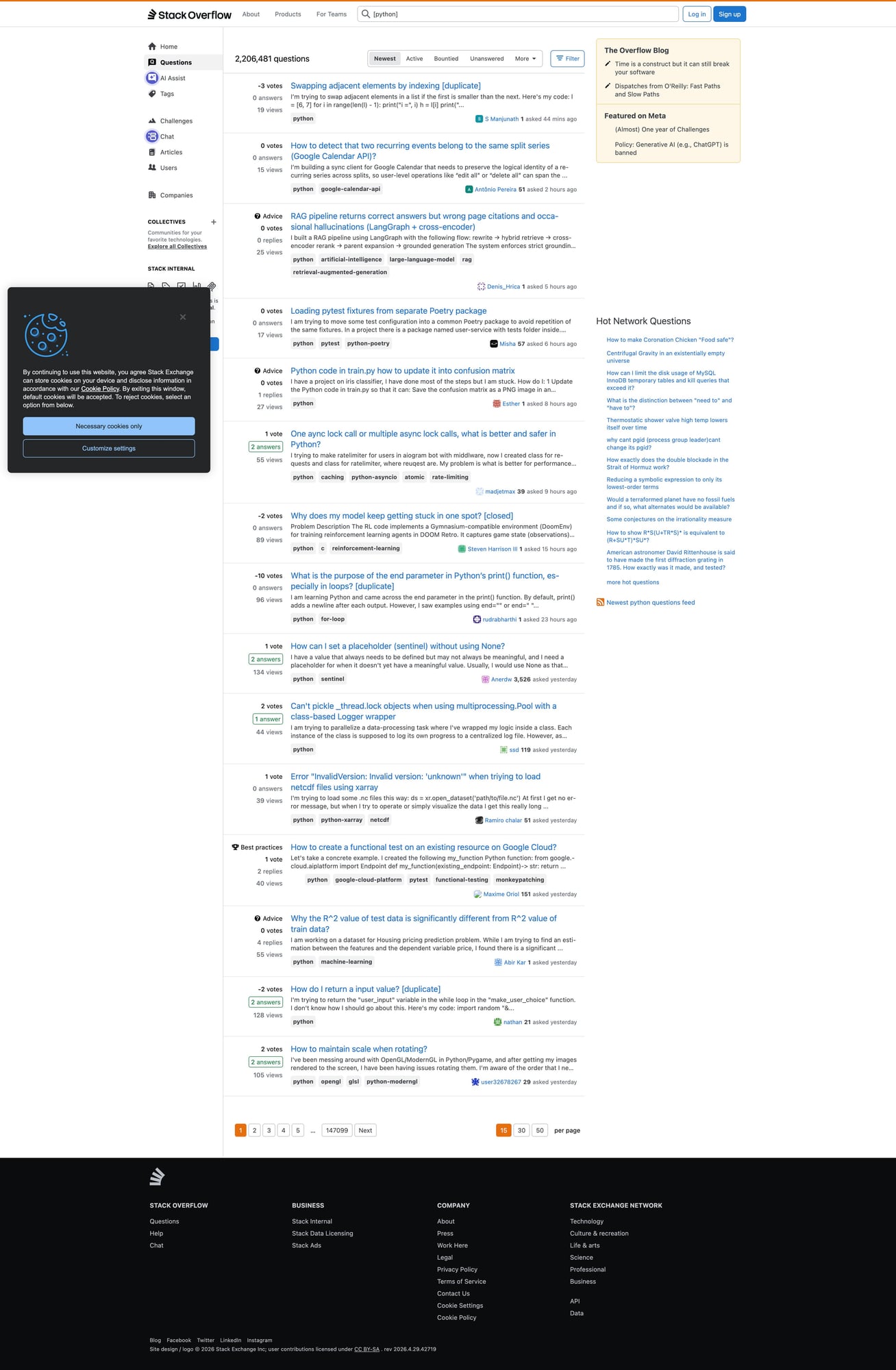
- includes a mandatory screenshot of the target pages
Even when a site is mostly HTML, scraping at scale means retries, rate limits, and occasional blocks. ProxiesAPI helps you rotate IPs and keep your crawler resilient.
Target pages (URL patterns)
We’ll scrape two page types:
1) Tag listing pages
Example:
https://stackoverflow.com/questions/tagged/python?tab=newest&page=1&pagesize=15
Key knobs:
page=Npagesize=15(or 30/50 depending on what the site allows)tab=newest(orvotes,active)
2) Question detail pages
Example:
https://stackoverflow.com/questions/12345678/some-slug
Setup
python -m venv .venv
source .venv/bin/activate
pip install requests beautifulsoup4 lxml tenacity python-dotenv
ProxiesAPI fetch wrapper (timeouts + retries)
Put credentials in .env:
PROXIESAPI_KEY="YOUR_KEY"
PROXIESAPI_ENDPOINT="https://proxiesapi.com"  # example; use your real endpoint
Fetcher:
import os
import random
import time
from urllib.parse import urlencode

import requests
from tenacity import retry, stop_after_attempt, wait_exponential_jitter

PROXIESAPI_KEY = os.getenv("PROXIESAPI_KEY")
PROXIESAPI_ENDPOINT = os.getenv("PROXIESAPI_ENDPOINT")

TIMEOUT = (10, 40)

session = requests.Session()

DEFAULT_HEADERS = {
    "User-Agent": (
        "Mozilla/5.0 (Macintosh; Intel Mac OS X 10_15_7) "
        "AppleWebKit/537.36 (KHTML, like Gecko) "
        "Chrome/123.0.0.0 Safari/537.36"
    ),
    "Accept-Language": "en-US,en;q=0.9",
}


def proxiesapi_url(target_url: str) -> str:
    if not PROXIESAPI_KEY or not PROXIESAPI_ENDPOINT:
        raise RuntimeError("Missing PROXIESAPI_KEY or PROXIESAPI_ENDPOINT")

    qs = urlencode({
        "api_key": PROXIESAPI_KEY,
        "url": target_url,
        # "country": "US",
    })
    return f"{PROXIESAPI_ENDPOINT.rstrip('/')}/?{qs}"


@retry(stop=stop_after_attempt(4), wait=wait_exponential_jitter(initial=1, max=20))
def fetch(url: str) -> str:
    time.sleep(random.uniform(0.25, 0.9))
    r = session.get(proxiesapi_url(url), headers=DEFAULT_HEADERS, timeout=TIMEOUT)
    r.raise_for_status()
    return r.text
Step 1: Crawl the tag listing pages
Stack Overflow’s tag listings are server-rendered HTML and generally parse cleanly.
On the tag page, each question summary contains a link to the question.
A reliable approach:
- grab all links matching
/questions/{id}/... - normalize to absolute URLs
- dedupe
import re
from urllib.parse import urljoin
from bs4 import BeautifulSoup

BASE = "https://stackoverflow.com"
Q_RE = re.compile(r"^/questions/(\d+)/")


def parse_tag_page(html: str) -> list[str]:
    soup = BeautifulSoup(html, "lxml")
    urls = []

    for a in soup.select("a"):
        href = a.get("href") or ""
        if Q_RE.match(href):
            urls.append(urljoin(BASE, href.split("?")[0]))

    # dedupe while keeping order
    seen = set()
    out = []
    for u in urls:
        if u in seen:
            continue
        seen.add(u)
        out.append(u)
    return out


def tag_page_url(tag: str, page: int, pagesize: int = 15, tab: str = "newest") -> str:
    return (
        f"{BASE}/questions/tagged/{tag}?tab={tab}"
        f"&page={page}&pagesize={pagesize}"
    )


def crawl_tag(tag: str, pages: int = 3) -> list[str]:
    all_urls: list[str] = []
    seen = set()

    for p in range(1, pages + 1):
        url = tag_page_url(tag, p)
        html = fetch(url)
        batch = parse_tag_page(html)

        for u in batch:
            if u in seen:
                continue
            seen.add(u)
            all_urls.append(u)

        print("page", p, "found", len(batch), "total", len(all_urls))

    return all_urls
Step 2: Scrape one question page (question + answers)
Selectors evolve, but Stack Overflow has fairly stable structural hooks.
We’ll extract:
- title
- tags
- question body (text)
- answers (text + vote count)
from bs4 import BeautifulSoup


def clean_text(el) -> str:
    if not el:
        return ""
    return el.get_text("\n", strip=True)


def parse_votes(vote_el) -> int | None:
    if not vote_el:
        return None
    txt = vote_el.get_text(" ", strip=True)
    try:
        return int(txt)
    except ValueError:
        return None


def parse_question_page(html: str, url: str) -> dict:
    soup = BeautifulSoup(html, "lxml")

    title_el = soup.select_one("h1 a.question-hyperlink") or soup.select_one("h1")
    title = clean_text(title_el)

    tag_els = soup.select("a.post-tag")
    tags = [t.get_text(strip=True) for t in tag_els]

    q_body = soup.select_one(".question .s-prose") or soup.select_one(".question .post-text")
    question_text = clean_text(q_body)

    # vote count can appear in different spots depending on layout
    q_vote = (
        soup.select_one(".question [data-value]")
        or soup.select_one(".question .js-vote-count")
        or soup.select_one(".question .vote-count-post")
    )

    answers = []
    for ans in soup.select(".answer"):
        a_body = ans.select_one(".s-prose") or ans.select_one(".post-text")
        a_text = clean_text(a_body)

        a_vote = ans.select_one(".js-vote-count") or ans.select_one(".vote-count-post")

        if a_text:
            answers.append({
                "score": parse_votes(a_vote),
                "text": a_text,
            })

    return {
        "url": url,
        "title": title,
        "tags": tags,
        "question_text": question_text,
        "question_score": parse_votes(q_vote),
        "answers": answers,
        "answer_count": len(answers),
    }


def scrape_question(url: str) -> dict:
    html = fetch(url)
    return parse_question_page(html, url)
Step 3: End-to-end run (tag → question URLs → dataset)
import json
from pathlib import Path


def run(tag: str, pages: int = 2, limit_questions: int = 25) -> list[dict]:
    q_urls = crawl_tag(tag, pages=pages)[:limit_questions]

    out = []
    for i, u in enumerate(q_urls, start=1):
        try:
            item = scrape_question(u)
            out.append(item)
            print(f"[{i}/{len(q_urls)}] ok", item.get("title")[:70])
        except Exception as e:
            print(f"[{i}/{len(q_urls)}] fail", u, repr(e))

    return out


if __name__ == "__main__":
    data = run(tag="python", pages=2, limit_questions=25)

    Path("out").mkdir(exist_ok=True)
    Path("out/stack_overflow_python.json").write_text(
        json.dumps(data, ensure_ascii=False, indent=2),
        encoding="utf-8",
    )

    # JSONL is nicer for big datasets
    with open("out/stack_overflow_python.jsonl", "w", encoding="utf-8") as f:
        for row in data:
            f.write(json.dumps(row, ensure_ascii=False) + "\n")

    print("wrote", len(data), "rows")
Mandatory screenshot (proof of what you scraped)
Even though Stack Overflow is largely HTML, I still recommend a proof screenshot so you can quickly spot:
- “you got served a block page”
- “you landed on a logged-out/consent interstitial”
- “the tag page layout changed”
Playwright screenshot:
pip install playwright
python -m playwright install chromium
import asyncio
from pathlib import Path
from playwright.async_api import async_playwright


async def screenshot(url: str, out_path: str) -> None:
    Path(out_path).parent.mkdir(parents=True, exist_ok=True)

    async with async_playwright() as p:
        browser = await p.chromium.launch(headless=True)
        page = await browser.new_page(viewport={"width": 1400, "height": 900})
        await page.goto(url, wait_until="domcontentloaded", timeout=60_000)
        await page.wait_for_timeout(1_000)
        await page.screenshot(path=out_path, full_page=True)
        await browser.close()


if __name__ == "__main__":
    asyncio.run(
        screenshot(
            "https://stackoverflow.com/questions/tagged/python?tab=newest&page=1&pagesize=15",
            "so-tag-page.png",
        )
    )
    print("saved so-tag-page.png")
In this repo, save to:
public/images/posts/scrape-stack-overflow-questions-answers-by-tag-python-proxiesapi/so-tag-page.jpg
Practical scraping advice for Stack Overflow
- Use moderate pagesize and a hard question limit.
- Cache question pages you’ve already scraped.
- Be polite: add jitter, backoff, and keep concurrency low.
Where ProxiesAPI fits (honestly)
Stack Overflow is generally scrape-friendly when you’re polite.
ProxiesAPI becomes useful when you:
- scale to many tags
- run a nightly crawler
- experience occasional rate limits
It gives you a consistent retry + rotation layer without building a proxy pool yourself.
Even when a site is mostly HTML, scraping at scale means retries, rate limits, and occasional blocks. ProxiesAPI helps you rotate IPs and keep your crawler resilient.