
Scrape Stack Overflow Questions and Answers by Tag (Python + ProxiesAPI)
Stack Overflow is a great target for building real-world scraping muscle:
- consistent HTML structure
- clean URLs for tags and pagination
- rich metadata (votes, views, accepted answers)
In this guide we’ll scrape:
- a tag’s question list (multiple pages)
- each question’s accepted answer (if present)
- export as JSON/CSV
…and we’ll do it in a way that survives production reality: timeouts, retries, backoff, and sanity checks.
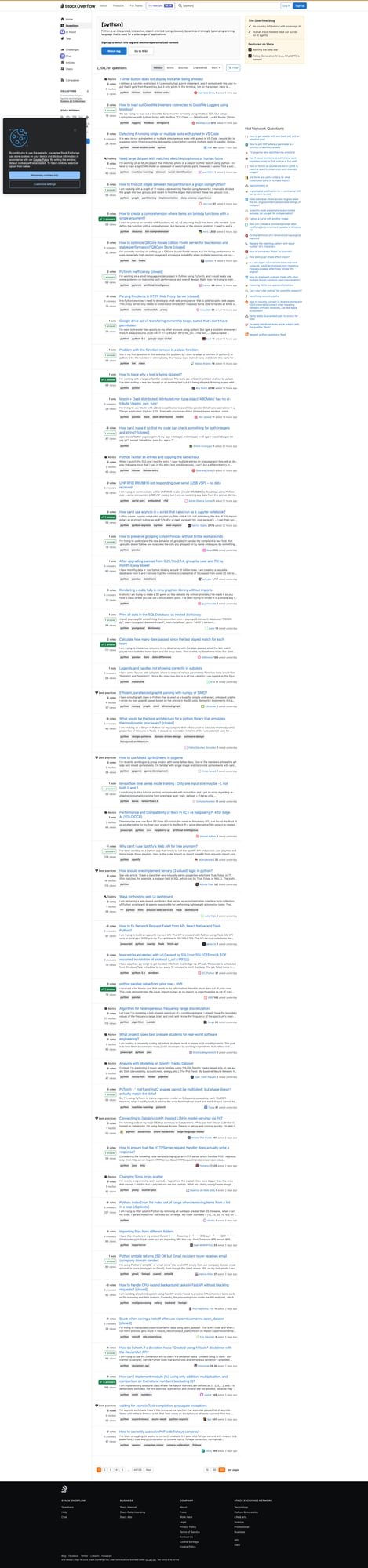
Stack Overflow is usually scrape-friendly at small scale, but tag crawls can hit throttles when you fetch many pages and answers. ProxiesAPI helps keep your network layer stable as volume grows.
What we’re scraping
We’ll start from a tag URL like:
https://stackoverflow.com/questions/tagged/python?tab=Newest&page=1&pagesize=50
From the list page, we’ll collect per question:
- title
- question URL
- vote count
- answer count
- view count (when visible)
- excerpt
Then we’ll visit each question page to extract:
- accepted answer (text)
- accepted answer id + score (when visible)
Setup
python -m venv .venv
source .venv/bin/activate
pip install requests beautifulsoup4 lxml tenacity
Step 1: A polite HTTP client (timeouts, retries, and headers)
import os
import random
import time
from dataclasses import dataclass
from typing import Optional

import requests
from tenacity import retry, stop_after_attempt, wait_exponential_jitter

BASE = "https://stackoverflow.com"
TIMEOUT = (10, 30)

USER_AGENTS = [
    "Mozilla/5.0 (Macintosh; Intel Mac OS X 10_15_7) AppleWebKit/537.36 (KHTML, like Gecko) Chrome/124.0.0.0 Safari/537.36",
    "Mozilla/5.0 (Windows NT 10.0; Win64; x64) AppleWebKit/537.36 (KHTML, like Gecko) Chrome/124.0.0.0 Safari/537.36",
]


@dataclass
class FetchResult:
    url: str
    final_url: str
    status_code: int
    text: str


def make_session() -> requests.Session:
    s = requests.Session()
    s.headers.update(
        {
            "Accept": "text/html,application/xhtml+xml,application/xml;q=0.9,*/*;q=0.8",
            "Accept-Language": "en-US,en;q=0.9",
            "Cache-Control": "no-cache",
            "Pragma": "no-cache",
        }
    )
    return s


@retry(stop=stop_after_attempt(4), wait=wait_exponential_jitter(initial=1, max=10))
def fetch_html(session: requests.Session, url: str, proxies: Optional[dict] = None) -> FetchResult:
    session.headers["User-Agent"] = random.choice(USER_AGENTS)
    r = session.get(url, timeout=TIMEOUT, allow_redirects=True, proxies=proxies)
    return FetchResult(url=url, final_url=str(r.url), status_code=r.status_code, text=r.text)


def polite_sleep():
    time.sleep(random.uniform(1.0, 2.5))
Step 2: Parse a tag results page (real selectors)
Stack Overflow’s question list uses stable-ish containers. A typical question summary contains:
- an
<a class="s-link">with the title - stats blocks (votes/answers/views)
We’ll parse defensively and keep fields optional.
import re
from bs4 import BeautifulSoup

INT_RE = re.compile(r"(\d+[\d,]*)")


def to_int(s: str | None) -> int | None:
    if not s:
        return None
    m = INT_RE.search(s.replace(",", ""))
    return int(m.group(1)) if m else None


def parse_tag_page(html: str) -> list[dict]:
    soup = BeautifulSoup(html, "lxml")

    # Block/interstitial sanity check
    title = (soup.title.get_text(strip=True) if soup.title else "").lower()
    if "human verification" in title or "captcha" in title:
        raise RuntimeError(f"Blocked/interstitial detected: title={title!r}")

    out = []

    # Newer SO layouts use "s-post-summary" for lists.
    for item in soup.select("div.s-post-summary"):
        a = item.select_one("a.s-link")
        if not a:
            continue

        href = a.get("href")
        url = href if href.startswith("http") else f"{BASE}{href}"
        title = a.get_text(" ", strip=True)

        excerpt_el = item.select_one("div.s-post-summary--content-excerpt")
        excerpt = excerpt_el.get_text(" ", strip=True) if excerpt_el else None

        # Stats often appear in s-post-summary--stats
        votes_el = item.select_one("span.s-post-summary--stats-item-number")
        votes = to_int(votes_el.get_text(strip=True) if votes_el else None)

        # Answers and views may be in subsequent stats items
        stats_nums = [x.get_text(strip=True) for x in item.select("span.s-post-summary--stats-item-number")]
        answers = to_int(stats_nums[1]) if len(stats_nums) > 1 else None
        views = to_int(stats_nums[2]) if len(stats_nums) > 2 else None

        out.append(
            {
                "title": title,
                "url": url,
                "votes": votes,
                "answers": answers,
                "views": views,
                "excerpt": excerpt,
            }
        )

    return out
Step 3: Extract the accepted answer from a question page
On a question page, accepted answers are marked. In many layouts you’ll see:
div.answerblocks- an “accepted” indicator (checkmark)
Selectors change over time, so we’ll implement two detection strategies:
- look for a container that has accepted marker
- fallback to the first answer if we can’t detect acceptance
def parse_accepted_answer(html: str) -> dict | None:
    soup = BeautifulSoup(html, "lxml")

    # Answers often live under #answers
    answers = soup.select("div.answer")
    if not answers:
        # Some pages render answers as article elements
        answers = soup.select("article.answer")

    if not answers:
        return None

    def extract_answer_block(block) -> dict:
        aid = block.get("data-answerid") or block.get("id")

        # Main answer body
        body = block.select_one("div.js-post-body") or block.select_one("div.s-prose")
        text = body.get_text("\n", strip=True) if body else ""

        score_el = block.select_one("div.js-vote-count") or block.select_one("span.js-vote-count")
        score = None
        if score_el:
            try:
                score = int(score_el.get_text(strip=True))
            except ValueError:
                score = None

        return {"answer_id": aid, "score": score, "text": text}

    # Try to find accepted
    for block in answers:
        # accepted indicator is often a class containing "js-accepted-answer-indicator"
        if block.select_one("div.js-accepted-answer-indicator") or "accepted-answer" in (block.get("class") or []):
            return extract_answer_block(block)

        # Some layouts mark the answer with aria-label or title
        if block.get("data-accepted-answer") == "true":
            return extract_answer_block(block)

    # Fallback: no accepted detected
    return extract_answer_block(answers[0])
Step 4: Crawl a tag (multiple pages) and fetch accepted answers
from datetime import datetime, timezone


def tag_url(tag: str, page: int = 1, pagesize: int = 50, tab: str = "Newest") -> str:
    return f"{BASE}/questions/tagged/{tag}?tab={tab}&page={page}&pagesize={pagesize}"


def proxiesapi_dict() -> dict | None:
    proxy = os.getenv("PROXIESAPI_PROXY_URL")
    if not proxy:
        return None
    return {"http": proxy, "https": proxy}


def crawl_tag(tag: str, pages: int = 2, pagesize: int = 50) -> list[dict]:
    session = make_session()
    out = []

    for p in range(1, pages + 1):
        url = tag_url(tag, page=p, pagesize=pagesize)
        res = fetch_html(session, url, proxies=proxiesapi_dict())
        batch = parse_tag_page(res.text)

        print("page", p, "questions", len(batch))

        for q in batch:
            polite_sleep()
            qres = fetch_html(session, q["url"], proxies=proxiesapi_dict())
            accepted = parse_accepted_answer(qres.text)

            out.append(
                {
                    "tag": tag,
                    **q,
                    "accepted_answer": accepted,
                    "scraped_at": datetime.now(timezone.utc).isoformat(),
                }
            )

        # Back off between pages
        time.sleep(random.uniform(2.0, 4.0))

    return out


rows = crawl_tag("python", pages=2)
print("total", len(rows))
print(rows[0]["title"], bool(rows[0]["accepted_answer"]))
Export JSON/CSV
Accepted answers are multi-line and nested, so JSON is the cleanest.
import csv
import json


def export_json(rows: list[dict], path: str = "so_tag_dump.json"):
    with open(path, "w", encoding="utf-8") as f:
        json.dump(rows, f, ensure_ascii=False, indent=2)


def export_csv(rows: list[dict], path: str = "so_tag_dump.csv"):
    # Flatten accepted answer (basic)
    flat = []
    for r in rows:
        aa = r.get("accepted_answer") or {}
        flat.append(
            {
                "tag": r.get("tag"),
                "title": r.get("title"),
                "url": r.get("url"),
                "votes": r.get("votes"),
                "answers": r.get("answers"),
                "views": r.get("views"),
                "accepted_answer_id": aa.get("answer_id"),
                "accepted_answer_score": aa.get("score"),
                "accepted_answer_text": (aa.get("text") or "")[:5000],
                "scraped_at": r.get("scraped_at"),
            }
        )

    keys = list(flat[0].keys()) if flat else []
    with open(path, "w", newline="", encoding="utf-8") as f:
        w = csv.DictWriter(f, fieldnames=keys)
        w.writeheader()
        w.writerows(flat)


export_json(rows)
export_csv(rows)
print("wrote", len(rows))
Where ProxiesAPI fits (without overclaiming)
Stack Overflow is usually accessible at low request volume.
But if you:
- crawl many pages per tag
- crawl multiple tags
- fetch each question’s answers
…your request count ramps fast. ProxiesAPI helps by:
- rotating IPs when throttling kicks in
- reducing correlated traffic from one address
Still follow the fundamentals:
- keep concurrency low
- jitter sleeps
- cache results
- re-crawl incrementally
QA checklist
- Tag page parsing returns non-empty list
- Question URLs resolve correctly
- Accepted answer extraction returns text for some pages
- Exports write valid JSON/CSV
- Backoff + jitter is enabled
Stack Overflow is usually scrape-friendly at small scale, but tag crawls can hit throttles when you fetch many pages and answers. ProxiesAPI helps keep your network layer stable as volume grows.