
Build a Job Board with Data from Indeed
A “job board” is mostly just structured job listings + a UI.
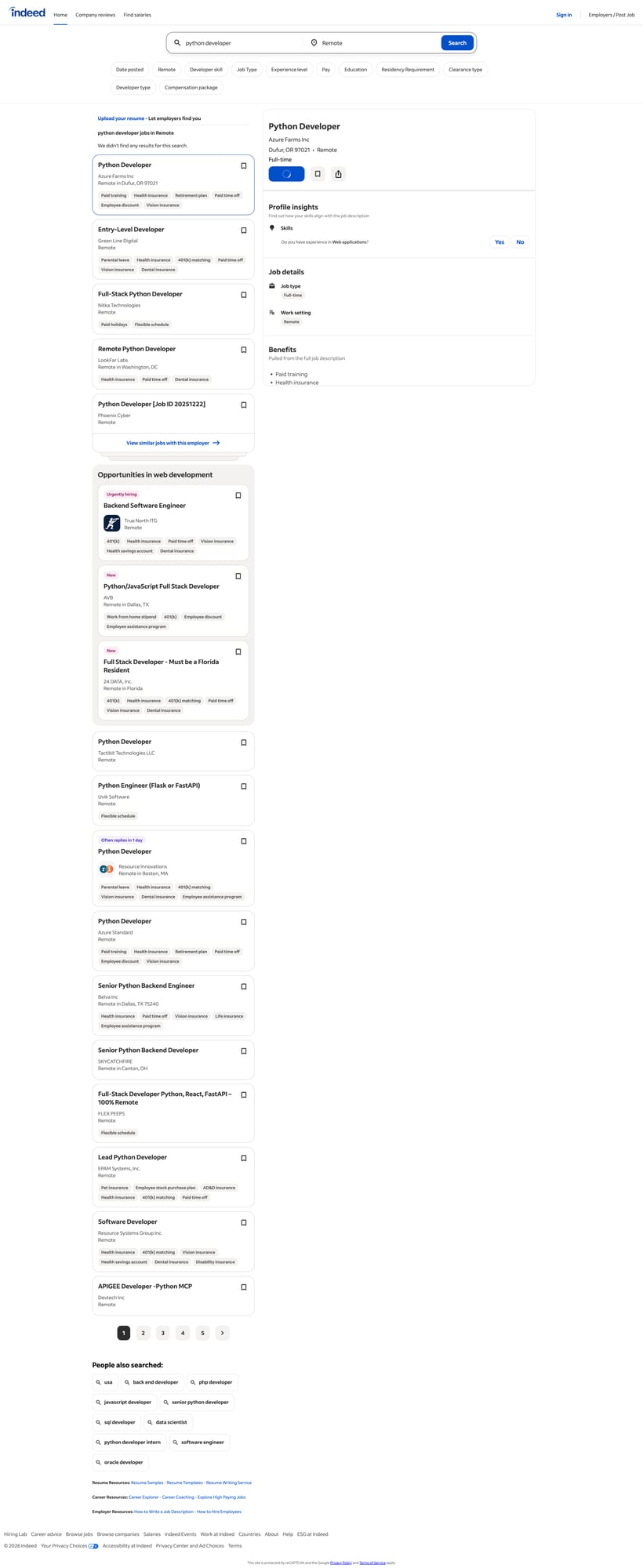
The hard part is getting consistent data: title, company, location, salary, and a short snippet — across multiple pages.
In this tutorial we’ll:
- scrape Indeed search results for a query (server-rendered HTML)
- parse job cards into a clean list of dicts
- paginate safely
- export CSV/JSON you can use to render a simple job board
- add ProxiesAPI at the network layer for more reliable fetches
Job sites can rate-limit repeated requests from a single IP. ProxiesAPI gives you a simple proxy-backed fetch URL so your pagination crawler fails less as your query count grows.
What we’re scraping (Indeed structure)
Indeed search URLs look like:
https://www.indeed.com/jobs?q=python+developer&l=Remote
The HTML is a list of “job cards”. The exact classes can change, but common patterns include:
- container list: cards with
data-jk(Indeed job key) - title link or button inside the job heading (
a.jcs-JobTitle,h2 a, and sometimes button-style controls in the results pane) - company:
[data-testid="company-name"](common) - location:
[data-testid="text-location"](common) - salary:
[data-testid="attribute_snippet_testid"]or salary snippet blocks
We’ll implement parsing with fallback selectors so you’re not tied to one class name.
Setup
python -m venv .venv
source .venv/bin/activate
pip install requests beautifulsoup4 lxml
Step 1: Fetch HTML (direct or via ProxiesAPI)
import random
import time
from urllib.parse import quote

import requests

TIMEOUT = (10, 30)

HEADERS = {
    "User-Agent": (
        "Mozilla/5.0 (Macintosh; Intel Mac OS X 10_15_7) "
        "AppleWebKit/537.36 (KHTML, like Gecko) "
        "Chrome/123.0.0.0 Safari/537.36"
    ),
    "Accept-Language": "en-US,en;q=0.9",
    "Accept": "text/html,application/xhtml+xml,application/xml;q=0.9,*/*;q=0.8",
}

session = requests.Session()


def fetch(url: str, api_key: str | None = None, retries: int = 4) -> str:
    last = None
    for attempt in range(1, retries + 1):
        try:
            if api_key:
                proxied = f"http://api.proxiesapi.com/?key={quote(api_key)}&url={quote(url, safe='')}"
                r = session.get(proxied, headers=HEADERS, timeout=TIMEOUT)
            else:
                r = session.get(url, headers=HEADERS, timeout=TIMEOUT)

            r.raise_for_status()
            return r.text
        except Exception as e:
            last = e
            sleep_s = (2 ** attempt) + random.random()
            print(f"attempt {attempt}/{retries} failed: {e}. sleeping {sleep_s:.1f}s")
            time.sleep(sleep_s)

    raise RuntimeError(f"failed after {retries} retries: {last}")
ProxiesAPI curl
API_KEY="YOUR_KEY"
URL="https://www.indeed.com/jobs?q=python+developer&l=Remote"
curl -s "http://api.proxiesapi.com/?key=$API_KEY&url=$URL" | head -n 20
Step 2: Parse job cards (selectors + fallbacks)
from bs4 import BeautifulSoup


def text_or_none(el) -> str | None:
    if not el:
        return None
    t = el.get_text(" ", strip=True)
    return t if t else None


def first(soup, selectors: list[str]):
    for sel in selectors:
        el = soup.select_one(sel)
        if el:
            return el
    return None


def parse_jobs(html: str) -> list[dict]:
    soup = BeautifulSoup(html, "lxml")

    jobs = []

    # Indeed job cards often have data-jk (job key)
    cards = soup.select("div[data-jk]")

    for card in cards:
        jk = card.get("data-jk")

        title_a = first(card, [
            "a.jcs-JobTitle",
            "h2 a",
            "a[data-jk]",
        ])
        title = text_or_none(title_a)
        href = title_a.get("href") if title_a else None

        company = text_or_none(first(card, [
            '[data-testid="company-name"]',
            "span.companyName",
        ]))

        location = text_or_none(first(card, [
            '[data-testid="text-location"]',
            "div.companyLocation",
        ]))

        salary = text_or_none(first(card, [
            "div.salary-snippet",
            "span.salary-snippet",
            '[data-testid="attribute_snippet_testid"]',
        ]))

        snippet = text_or_none(first(card, [
            "div.job-snippet",
            'div[data-testid="jobsnippet"]',
        ]))

        if not title or not href:
            continue

        url = href if href.startswith("http") else f"https://www.indeed.com{href}"

        jobs.append({
            "jk": jk,
            "title": title,
            "company": company,
            "location": location,
            "salary": salary,
            "snippet": snippet,
            "url": url,
        })

    return jobs
Step 3: Paginate (crawl N pages)
Indeed uses a start= query parameter for pagination in many locales.
from urllib.parse import urlencode


def build_search_url(query: str, location: str, start: int = 0) -> str:
    params = {
        "q": query,
        "l": location,
        "start": start,
    }
    return "https://www.indeed.com/jobs?" + urlencode(params)


def crawl(query: str, location: str = "Remote", pages: int = 3, api_key: str | None = None) -> list[dict]:
    all_jobs = []
    seen = set()

    for p in range(pages):
        start = p * 10  # often 10 results/page
        url = build_search_url(query, location, start=start)
        html = fetch(url, api_key=api_key)
        batch = parse_jobs(html)

        for j in batch:
            key = j.get("jk") or j.get("url")
            if not key or key in seen:
                continue
            seen.add(key)
            all_jobs.append(j)

        print(f"page {p+1}/{pages}: {len(batch)} jobs (total {len(all_jobs)})")

    return all_jobs
Terminal run (typical)
page 1/3: 15 jobs (total 15)
page 2/3: 16 jobs (total 31)
page 3/3: 14 jobs (total 45)
Step 4: Export a dataset for your job board (CSV + JSON)
import csv
import json


def export(jobs: list[dict], base: str = "jobs"):
    with open(f"{base}.json", "w", encoding="utf-8") as f:
        json.dump(jobs, f, ensure_ascii=False, indent=2)

    with open(f"{base}.csv", "w", encoding="utf-8", newline="") as f:
        w = csv.DictWriter(f, fieldnames=[
            "jk", "title", "company", "location", "salary", "snippet", "url"
        ])
        w.writeheader()
        for j in jobs:
            w.writerow(j)

    print("wrote", f"{base}.json", "and", f"{base}.csv", "rows", len(jobs))
Full script: scrape → export
if __name__ == "__main__":
    QUERY = "python developer"
    LOCATION = "Remote"

    PROXIESAPI_KEY = None  # "YOUR_KEY"

    jobs = crawl(QUERY, LOCATION, pages=3, api_key=PROXIESAPI_KEY)
    export(jobs, base="indeed_python_remote")

    # quick peek
    for j in jobs[:3]:
        print(j["title"], "—", j.get("company"), "—", j.get("location"))
Rendering a simple job board (minimal)
Once you have indeed_python_remote.json, you can render it in any frontend.
If you want a no-framework version, you can generate a static HTML file:
from pathlib import Path


def render_html(jobs: list[dict], out_path: str = "job-board.html"):
    rows = []
    for j in jobs:
        rows.append(
            f"<li><a href='{j['url']}' target='_blank' rel='noreferrer'>{j['title']}</a> "
            f"— {j.get('company') or ''} — {j.get('location') or ''}"
            f"<div style='opacity:.8'>{j.get('salary') or ''}</div>"
            f"<div style='margin:.25rem 0'>{j.get('snippet') or ''}</div>"
            f"</li>"
        )

    html = """
<!doctype html>
<html>
<head>
  <meta charset='utf-8' />
  <meta name='viewport' content='width=device-width, initial-scale=1' />
  <title>Job Board</title>
</head>
<body>
  <h1>Job Board</h1>
  <ul>
  {items}
  </ul>
</body>
</html>
""".replace("{items}", "\n".join(rows))

    Path(out_path).write_text(html, encoding="utf-8")
    print("wrote", out_path)
This is intentionally simple — the “job board” UX is a product problem. The data pipeline is what matters.
Where ProxiesAPI fits (honestly)
Pagination crawls are repetitive by nature: same domain, same route, many pages.
ProxiesAPI gives you a proxy-backed fetch URL:
curl "http://api.proxiesapi.com/?key=API_KEY&url=https://www.indeed.com/jobs?q=python+developer&l=Remote"
If you keep your crawler polite (timeouts, backoff, limited pages), ProxiesAPI helps reduce the “everything died mid-run” problem when you run many queries per day.
Job sites can rate-limit repeated requests from a single IP. ProxiesAPI gives you a simple proxy-backed fetch URL so your pagination crawler fails less as your query count grows.