
Scrape Stack Overflow with Python: Tag Pages + Question Threads + Q/A Export
Stack Overflow is one of the best “real world” scraping targets:
- pages are mostly server-rendered (no JS required)
- structure is consistent
- it has two crawl layers (lists → details), which is the pattern you’ll reuse everywhere
In this guide we’ll build a Stack Overflow scraper that:
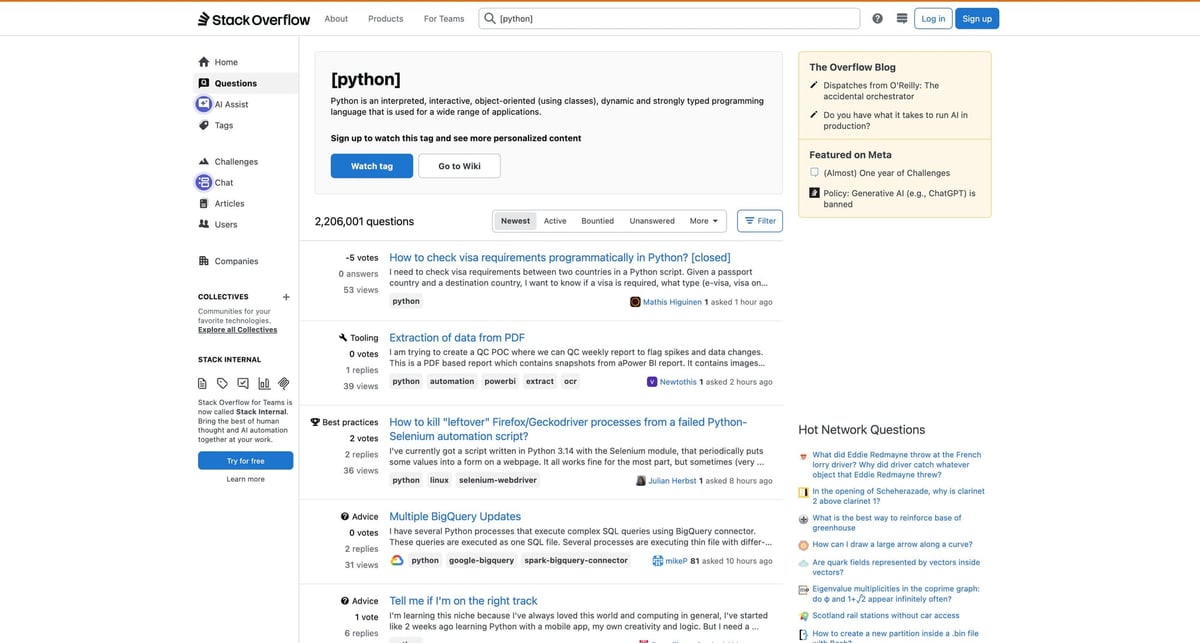
- crawls a tag page (e.g.
python) for question links - fetches each question page
- extracts question + answers + votes
- exports JSON and CSV
Stack Overflow is usually scrape-friendly, but big crawls still hit rate limits and transient failures. ProxiesAPI helps keep the fetch layer consistent so your crawl doesn’t collapse mid-run.
What we’re scraping
We’ll use:
- tag listing:
https://stackoverflow.com/questions/tagged/python?tab=Newest&page=1&pagesize=15 - question page:
https://stackoverflow.com/questions/<id>/<slug>
From the tag page we want:
- question URL
- title
- excerpt (optional)
From each question page we want:
- question text
- question vote count
- answers (text + vote count + accepted flag)
Setup
python3 -m venv .venv
source .venv/bin/activate
pip install requests beautifulsoup4 lxml python-dotenv
export PROXIESAPI_KEY="YOUR_PROXIESAPI_KEY" # optional
Step 1: Fetch HTML (optionally via ProxiesAPI)
We’ll write one fetch() that supports both direct and ProxiesAPI fetches.
import os
import time
import urllib.parse

import requests
from dotenv import load_dotenv

load_dotenv()

PROXIESAPI_KEY = os.getenv("PROXIESAPI_KEY")
TIMEOUT = (10, 60)

session = requests.Session()
session.headers.update({
    "User-Agent": "Mozilla/5.0 (Macintosh; Intel Mac OS X 10_15_7) AppleWebKit/537.36 (KHTML, like Gecko) Chrome/123.0 Safari/537.36",
    "Accept-Language": "en-US,en;q=0.9",
})


def proxiesapi_url(target_url: str) -> str:
    return "https://api.proxiesapi.com/?" + urllib.parse.urlencode({
        "key": PROXIESAPI_KEY,
        "url": target_url,
    })


def fetch(url: str, *, use_proxiesapi: bool = False, retries: int = 3) -> str:
    last_err = None
    for attempt in range(1, retries + 1):
        try:
            final = proxiesapi_url(url) if (use_proxiesapi and PROXIESAPI_KEY) else url
            r = session.get(final, timeout=TIMEOUT)
            r.raise_for_status()
            return r.text
        except Exception as e:
            last_err = e
            sleep_s = 2.0 ** attempt
            print(f"attempt {attempt}/{retries} failed: {e} -> sleeping {sleep_s:.1f}s")
            time.sleep(sleep_s)
    raise RuntimeError(last_err)
Step 2: Parse the tag page (question links + titles)
At the time of writing, Stack Overflow tag pages use div.s-post-summary blocks.
Inside each block:
- question title link:
a.s-link
from bs4 import BeautifulSoup
from urllib.parse import urljoin

BASE = "https://stackoverflow.com"


def parse_tag_page(html: str) -> list[dict]:
    soup = BeautifulSoup(html, "lxml")
    rows = []

    for card in soup.select("div.s-post-summary"):
        a = card.select_one("a.s-link")
        if not a:
            continue
        href = a.get("href")
        title = a.get_text(" ", strip=True)

        excerpt_el = card.select_one(".s-post-summary--content-excerpt")
        excerpt = excerpt_el.get_text(" ", strip=True) if excerpt_el else None

        rows.append({
            "title": title,
            "url": urljoin(BASE, href),
        })
        if excerpt:
            rows[-1]["excerpt"] = excerpt

    return rows
Pagination parameters:
pagepagesize
def tag_url(tag: str, *, page: int, pagesize: int = 15, tab: str = "Newest") -> str:
    return f"{BASE}/questions/tagged/{tag}?tab={tab}&page={page}&pagesize={pagesize}"
Step 3: Parse question + answers from a question page
On a question page:
- the question is the first
div.question - each answer is a
div.answer - vote counts appear in vote containers (we’ll parse integers defensively)
import re
from bs4 import BeautifulSoup


def parse_int(text: str) -> int | None:
    m = re.search(r"-?\d+", text or "")
    return int(m.group(0)) if m else None


def parse_post_body(container) -> str | None:
    body = container.select_one(".js-post-body")
    if not body:
        return None
    return body.get_text("\n", strip=True)


def parse_question_page(html: str) -> dict:
    soup = BeautifulSoup(html, "lxml")

    q = soup.select_one("div.question")
    if not q:
        raise RuntimeError("No question container found; markup may have changed")

    q_title = soup.select_one("h1 a.question-hyperlink")
    title = q_title.get_text(" ", strip=True) if q_title else None

    q_votes = None
    q_vote_el = q.select_one(".js-vote-count")
    if q_vote_el:
        q_votes = parse_int(q_vote_el.get_text(" ", strip=True))

    question = {
        "title": title,
        "votes": q_votes,
        "text": parse_post_body(q),
    }

    answers = []
    for a in soup.select("div.answer"):
        vote_el = a.select_one(".js-vote-count")
        votes = parse_int(vote_el.get_text(" ", strip=True)) if vote_el else None
        accepted = bool(a.select_one(".js-accepted-answer-indicator") or ("accepted-answer" in (a.get("class") or [])))

        answers.append({
            "votes": votes,
            "accepted": accepted,
            "text": parse_post_body(a),
        })

    return {"question": question, "answers": answers}
Step 4: Crawl (list → details) and export
import csv
import json


def crawl_tag(tag: str, *, pages: int = 2, per_page: int = 15) -> list[dict]:
    out = []

    for page in range(1, pages + 1):
        html = fetch(tag_url(tag, page=page, pagesize=per_page), use_proxiesapi=False)
        items = parse_tag_page(html)
        print(f"tag page {page}: {len(items)} questions")

        for it in items:
            q_html = fetch(it["url"], use_proxiesapi=False)
            payload = parse_question_page(q_html)
            payload["url"] = it["url"]
            out.append(payload)
            time.sleep(0.6)

        time.sleep(0.8)

    return out


def export_json(path: str, rows: list[dict]) -> None:
    with open(path, "w", encoding="utf-8") as f:
        json.dump(rows, f, ensure_ascii=False, indent=2)


def export_csv(path: str, rows: list[dict]) -> None:
    # Flatten to one row per answer, keeping question context.
    with open(path, "w", newline="", encoding="utf-8") as f:
        cols = ["url", "q_title", "q_votes", "q_text", "a_index", "a_votes", "a_accepted", "a_text"]
        w = csv.DictWriter(f, fieldnames=cols)
        w.writeheader()
        for r in rows:
            q = r["question"]
            for i, a in enumerate(r["answers"]):
                w.writerow({
                    "url": r["url"],
                    "q_title": q.get("title"),
                    "q_votes": q.get("votes"),
                    "q_text": q.get("text"),
                    "a_index": i,
                    "a_votes": a.get("votes"),
                    "a_accepted": a.get("accepted"),
                    "a_text": a.get("text"),
                })


if __name__ == "__main__":
    rows = crawl_tag("python", pages=2, per_page=10)
    export_json("so_python_qa.json", rows)
    export_csv("so_python_qa.csv", rows)
    print("wrote", len(rows), "questions")
Where ProxiesAPI fits (honestly)
For small runs, Stack Overflow is usually fine without proxies.
ProxiesAPI becomes useful when:
- you scale to many tags / many pages
- you run from a server where your IP reputation is “unknown”
- you want fewer “random” failures from transient rate limits
The important thing is the architecture you built:
tag pages → question pages → parse → export
That same shape works on almost any site.
Stack Overflow is usually scrape-friendly, but big crawls still hit rate limits and transient failures. ProxiesAPI helps keep the fetch layer consistent so your crawl doesn’t collapse mid-run.