
Scrape Crunchbase Company Data
Crunchbase is useful when you need a compact company research dataset: name, description, categories, location, website, and a few ranking or momentum signals in one place.
The catch is that Crunchbase is not a simple static HTML site. The public pages are wrapped in a large client-side app, and direct requests often return a Cloudflare block page instead of the company profile you wanted.
In this guide we will use a practical two-step pattern:
- discover organization profile URLs from the public company search page
- fetch each profile page, render the HTML, and parse structured data plus visible score signals
The result is a CSV you can use for lead lists, market maps, or founder research.
Crunchbase mixes Cloudflare protection with a JavaScript-heavy app. ProxiesAPI gives you one fetch layer for rendered HTML while you keep the parsing code simple.
What we are scraping
We will use two public page types:
- discover page:
https://www.crunchbase.com/discover/organization.companies - profile page:
https://www.crunchbase.com/organization/openai
On the discover page, the useful pattern is the organization link itself:
- result links look like
a[aria-label][href^="/organization/"] - the rendered result rows live inside Crunchbase
grid-rowelements
On profile pages, the cleanest source is usually the structured data block:
script[type="application/ld+json"]
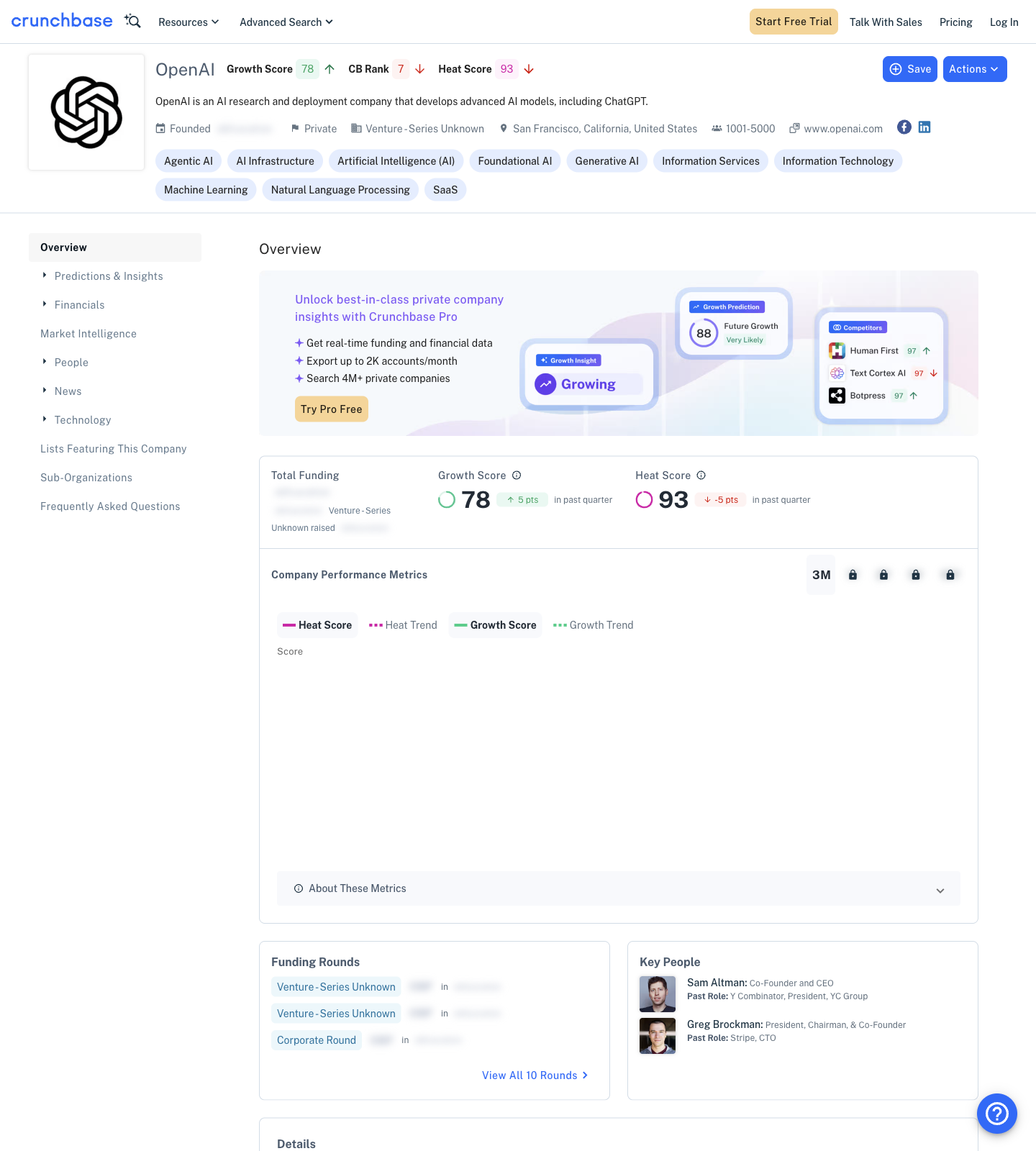
Crunchbase also exposes useful visible text signals in the rendered DOM, such as:
Growth ScoreCB RankHeat Score- company type / funding stage text such as
PrivateorVenture - Series Unknown
That combination is enough for a solid research dataset.
Setup
python3 -m venv .venv
source .venv/bin/activate
pip install requests beautifulsoup4 pandas lxml
We will use:
requestsfor HTTPBeautifulSoupfor HTML parsingpandasfor export
If you plan to fetch through ProxiesAPI, set your key first:
export PROXIESAPI_KEY="YOUR_KEY"
Step 1: Fetch rendered HTML
Crunchbase is one of those sites where "download the raw HTML and parse it" is usually not enough. A direct request often fails before the real app loads.
This helper routes requests through ProxiesAPI when a key is present. I also pass render=1 because the page content is JavaScript-heavy.
import os
import time
import requests
from urllib.parse import urlencode

TIMEOUT = (20, 60)
HEADERS = {
    "User-Agent": (
        "Mozilla/5.0 (Macintosh; Intel Mac OS X 10_15_7) "
        "AppleWebKit/537.36 (KHTML, like Gecko) "
        "Chrome/125.0.0.0 Safari/537.36"
    ),
    "Accept-Language": "en-US,en;q=0.9",
}

PROXIESAPI_KEY = os.getenv("PROXIESAPI_KEY", "").strip()


def proxiesapi_url(target_url: str, render: bool = True) -> str:
    if not PROXIESAPI_KEY:
        return target_url
    params = {
        "auth_key": PROXIESAPI_KEY,
        "url": target_url,
    }
    if render:
        params["render"] = "1"
    return "https://api.proxiesapi.com/?" + urlencode(params)


def fetch_html(url: str, session: requests.Session | None = None) -> str:
    s = session or requests.Session()
    final_url = proxiesapi_url(url, render=True)
    r = s.get(final_url, headers=HEADERS, timeout=TIMEOUT)
    r.raise_for_status()

    text = r.text
    lowered = text.lower()
    if "attention required" in lowered or "sorry, you have been blocked" in lowered:
        raise RuntimeError(f"blocked while fetching {url}")
    return text
This does not overpromise anything: if the target still returns a block page, the script fails loudly instead of silently parsing junk.
Step 2: Discover company profile URLs
The company search page already contains links to organization profiles. That gives us a simple way to bootstrap a crawl.
from bs4 import BeautifulSoup
from urllib.parse import urljoin

BASE = "https://www.crunchbase.com"
DISCOVER_URL = f"{BASE}/discover/organization.companies"


def parse_company_links(html: str, limit: int = 25) -> list[str]:
    soup = BeautifulSoup(html, "lxml")
    seen = set()
    urls = []

    for a in soup.select('a[aria-label][href^="/organization/"]'):
        href = a.get("href", "").strip()
        label = a.get("aria-label", "").strip()
        if not href or not label:
            continue

        full_url = urljoin(BASE, href)
        if full_url in seen:
            continue

        seen.add(full_url)
        urls.append(full_url)

        if len(urls) >= limit:
            break

    return urls


session = requests.Session()
discover_html = fetch_html(DISCOVER_URL, session=session)
company_urls = parse_company_links(discover_html, limit=10)

print("discovered:", len(company_urls))
print(company_urls[:5])
Typical output:
discovered: 10
['https://www.crunchbase.com/organization/european-investment-bank',
 'https://www.crunchbase.com/organization/coreweave',
 'https://www.crunchbase.com/organization/xai', ...]
For a lot of research tasks, that is enough: discover a small batch of companies, then enrich the details from the profile pages.
Step 3: Parse the profile JSON-LD
The rendered profile page includes application/ld+json blocks. That is much more stable than scraping visible labels one by one.
import json


def find_org_jsonld(html: str) -> dict:
    soup = BeautifulSoup(html, "lxml")

    for tag in soup.select('script[type="application/ld+json"]'):
        raw = (tag.string or tag.get_text() or "").strip()
        if not raw:
            continue
        try:
            data = json.loads(raw)
        except json.JSONDecodeError:
            continue

        candidates = data if isinstance(data, list) else [data]
        for item in candidates:
            entity = item.get("mainEntity", item)
            if entity.get("@type") in {"Corporation", "Organization"}:
                return entity

    raise ValueError("Could not find organization JSON-LD")


def clean_list(value) -> list[str]:
    if value is None:
        return []
    if isinstance(value, str):
        return [x.strip() for x in value.split(",") if x.strip()]
    if isinstance(value, list):
        return [str(x).strip() for x in value if str(x).strip()]
    return [str(value).strip()]


def parse_profile_fields(html: str, profile_url: str) -> dict:
    entity = find_org_jsonld(html)
    soup = BeautifulSoup(html, "lxml")
    page_text = soup.get_text(" ", strip=True)

    address = entity.get("address", {}) or {}
    location = ", ".join(
        part for part in [
            address.get("addressLocality"),
            address.get("addressRegion"),
            address.get("addressCountry"),
        ] if part
    )

    scores = {}
    for label in ["Growth Score", "CB Rank", "Heat Score"]:
        import re
        m = re.search(rf"{label}\s+(\d+)", page_text)
        scores[label.lower().replace(" ", "_")] = int(m.group(1)) if m else None

    stage = None
    for candidate in [
        "Venture - Series Unknown",
        "Private",
        "Public",
        "Seed",
        "Series A",
        "Series B",
    ]:
        if candidate in page_text:
            stage = candidate
            break

    return {
        "profile_url": profile_url,
        "name": entity.get("name"),
        "description": entity.get("description"),
        "website": entity.get("url"),
        "location": location,
        "categories": clean_list(entity.get("keywords")),
        "linkedin": next((u for u in clean_list(entity.get("sameAs")) if "linkedin.com" in u), None),
        "growth_score": scores["growth_score"],
        "cb_rank": scores["cb_rank"],
        "heat_score": scores["heat_score"],
        "stage_signal": stage,
    }
This gives you a useful structure without depending on brittle nth-child selectors.
Step 4: Crawl a batch and export CSV
import pandas as pd


def crawl_companies(limit: int = 10, delay_seconds: float = 2.0) -> pd.DataFrame:
    session = requests.Session()
    discover_html = fetch_html(DISCOVER_URL, session=session)
    company_urls = parse_company_links(discover_html, limit=limit)

    rows = []
    for i, url in enumerate(company_urls, start=1):
        print(f"[{i}/{len(company_urls)}] {url}")
        html = fetch_html(url, session=session)
        row = parse_profile_fields(html, profile_url=url)
        rows.append(row)
        time.sleep(delay_seconds)

    return pd.DataFrame(rows)


if __name__ == "__main__":
    df = crawl_companies(limit=10, delay_seconds=2.5)
    df["categories"] = df["categories"].apply(lambda xs: "; ".join(xs))
    df.to_csv("crunchbase_companies.csv", index=False)
    print(df.head(3).to_dict(orient="records"))
Example output shape:
[
  {
    'profile_url': 'https://www.crunchbase.com/organization/coreweave',
    'name': 'CoreWeave',
    'description': 'CoreWeave is a cloud infrastructure provider purpose-built for AI.',
    'website': 'https://www.coreweave.com',
    'location': 'Roseland, New Jersey, United States',
    'categories': 'Artificial Intelligence; Cloud Computing; GPU',
    'growth_score': 97,
    'cb_rank': 2,
    'heat_score': 95
  }
]
Practical notes for Crunchbase
Crunchbase is a good example of why scraper architecture matters more than clever selectors.
Use this checklist:
- fail if the response contains a block page
- dedupe profile URLs before crawling
- keep request rates low
- treat scores as optional fields because the visible page can change
- prefer JSON-LD when it exists
Also remember that discover results are paginated and filterable. Once the basic flow works, you can expand it by:
- storing the query URL you used for discovery
- following the next result page
- segmenting by industry or geography
If your goal is account enrichment rather than full-site crawling, a smaller high-quality crawl is usually better than a giant noisy one.
When to switch to Playwright
Stay with requests + rendered HTML when:
- the rendered response contains the fields you need
- you only need profile text, links, and visible scores
Switch to Playwright when:
- the page requires button clicks or scrolling before data appears
- you need data hidden behind tabs or dialogs
- the rendered HTML route stops exposing stable structure
For many research pipelines, the hybrid pattern is enough:
- discover URLs from rendered HTML
- parse JSON-LD and visible text
- export a narrow, reliable CSV
That gets you company names, descriptions, categories, websites, and lightweight momentum signals from Crunchbase without building a full browser automation stack from day one.
Crunchbase mixes Cloudflare protection with a JavaScript-heavy app. ProxiesAPI gives you one fetch layer for rendered HTML while you keep the parsing code simple.