
Scrape Wikipedia Category Pages into CSV
Wikipedia category pages are one of the most useful public structures on the web.
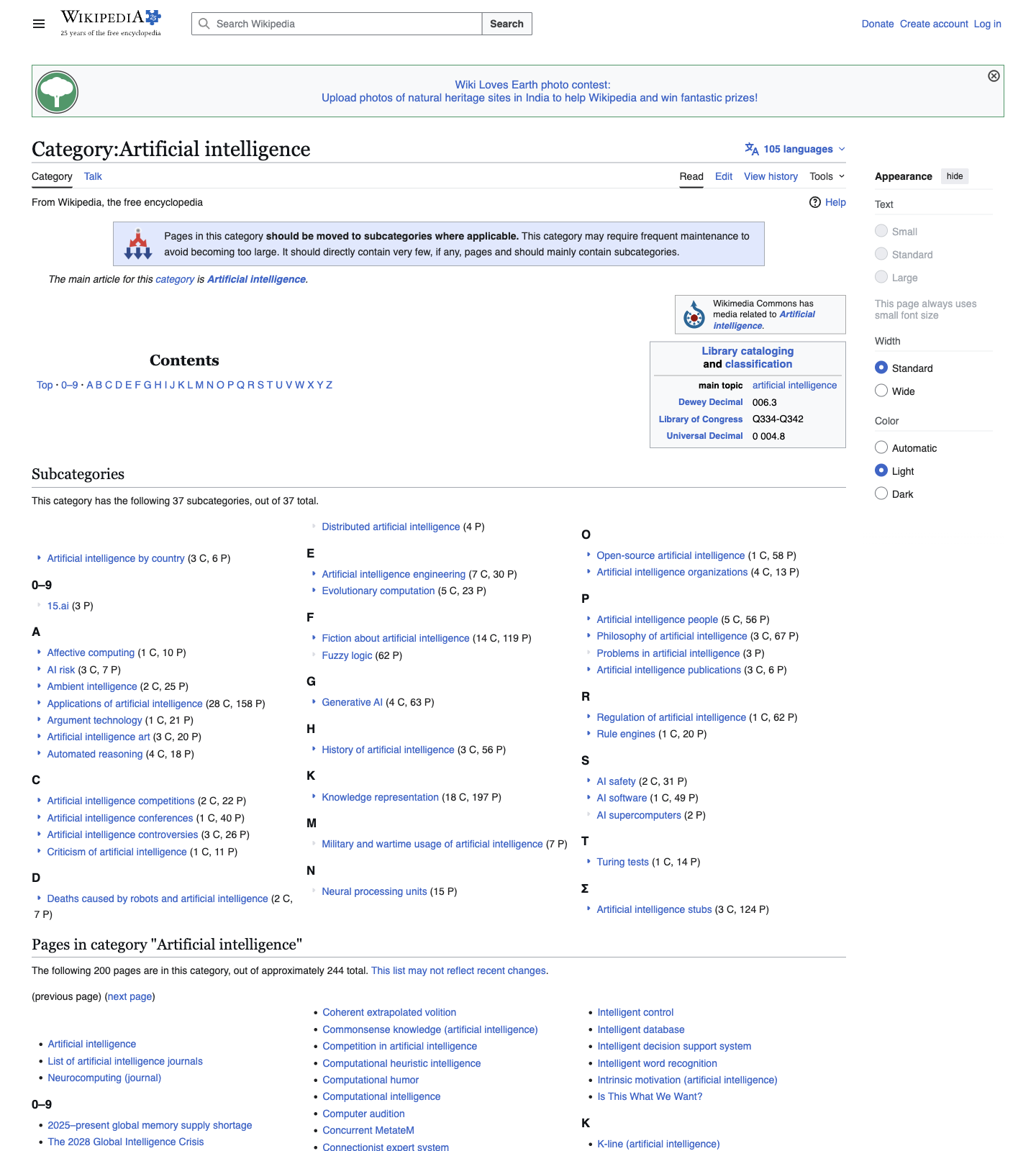
Instead of scraping one article at a time, you can start from a category page, collect all member pages, follow subcategories, and turn the whole tree into a research dataset.
That is useful for:
- building topic maps
- creating seed lists for later enrichment
- collecting public entities by subject, geography, or industry
In this tutorial we will crawl a real category page, walk through subcategories, follow member pagination, and export everything to CSV.
Wikipedia is friendly, but most production crawls do not stay that way. ProxiesAPI gives you a consistent fetch layer once your category crawler graduates to many public sites.
The page structure we care about
We will use:
https://en.wikipedia.org/wiki/Category:Artificial_intelligence
Wikipedia category pages have two main sections:
#mw-subcategoriesfor child categories#mw-pagesfor article members
Inside both sections, links are grouped under:
.mw-category-group a
When a category has more than 200 page members, Wikipedia adds pagination links such as:
#mw-pages a[href*="pagefrom="]
That makes category crawling pleasantly boring, which is exactly what you want in production.
Setup
python3 -m venv .venv
source .venv/bin/activate
pip install requests beautifulsoup4 pandas lxml
Wikipedia usually does not need proxying for light workloads, but I will wire in optional ProxiesAPI support so the same fetch layer works later on less friendly targets.
export PROXIESAPI_KEY="YOUR_KEY" # optional
Step 1: Fetch a category page
import os
import requests
from urllib.parse import urlencode

TIMEOUT = (10, 30)
HEADERS = {
    "User-Agent": (
        "Mozilla/5.0 (Macintosh; Intel Mac OS X 10_15_7) "
        "AppleWebKit/537.36 (KHTML, like Gecko) "
        "Chrome/125.0.0.0 Safari/537.36"
    ),
    "Accept-Language": "en-US,en;q=0.9",
}

PROXIESAPI_KEY = os.getenv("PROXIESAPI_KEY", "").strip()


def maybe_proxy(url: str) -> str:
    if not PROXIESAPI_KEY:
        return url
    return "https://api.proxiesapi.com/?" + urlencode({
        "auth_key": PROXIESAPI_KEY,
        "url": url,
    })


def fetch_html(url: str, session: requests.Session | None = None) -> str:
    s = session or requests.Session()
    r = s.get(maybe_proxy(url), headers=HEADERS, timeout=TIMEOUT)
    r.raise_for_status()
    return r.text


html = fetch_html("https://en.wikipedia.org/wiki/Category:Artificial_intelligence")
print(len(html))
print(html[:150])
You should see normal Wikipedia HTML, not a bot challenge page.
Step 2: Parse subcategories and page members
from bs4 import BeautifulSoup
from urllib.parse import urljoin

BASE = "https://en.wikipedia.org"


def parse_category_page(html: str) -> dict:
    soup = BeautifulSoup(html, "lxml")

    subcategories = []
    for a in soup.select("#mw-subcategories .mw-category-group a"):
        title = a.get_text(" ", strip=True)
        href = a.get("href", "").strip()
        if not href.startswith("/wiki/Category:"):
            continue
        subcategories.append({
            "title": title,
            "url": urljoin(BASE, href),
        })

    pages = []
    for a in soup.select("#mw-pages .mw-category-group a"):
        title = a.get_text(" ", strip=True)
        href = a.get("href", "").strip()
        if not href.startswith("/wiki/") or href.startswith("/wiki/Category:"):
            continue
        pages.append({
            "title": title,
            "url": urljoin(BASE, href),
        })

    next_page = None
    next_link = soup.select_one('#mw-pages a[href*="pagefrom="]')
    if next_link:
        next_page = urljoin(BASE, next_link.get("href"))

    return {
        "subcategories": subcategories,
        "pages": pages,
        "next_page": next_page,
    }
This mirrors the actual page structure closely:
- child categories come from
#mw-subcategories - member articles come from
#mw-pages - overflow member pages are handled via the
pagefromlink
Step 3: Handle member pagination
Wikipedia category pages often show all subcategories on one page but split article members into chunks.
Here is a helper that keeps collecting member pages until there is no next page link left.
def collect_all_members(category_url: str, session: requests.Session | None = None) -> tuple[list[dict], list[dict]]:
    s = session or requests.Session()

    html = fetch_html(category_url, session=s)
    parsed = parse_category_page(html)

    subcategories = parsed["subcategories"]
    pages = list(parsed["pages"])
    next_page = parsed["next_page"]

    while next_page:
        html = fetch_html(next_page, session=s)
        parsed = parse_category_page(html)
        pages.extend(parsed["pages"])
        next_page = parsed["next_page"]

    return subcategories, pages
For the artificial intelligence category, this matters because the member list is larger than the first page.
Step 4: Crawl the category tree
Now we can build a small breadth-first crawler.
from collections import deque
import time


def crawl_category_tree(root_url: str, max_categories: int = 20, delay_seconds: float = 1.0) -> list[dict]:
    session = requests.Session()
    queue = deque([(root_url, None)])
    seen_categories = set()
    rows = []

    while queue and len(seen_categories) < max_categories:
        category_url, parent_url = queue.popleft()
        if category_url in seen_categories:
            continue

        seen_categories.add(category_url)
        print(f"visiting category {len(seen_categories)}: {category_url}")

        subcategories, pages = collect_all_members(category_url, session=session)

        for sub in subcategories:
            rows.append({
                "kind": "subcategory",
                "parent_category_url": category_url,
                "parent_category_parent_url": parent_url,
                "title": sub["title"],
                "url": sub["url"],
            })
            if sub["url"] not in seen_categories:
                queue.append((sub["url"], category_url))

        for page in pages:
            rows.append({
                "kind": "page",
                "parent_category_url": category_url,
                "parent_category_parent_url": parent_url,
                "title": page["title"],
                "url": page["url"],
            })

        time.sleep(delay_seconds)

    return rows
This exports two useful record types:
subcategoryrows so you preserve the tree structurepagerows so you can enrich article members later
Step 5: Save a clean CSV
import pandas as pd

ROOT = "https://en.wikipedia.org/wiki/Category:Artificial_intelligence"

rows = crawl_category_tree(ROOT, max_categories=12, delay_seconds=1.0)
df = pd.DataFrame(rows)

df = df.drop_duplicates(subset=["kind", "parent_category_url", "url"])
df.to_csv("wikipedia_category_tree.csv", index=False)

print("rows:", len(df))
print(df.head(10).to_dict(orient="records"))
Example output shape:
[
  {
    'kind': 'subcategory',
    'parent_category_url': 'https://en.wikipedia.org/wiki/Category:Artificial_intelligence',
    'title': 'Affective computing',
    'url': 'https://en.wikipedia.org/wiki/Category:Affective_computing'
  },
  {
    'kind': 'page',
    'parent_category_url': 'https://en.wikipedia.org/wiki/Category:Artificial_intelligence',
    'title': 'Artificial intelligence',
    'url': 'https://en.wikipedia.org/wiki/Artificial_intelligence'
  }
]
A few improvements worth adding
Once the basic CSV works, the next upgrades are straightforward:
| Upgrade | Why it helps | Effort |
|---|---|---|
Add depth column | Lets you analyze the tree by distance from the root | Low |
| Save category titles too | Easier downstream joins and debugging | Low |
| Export JSON as well as CSV | Better for nested workflows | Low |
| Enrich page summaries later | Turns a link list into a topic dataset | Medium |
| Cache HTML responses | Speeds up reruns and reduces requests | Medium |
One practical pattern is to keep this crawl narrow:
- first crawl category membership
- then enrich only the pages that matter
That keeps your first pass fast and reliable.
Practical notes for Wikipedia category crawls
Wikipedia is forgiving, but a few habits still matter:
- respect pagination instead of guessing counts
- dedupe page URLs because related categories overlap
- keep delays modest and consistent
- store the parent category so you do not lose the tree context
Also note that many categories contain both broad topic pages and very specific edge cases. That is normal. The job of the scraper is to collect the graph cleanly. Filtering comes later.
If your long-term goal is taxonomy building, seed generation, or entity collection, category pages are one of the highest-leverage entry points on Wikipedia.
They are predictable, link-rich, and easy to turn into a CSV you can actually use.
Wikipedia is friendly, but most production crawls do not stay that way. ProxiesAPI gives you a consistent fetch layer once your category crawler graduates to many public sites.