
Scrape Currency Exchange Rates (USD/EUR/INR) into a Daily Dataset with Python + ProxiesAPI
A “daily FX dataset” is one of those deceptively simple scraping projects:
- it works fine on day 1
- then a few days later you get timeouts, occasional 403s, or markup changes
- and your time series develops gaps (which makes analysis and alerts messy)
In this tutorial we’ll build a small, reliable FX scraper in Python that:
- fetches a public currency rates page
- extracts rates for USD, EUR, and INR (against a base currency)
- normalizes values into a clean record
- appends to a daily CSV time series
- performs basic sanity checks (no zeros, no wild jumps)
- is easy to route through ProxiesAPI
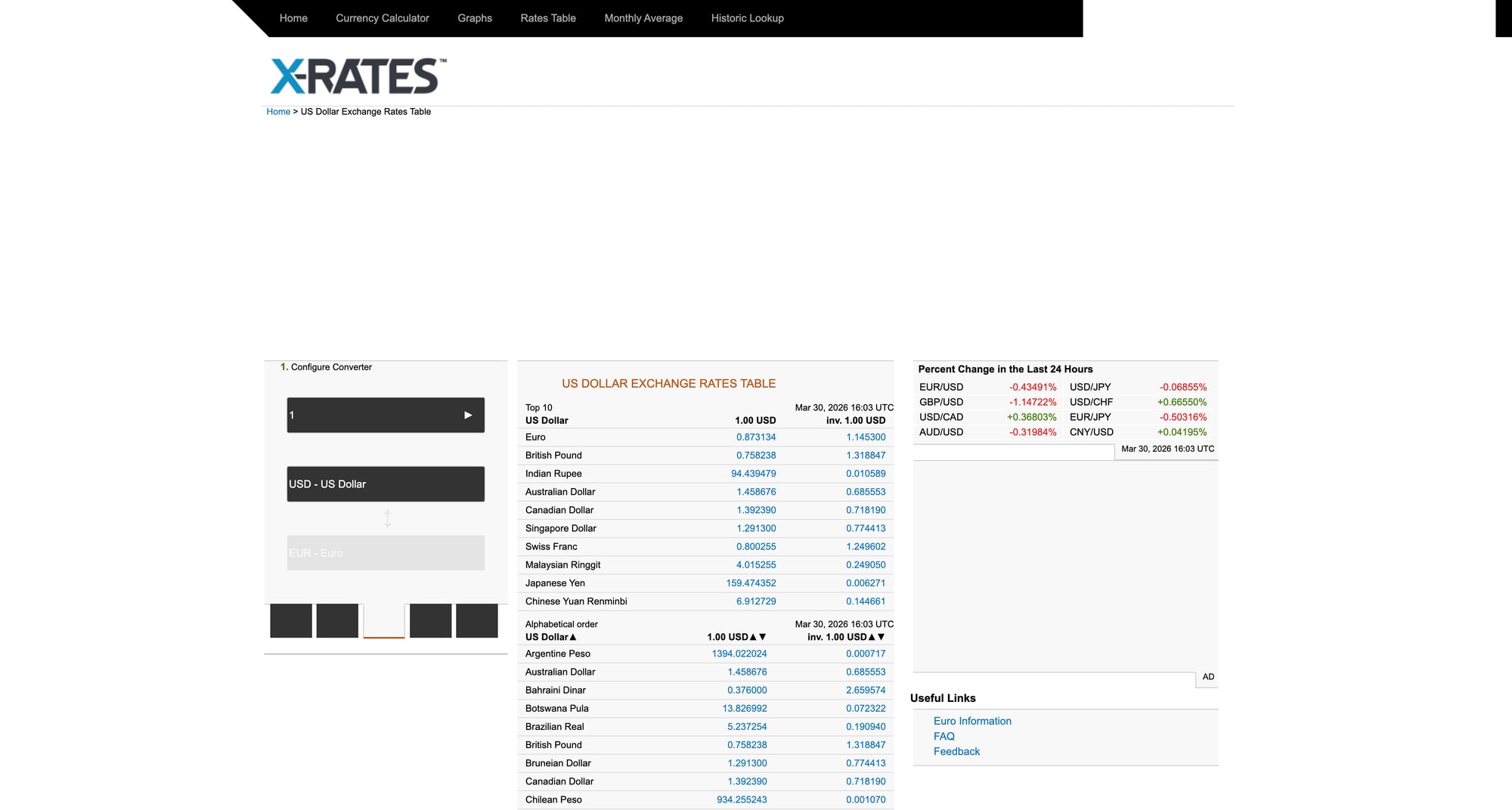
We’ll use x-rates.com as the example source because it provides a stable HTML table.
Source page we’ll scrape: https://www.x-rates.com/table/?from=USD&amount=1
Even simple datasets break when your source rate-limits, geo-fences, or intermittently times out. ProxiesAPI helps keep the fetch layer stable so your daily time series doesn’t develop gaps.
Important notes (read before you scrape)
- Terms & robots: Always review the site’s terms and robots.txt.
- Educational use: This is a tutorial. If you need guaranteed availability and licensing, use a paid FX API.
- What “rate” means: Here we’ll scrape “1 USD → X EUR/INR”. That gives a consistent base.
Setup
python3 -m venv .venv
source .venv/bin/activate
pip install requests beautifulsoup4 lxml
Step 1: Fetch HTML with timeouts + retries (+ ProxiesAPI hook)
We’ll reuse a fetch helper with:
- browser-like headers
- timeouts
- retry on transient errors (429/5xx)
- optional ProxiesAPI URL template
from __future__ import annotations

import os
import random
import time
from typing import Optional

import requests

TIMEOUT = (10, 30)

HEADERS = {
    "User-Agent": (
        "Mozilla/5.0 (Macintosh; Intel Mac OS X 10_15_7) "
        "AppleWebKit/537.36 (KHTML, like Gecko) "
        "Chrome/123.0.0.0 Safari/537.36"
    ),
    "Accept": "text/html,application/xhtml+xml,application/xml;q=0.9,*/*;q=0.8",
    "Accept-Language": "en-US,en;q=0.9",
}


class FetchError(RuntimeError):
    pass


def backoff(attempt: int) -> None:
    time.sleep(min(2 ** attempt, 16) + random.uniform(0.2, 0.8))


def fetch(url: str, *, proxiesapi_url: Optional[str] = None, max_retries: int = 4) -> str:
    session = requests.Session()

    target = url
    if proxiesapi_url:
        # Your ProxiesAPI account may support a URL-template integration.
        # Example: export PROXIESAPI_URL_TEMPLATE='https://YOUR_ENDPOINT?url={url}'
        target = proxiesapi_url.format(url=url)

    last = None
    for attempt in range(max_retries + 1):
        try:
            r = session.get(target, headers=HEADERS, timeout=TIMEOUT)
            if r.status_code in (429, 500, 502, 503, 504):
                raise FetchError(f"Transient HTTP {r.status_code}")
            r.raise_for_status()
            return r.text
        except (requests.RequestException, FetchError) as e:
            last = e
            if attempt >= max_retries:
                break
            backoff(attempt)

    raise FetchError(f"failed: {url} ({last})")
Step 2: Parse the rates table (robustly)
The X-Rates “table” page is an HTML table where each row is a currency.
We’ll parse:
- currency name
- currency code (present in the “currency” column text)
- the rate (1 USD → X [currency])
Then we’ll keep only EUR and INR.
from __future__ import annotations

import re
from typing import Optional

from bs4 import BeautifulSoup


def parse_float(text: str) -> Optional[float]:
    if not text:
        return None
    cleaned = re.sub(r"[^0-9\.]", "", text)
    try:
        return float(cleaned)
    except Exception:
        return None


def parse_xrates_table(html: str) -> dict[str, float]:
    """Return a mapping like {"EUR": 0.92, "INR": 83.1, ...} for a USD base."""

    soup = BeautifulSoup(html, "lxml")

    # The table typically has class "tablesorter ratesTable"
    table = soup.select_one("table.ratesTable")
    if not table:
        # fallback: any table with 'ratesTable'
        table = soup.select_one("table[class*='ratesTable']")
    if not table:
        raise ValueError("rates table not found")

    out: dict[str, float] = {}

    for tr in table.select("tbody tr"):
        tds = tr.select("td")
        if len(tds) < 2:
            continue

        # First column often contains currency name + link
        # Second column is the rate for 1 USD
        name = tds[0].get_text(" ", strip=True)
        rate_text = tds[1].get_text(" ", strip=True)
        rate = parse_float(rate_text)
        if rate is None:
            continue

        # Code is not always explicit; we can extract from link href like /graph/?from=USD&to=EUR
        code = None
        a = tds[0].select_one("a")
        if a and a.get("href"):
            m = re.search(r"to=([A-Z]{3})", a.get("href"))
            if m:
                code = m.group(1)

        # Fallback: try to find a 3-letter code in text (sometimes not present)
        if not code:
            m = re.search(r"\b([A-Z]{3})\b", name)
            if m:
                code = m.group(1)

        if code:
            out[code] = rate

    return out
Step 3: Normalize into a daily record + validate
A “daily dataset” is just a table with a date column.
We’ll store rows like:
date(ISO yyyy-mm-dd)base(USD)eur(rate)inr(rate)
And we’ll do basic validation:
- values present
- rates are > 0
- optional: detect extreme jumps vs yesterday
from __future__ import annotations

import csv
import datetime as dt
from dataclasses import dataclass
from pathlib import Path


@dataclass
class FxRow:
    date: str
    base: str
    eur: float
    inr: float


def today_iso() -> str:
    return dt.date.today().isoformat()


def validate_row(row: FxRow) -> None:
    if row.eur <= 0 or row.inr <= 0:
        raise ValueError("rates must be > 0")


def read_last_row(csv_path: Path) -> FxRow | None:
    if not csv_path.exists():
        return None

    with csv_path.open("r", encoding="utf-8") as f:
        rows = list(csv.DictReader(f))
        if not rows:
            return None

    last = rows[-1]
    return FxRow(
        date=last["date"],
        base=last["base"],
        eur=float(last["eur"]),
        inr=float(last["inr"]),
    )


def append_row(csv_path: Path, row: FxRow) -> None:
    csv_path.parent.mkdir(parents=True, exist_ok=True)

    write_header = not csv_path.exists()

    with csv_path.open("a", newline="", encoding="utf-8") as f:
        w = csv.DictWriter(f, fieldnames=["date", "base", "eur", "inr"])
        if write_header:
            w.writeheader()
        w.writerow({
            "date": row.date,
            "base": row.base,
            "eur": f"{row.eur:.6f}",
            "inr": f"{row.inr:.6f}",
        })
Optional “wild jump” detector:
def assert_not_wild_jump(new: FxRow, prev: FxRow, max_pct: float = 10.0) -> None:
    def pct(a: float, b: float) -> float:
        return abs(a - b) / b * 100.0

    if pct(new.eur, prev.eur) > max_pct:
        raise ValueError(f"EUR jump too large: {prev.eur} -> {new.eur}")
    if pct(new.inr, prev.inr) > max_pct:
        raise ValueError(f"INR jump too large: {prev.inr} -> {new.inr}")
Step 4: End-to-end script
This script:
- fetches X-Rates table (USD base)
- parses rates
- keeps EUR + INR
- appends to a CSV if today’s row isn’t already present
from __future__ import annotations

import os
from pathlib import Path

# reuse: fetch, parse_xrates_table, FxRow, validate_row, read_last_row, append_row, assert_not_wild_jump, today_iso

SOURCE_URL = "https://www.x-rates.com/table/?from=USD&amount=1"
OUT = Path("data") / "fx_usd_eur_inr_daily.csv"


def main() -> None:
    tpl = os.getenv("PROXIESAPI_URL_TEMPLATE")

    html = fetch(SOURCE_URL, proxiesapi_url=tpl)
    rates = parse_xrates_table(html)

    eur = rates.get("EUR")
    inr = rates.get("INR")
    if eur is None or inr is None:
        raise ValueError(f"missing EUR/INR in parsed rates (keys: {sorted(rates.keys())[:10]} ...)")

    row = FxRow(date=today_iso(), base="USD", eur=float(eur), inr=float(inr))
    validate_row(row)

    prev = read_last_row(OUT)
    if prev and prev.date == row.date:
        print("already have today; nothing to do")
        return

    if prev:
        assert_not_wild_jump(row, prev, max_pct=10.0)

    append_row(OUT, row)
    print("appended", row, "to", OUT)


if __name__ == "__main__":
    main()
Scheduling it daily
On macOS/Linux you can run this once per day with cron or a scheduler. Keep it simple:
- write a log file
- alert if it fails
When reliability matters, adding a proxy-backed fetch layer (and retry logic) is the difference between a clean time series and a dataset full of holes.
Where ProxiesAPI fits (honestly)
Scraping a single HTML table is lightweight.
But production “daily dataset” pipelines fail for mundane reasons:
- the source site rate-limits at peak times
- your IP gets temporarily throttled
- you travel and your egress IP / geo changes
ProxiesAPI helps by stabilizing the fetch layer so your daily dataset stays continuous.
Even simple datasets break when your source rate-limits, geo-fences, or intermittently times out. ProxiesAPI helps keep the fetch layer stable so your daily time series doesn’t develop gaps.