
Scrape Stock Prices and Financial Data with Python (Yahoo Finance) + ProxiesAPI
Yahoo Finance is one of the fastest ways to bootstrap a daily stock dataset without paying for a market data vendor.
In this guide we’ll scrape a small-but-useful set of fields from Yahoo Finance quote pages (price, change, market cap, PE, 52-week range, etc.), then store it as:
- CSV (easy to inspect)
- SQLite (easy to query, dedupe, and keep history)
We’ll also build the part that usually breaks in production: the fetch layer.
- timeouts
- retries + backoff
- randomized delays
- proxy rotation via ProxiesAPI
Quote pages and endpoints can get flaky at scale. ProxiesAPI gives you a cleaner network layer (rotation, retries, fewer blocks) so your daily dataset stays reliable.
What we’re scraping (Yahoo Finance structure)
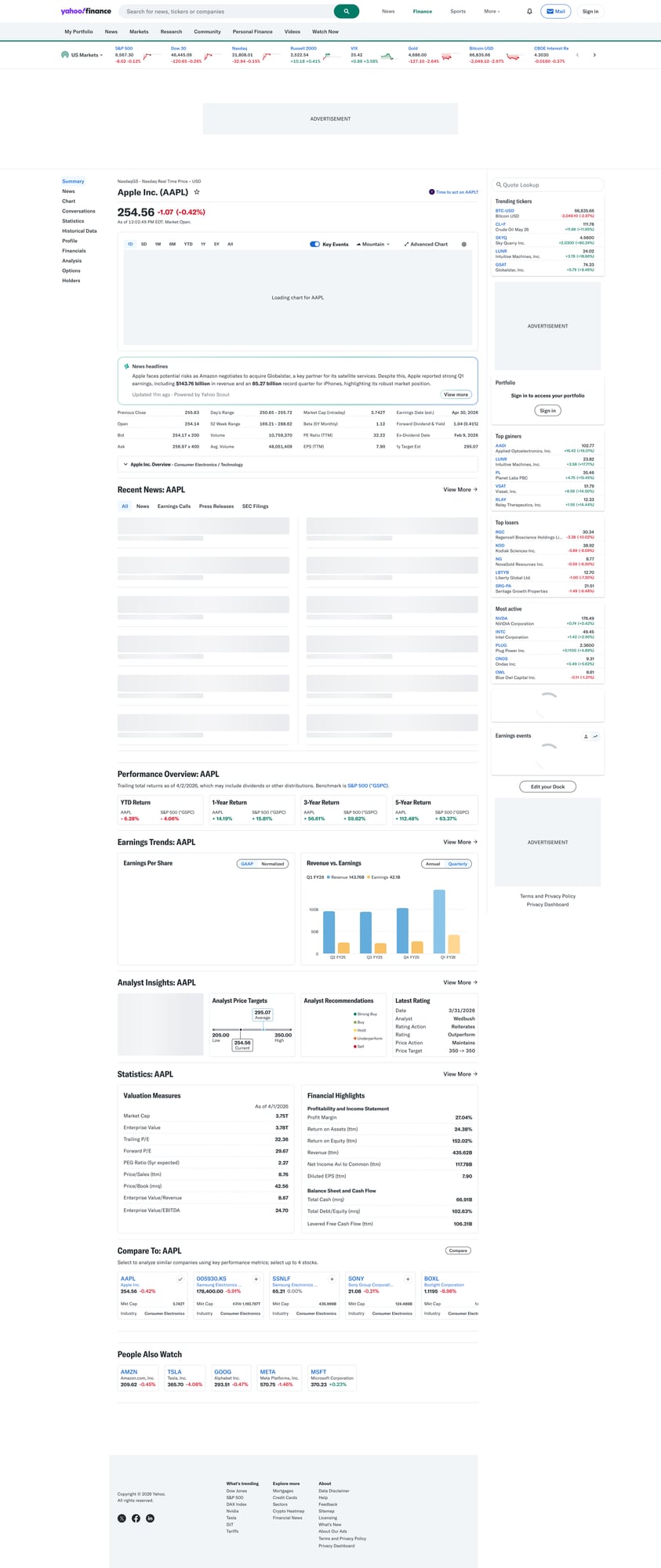
A quote page looks like:
https://finance.yahoo.com/quote/AAPL/https://finance.yahoo.com/quote/TSLA/
On the page you’ll see multiple “cards”. Two patterns matter:
- Top header: current price + change
- Key/Value tables: “Previous Close”, “Open”, “Market Cap”, “PE Ratio (TTM)”, etc.
These tables are usually rendered as rows with two columns (label/value). We’ll parse them by selecting rows and reading both cells.
Important note (honesty)
Yahoo Finance is not an official market data API. HTML structure can change and the site may rate-limit or block aggressive traffic.
This tutorial is for educational / internal use. If you need guaranteed data correctness and licensing, use a paid provider.
Setup
python -m venv .venv
source .venv/bin/activate
pip install requests beautifulsoup4 lxml python-dotenv
We’ll use:
requestsfor HTTPBeautifulSoup(lxml)for robust parsingpython-dotenvfor local configuration
Create a .env (or set env vars in your CI):
PROXIESAPI_KEY="YOUR_KEY"
Step 1: Build a production-ish fetch layer
When scraping quote pages for multiple tickers every day, you’ll hit transient failures:
- 429s / bot challenges
- occasional 5xx
- slow responses
A resilient fetch layer does:
- timeouts (no hanging)
- retries (but capped)
- backoff (don’t hammer)
- rotating proxy via ProxiesAPI
Below is a template you can reuse across many sites.
import os
import random
import time
from dataclasses import dataclass
from typing import Optional

import requests
from dotenv import load_dotenv

load_dotenv()

PROXIESAPI_KEY = os.getenv("PROXIESAPI_KEY")

# You’ll need to confirm your exact ProxiesAPI endpoint + auth format.
# Many proxy services offer either:
# 1) a proxy URL like http(s)://USER:PASS@HOST:PORT
# 2) an API gateway URL you call with ?url=... and your key
#
# This example assumes ProxiesAPI provides a standard proxy endpoint.
PROXY_URL = os.getenv("PROXIESAPI_PROXY_URL")  # e.g. http://user:pass@gw.proxiesapi.com:10000

TIMEOUT = (10, 30)  # connect, read


@dataclass
class FetchResult:
    url: str
    status_code: int
    text: str


def make_session() -> requests.Session:
    s = requests.Session()
    s.headers.update({
        "User-Agent": (
            "Mozilla/5.0 (Macintosh; Intel Mac OS X 10_15_7) "
            "AppleWebKit/537.36 (KHTML, like Gecko) "
            "Chrome/123.0.0.0 Safari/537.36"
        ),
        "Accept-Language": "en-US,en;q=0.9",
    })
    return s


def fetch(url: str, session: requests.Session, max_attempts: int = 4) -> FetchResult:
    last_exc: Optional[Exception] = None

    for attempt in range(1, max_attempts + 1):
        # jitter to look less “botty” and reduce burstiness
        time.sleep(random.uniform(0.8, 2.0))

        try:
            proxies = None
            if PROXY_URL:
                proxies = {"http": PROXY_URL, "https": PROXY_URL}

            r = session.get(url, timeout=TIMEOUT, proxies=proxies)

            # treat common temporary blocks as retryable
            if r.status_code in (403, 429, 500, 502, 503, 504):
                wait = min(10, 1.5 ** attempt) + random.uniform(0, 0.7)
                time.sleep(wait)
                continue

            r.raise_for_status()
            return FetchResult(url=url, status_code=r.status_code, text=r.text)

        except Exception as e:
            last_exc = e
            wait = min(10, 1.5 ** attempt) + random.uniform(0, 0.7)
            time.sleep(wait)

    raise RuntimeError(f"Failed to fetch {url} after {max_attempts} attempts") from last_exc
How ProxiesAPI fits
If you’re fetching 10 tickers/day from one machine, you might be fine without proxies.
If you’re fetching hundreds (or your IP gets flagged), ProxiesAPI is most useful as a drop-in network layer:
- rotate IPs
- isolate failures
- reduce “one IP got blocked, everything breaks” events
Step 2: Parse quote data from HTML
Yahoo Finance’s HTML changes, so we’ll avoid overly brittle selectors.
Common stable patterns:
- price in a prominent element near the header
- key/value rows across “summary” tables
We’ll do two passes:
- Parse key/value rows into a dictionary
- Parse price + change separately
import re
from bs4 import BeautifulSoup


def normalize_space(s: str) -> str:
    return re.sub(r"\s+", " ", (s or "").strip())


def parse_kv_tables(soup: BeautifulSoup) -> dict:
    """Return a dict like {"Previous Close": "189.12", "Market Cap": "287B", ...}."""
    out = {}

    # Many quote pages include rows where the label/value are adjacent cells.
    # We look for table rows and pull the first two cells.
    for row in soup.select("table tr"):
        cells = row.select("td")
        if len(cells) < 2:
            continue

        k = normalize_space(cells[0].get_text(" ", strip=True))
        v = normalize_space(cells[1].get_text(" ", strip=True))
        if not k or not v:
            continue

        # avoid extremely long text blobs
        if len(k) > 60 or len(v) > 120:
            continue

        out[k] = v

    return out


def parse_price_block(soup: BeautifulSoup) -> dict:
    """Try to extract current price and daily change."""

    text = soup.get_text("\n", strip=True)

    # Heuristic: price is typically the first large float near the top.
    # This is intentionally conservative; you should validate on 3–5 tickers.
    m = re.search(r"\b(\d{1,5}(?:,\d{3})*(?:\.\d+)?)\b", text)

    price = m.group(1) if m else None
    return {"Price": price}


def parse_quote_page(html: str) -> dict:
    soup = BeautifulSoup(html, "lxml")

    kv = parse_kv_tables(soup)
    price = parse_price_block(soup)

    # merge with price taking precedence
    return {**kv, **price}
Selector sanity check
Before you automate, do a 30-second manual check:
curl -L -s "https://finance.yahoo.com/quote/AAPL/" | head -n 20
If you’re getting a “consent” page or bot check HTML, that’s where:
- headers
- pacing
- proxies
…make a difference.
Step 3: Turn tickers into daily rows
We’ll scrape multiple tickers and produce a normalized row per ticker/day.
from datetime import date


def scrape_ticker(ticker: str, session: requests.Session) -> dict:
    url = f"https://finance.yahoo.com/quote/{ticker}/"
    res = fetch(url, session=session)
    data = parse_quote_page(res.text)

    # A minimal schema (add fields as you need)
    return {
        "ticker": ticker.upper(),
        "as_of": date.today().isoformat(),
        "price": data.get("Price"),
        "previous_close": data.get("Previous Close"),
        "open": data.get("Open"),
        "day_range": data.get("Day's Range") or data.get("Day Range"),
        "week52_range": data.get("52 Week Range"),
        "market_cap": data.get("Market Cap"),
        "pe_ttm": data.get("PE Ratio (TTM)"),
        "eps_ttm": data.get("EPS (TTM)"),
        "volume": data.get("Volume"),
        "avg_volume": data.get("Avg. Volume"),
    }


def scrape_many(tickers: list[str]) -> list[dict]:
    s = make_session()
    rows = []
    for t in tickers:
        row = scrape_ticker(t, session=s)
        rows.append(row)
        print("scraped", t, "price", row.get("price"))
    return rows


if __name__ == "__main__":
    tickers = ["AAPL", "MSFT", "TSLA"]
    rows = scrape_many(tickers)
    print(rows)
Step 4: Export to CSV
import csv


def write_csv(rows: list[dict], path: str = "stocks_daily.csv") -> None:
    if not rows:
        return

    fieldnames = list(rows[0].keys())
    with open(path, "w", newline="", encoding="utf-8") as f:
        w = csv.DictWriter(f, fieldnames=fieldnames)
        w.writeheader()
        for r in rows:
            w.writerow(r)


# usage:
# write_csv(rows)
Step 5: Store history in SQLite (recommended)
CSV is fine. SQLite is better for daily runs.
- easy to append
- easy to query “last 30 days”
- dedupe with a unique constraint
import sqlite3


def init_db(db_path: str = "stocks.db") -> None:
    con = sqlite3.connect(db_path)
    cur = con.cursor()
    cur.execute(
        """
        CREATE TABLE IF NOT EXISTS stock_prices (
          ticker TEXT NOT NULL,
          as_of TEXT NOT NULL,
          price TEXT,
          previous_close TEXT,
          open TEXT,
          day_range TEXT,
          week52_range TEXT,
          market_cap TEXT,
          pe_ttm TEXT,
          eps_ttm TEXT,
          volume TEXT,
          avg_volume TEXT,
          PRIMARY KEY (ticker, as_of)
        );
        """
    )
    con.commit()
    con.close()


def upsert_rows(rows: list[dict], db_path: str = "stocks.db") -> None:
    con = sqlite3.connect(db_path)
    cur = con.cursor()

    cur.executemany(
        """
        INSERT OR REPLACE INTO stock_prices (
          ticker, as_of, price, previous_close, open, day_range, week52_range,
          market_cap, pe_ttm, eps_ttm, volume, avg_volume
        ) VALUES (
          :ticker, :as_of, :price, :previous_close, :open, :day_range, :week52_range,
          :market_cap, :pe_ttm, :eps_ttm, :volume, :avg_volume
        );
        """,
        rows,
    )

    con.commit()
    con.close()


# usage:
# init_db(); upsert_rows(rows)
QA checklist
- Can you fetch 3 tickers without getting consent/bot HTML?
- Are key fields present (Previous Close, Open, Market Cap) for at least 2 tickers?
- Does your run complete in under 2 minutes for 50 tickers? (tune pacing)
- Do retries recover from occasional 5xx/429?
Next upgrades
- Incremental updates: skip tickers already scraped today
- Structured typing: parse
2.87Tinto a numeric value - Scheduling: run at market close and store EOD snapshots
- Alerting: notify when a ticker changes >X%
If you want to turn this into a reliable daily job, focus less on parsing tricks and more on the fetch layer + monitoring. That’s where ProxiesAPI earns its keep.
Quote pages and endpoints can get flaky at scale. ProxiesAPI gives you a cleaner network layer (rotation, retries, fewer blocks) so your daily dataset stays reliable.