
Scrape Numbeo Restaurant Prices by City with Python
Numbeo is useful when you need fast, public city-level pricing benchmarks without signing up for a vendor data feed.
One especially practical slice is restaurant pricing:
- inexpensive meal
- dinner for two
- fast-food combo meal
- coffee, water, beer, and soft drinks
That is enough to build:
- relocation comparison tools
- restaurant-market research dashboards
- travel budgeting datasets
- city benchmark newsletters
In this guide we will scrape Numbeo city pages and export restaurant price rows for multiple cities into one CSV.
Numbeo pages are lightweight HTML, but batch collection across many cities still benefits from retries, pacing, and a proxy layer you can enable without rewriting your parser.
What we are scraping
Numbeo city pages follow a predictable pattern:
https://www.numbeo.com/cost-of-living/in/Amsterdamhttps://www.numbeo.com/cost-of-living/in/Singaporehttps://www.numbeo.com/cost-of-living/in/Austin-TX
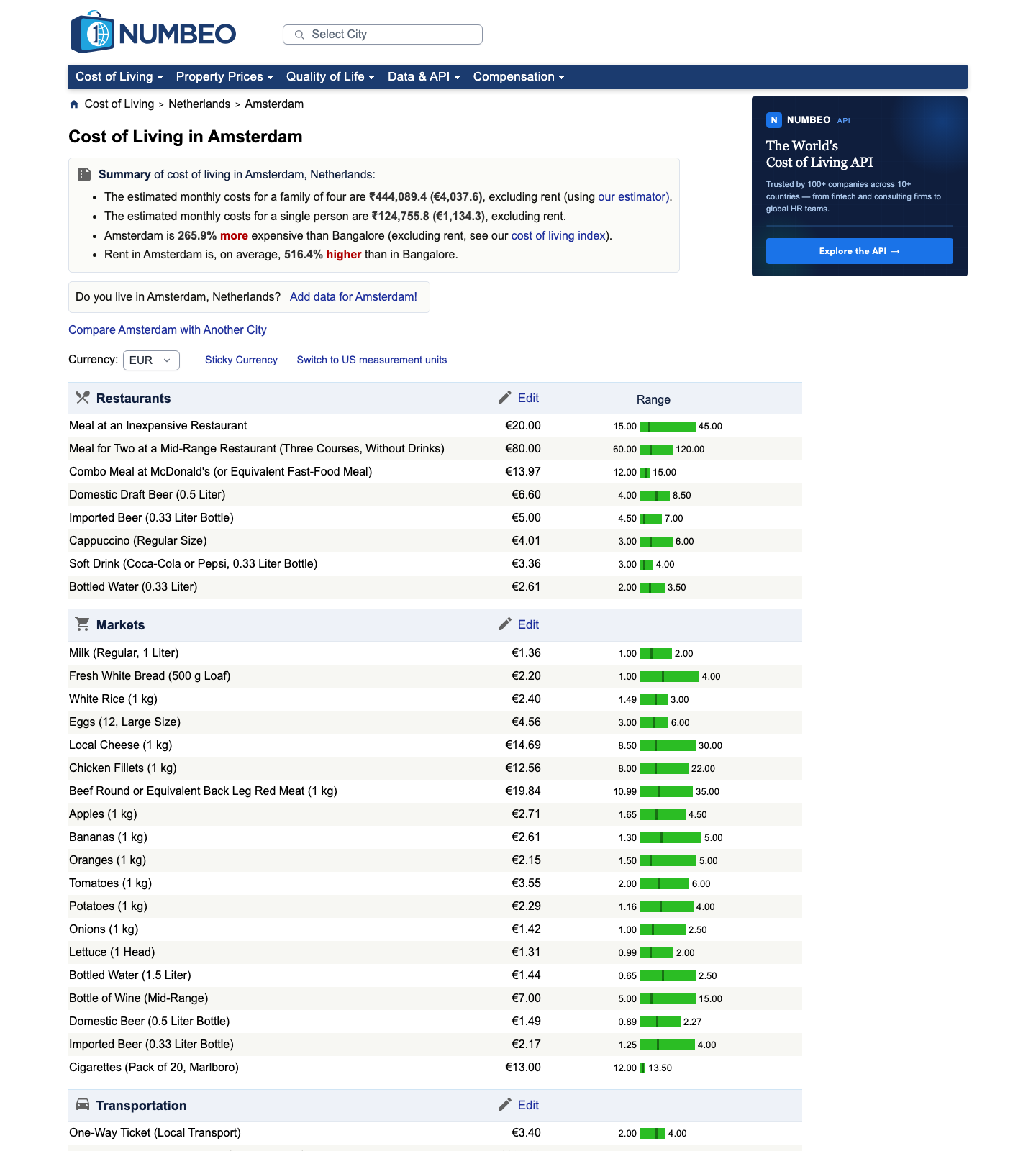
The useful part for this tutorial is the large table that includes restaurant rows such as:
Meal at an Inexpensive RestaurantMeal for Two at a Mid-Range Restaurant (Three Courses, Without Drinks)Combo Meal at McDonald's (or Equivalent Fast-Food Meal)Cappuccino (Regular Size)
Quick sanity check:
curl -L -A "Mozilla/5.0" -s "https://www.numbeo.com/cost-of-living/in/Amsterdam" | rg -n "Meal at an Inexpensive Restaurant|data_wide_table"
If you see those strings in the HTML, you can stay with a regular HTTP client and skip browser automation.
Setup
python3 -m venv .venv
source .venv/bin/activate
pip install requests beautifulsoup4 lxml pandas
Step 1: Fetch HTML with optional ProxiesAPI support
from __future__ import annotations

import os
import random
import time
from urllib.parse import quote

import requests

HEADERS = {
    "User-Agent": (
        "Mozilla/5.0 (Macintosh; Intel Mac OS X 10_15_7) "
        "AppleWebKit/537.36 (KHTML, like Gecko) "
        "Chrome/127.0.0.0 Safari/537.36"
    ),
    "Accept-Language": "en-US,en;q=0.9",
}

TIMEOUT = (10, 30)
MAX_ATTEMPTS = 4
session = requests.Session()


def build_proxiesapi_url(target_url: str) -> str:
    api_key = os.environ.get("PROXIESAPI_KEY")
    if not api_key:
        return target_url
    return f"http://api.proxiesapi.com/?key={quote(api_key)}&url={quote(target_url, safe='')}"


def fetch_html(url: str) -> str:
    final_url = build_proxiesapi_url(url)
    last_error = None

    for attempt in range(1, MAX_ATTEMPTS + 1):
        try:
            response = session.get(final_url, headers=HEADERS, timeout=TIMEOUT)
            if response.status_code in {429, 500, 502, 503, 504}:
                raise RuntimeError(f"retryable status {response.status_code}")
            response.raise_for_status()
            return response.text
        except Exception as exc:
            last_error = exc
            if attempt == MAX_ATTEMPTS:
                break
            time.sleep(min(12, 2 ** attempt) + random.random())

    raise RuntimeError(f"failed to fetch {url}: {last_error}")
Step 2: Target the restaurant rows only
Numbeo pages contain many categories in one big table. We do not need all of them. For this post, we only want restaurant-related rows.
import re
from bs4 import BeautifulSoup

RESTAURANT_LABELS = {
    "Meal at an Inexpensive Restaurant",
    "Meal for Two at a Mid-Range Restaurant (Three Courses, Without Drinks)",
    "Combo Meal at McDonald's (or Equivalent Fast-Food Meal)",
    "Domestic Draft Beer (0.5 Liter)",
    "Imported Beer (0.33 Liter Bottle)",
    "Cappuccino (Regular Size)",
    "Soft Drink (Coca-Cola or Pepsi, 0.33 Liter Bottle)",
    "Bottled Water (0.33 Liter)",
}


def clean_text(text: str | None) -> str | None:
    if not text:
        return None
    return re.sub(r"\s+", " ", text).strip() or None


def parse_num(value: str | None) -> float | None:
    if not value:
        return None
    value = re.sub(r"[^0-9.,-]", "", value).replace(",", "")
    try:
        return float(value)
    except ValueError:
        return None


def parse_restaurant_prices(html: str, city: str) -> list[dict]:
    soup = BeautifulSoup(html, "lxml")
    rows = []

    for tr in soup.select("table.data_wide_table tr"):
        cells = tr.select("td")
        if len(cells) < 2:
            continue

        item = clean_text(cells[0].get_text(" ", strip=True))
        if item not in RESTAURANT_LABELS:
            continue

        price_text = clean_text(cells[1].get_text(" ", strip=True))
        rows.append(
            {
                "city": city,
                "item": item,
                "price_text": price_text,
                "price_value": parse_num(price_text),
            }
        )

    return rows
This is much cleaner than trying to split the entire cost-of-living page into semantic blocks. Since the item names are visible in the table, label-based filtering is the most maintainable route.
Step 3: Build city URLs and crawl several cities
from urllib.parse import quote

BASE = "https://www.numbeo.com/cost-of-living/in"


def city_url(city_slug: str) -> str:
    return f"{BASE}/{quote(city_slug)}"


def scrape_city(city_slug: str) -> list[dict]:
    url = city_url(city_slug)
    html = fetch_html(url)
    return parse_restaurant_prices(html, city_slug)
Now run it across a few cities:
import csv


def write_rows(rows: list[dict], path: str = "numbeo_restaurant_prices.csv") -> None:
    with open(path, "w", newline="", encoding="utf-8") as handle:
        writer = csv.DictWriter(handle, fieldnames=["city", "item", "price_text", "price_value"])
        writer.writeheader()
        writer.writerows(rows)


if __name__ == "__main__":
    cities = ["Amsterdam", "Singapore", "Austin-TX", "Lisbon"]
    all_rows = []

    for city in cities:
        batch = scrape_city(city)
        print(city, len(batch))
        all_rows.extend(batch)

    write_rows(all_rows)
Typical output:
Amsterdam 8
Singapore 8
Austin-TX 8
Lisbon 8
Step 4: Pivot the data into a comparison table
If your goal is comparison, a long CSV is good storage format, but a pivot is easier to read.
import pandas as pd


def build_comparison_table(csv_path: str = "numbeo_restaurant_prices.csv") -> pd.DataFrame:
    df = pd.read_csv(csv_path)
    table = df.pivot(index="item", columns="city", values="price_value")
    return table.sort_index()


comparison = build_comparison_table()
print(comparison.round(2))
comparison.to_csv("numbeo_restaurant_prices_comparison.csv")
That gives you a compact comparison by item and city, which is usually what teams actually want downstream.
Why this parser is more reliable than overfitting section headers
A common mistake is trying to infer "restaurant section starts here and ends there" from surrounding headings or icons.
That is unnecessary.
The row labels already tell you what matters, and those labels are the business meaning of the table. Even if Numbeo changes icon markup or wraps sections differently, rows like Meal at an Inexpensive Restaurant are likely to remain interpretable.
That makes label filtering a better maintenance strategy than DOM gymnastics.
Practical advice for Numbeo scraping
- keep a small verified seed list of city slugs
- save raw HTML samples when you are updating selectors
- do not assume every city has identical rows
- store the scrape date if you plan to compare snapshots over time
Numbeo values can drift because the site reflects user-contributed data. For analytics, that is not a bug. It just means you should treat the output as a dated snapshot.
Where ProxiesAPI helps
One or two city pages are easy. The pain shows up when you:
- collect hundreds of cities on a schedule
- retry failed pages automatically
- mix Numbeo with tougher targets in the same pipeline
ProxiesAPI helps by letting you keep the parser the same while making the fetch layer more resilient. That is the right place to add complexity, not inside the HTML parsing code.
Final takeaway
Numbeo restaurant prices are a good scraping target because the page already looks like a semi-structured dataset.
Your job is mainly to:
- fetch carefully
- filter by the exact row labels you care about
- normalize into long-form rows
- pivot into a city comparison table
That gives you a useful meal-price dataset with a very small amount of Python.
Numbeo pages are lightweight HTML, but batch collection across many cities still benefits from retries, pacing, and a proxy layer you can enable without rewriting your parser.