
Scrape Rightmove Sold Prices with Python: Sold Listings + Price History Dataset (with ProxiesAPI)
Rightmove’s Sold House Prices section is one of the most useful public sources for UK property price research.
In this guide we’ll build a production-style Python scraper that:
- crawls sold-price results for a location
- paginates through results pages
- opens each property detail page
- extracts sale price + sale date + address and a few useful fields
- outputs a clean, analysis-ready dataset (CSV/JSON)
And we’ll integrate ProxiesAPI as a simple network wrapper so your scraper can handle bigger jobs with fewer random failures.
Property portals can throttle repetitive crawling, especially when you paginate and fetch many details pages. ProxiesAPI helps keep your Rightmove scrapes stable when you move from a few streets to an entire region.
What we’re scraping (Rightmove Sold House Prices)
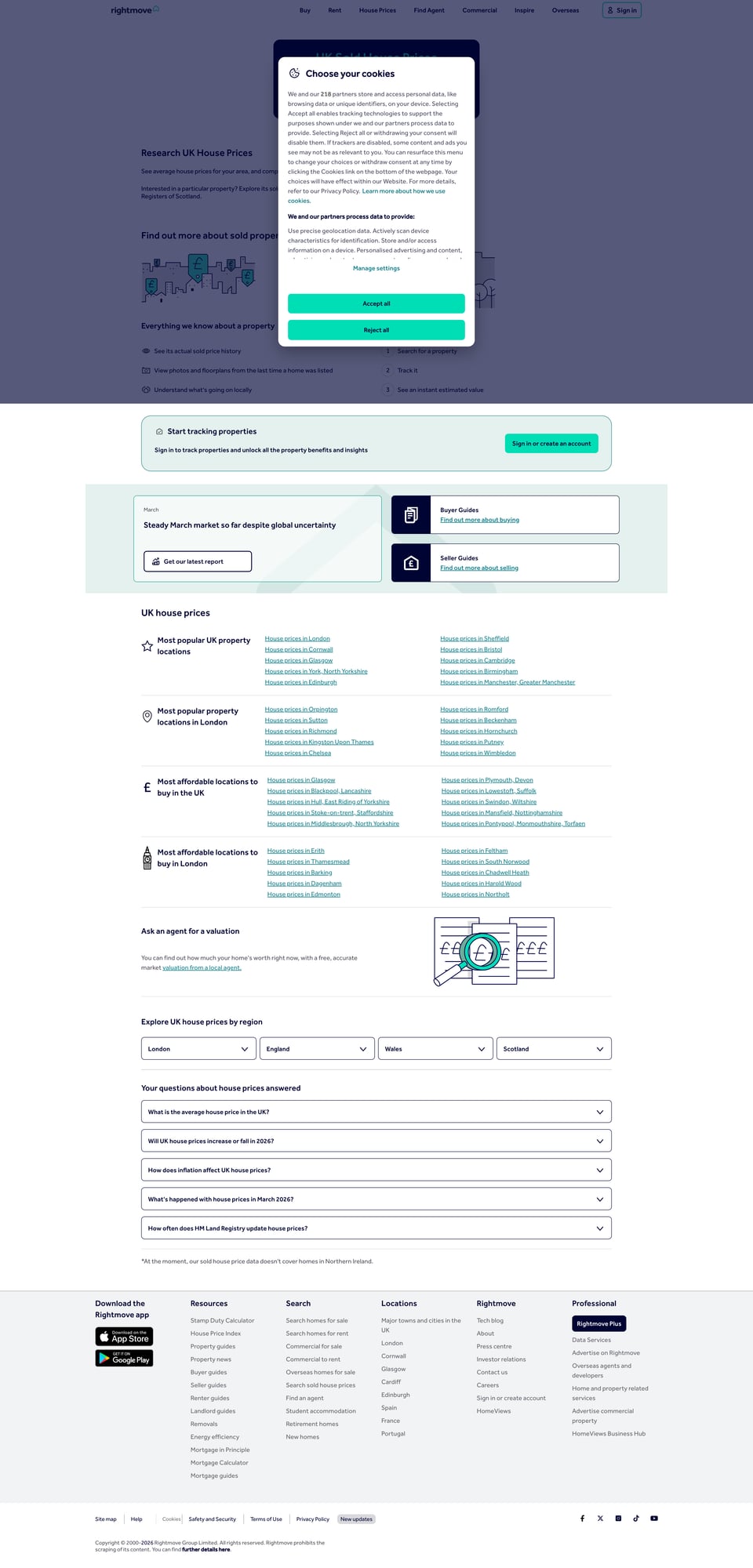
Rightmove has multiple sections. For sold prices, you’ll typically land on pages under:
https://www.rightmove.co.uk/house-prices.html
From there, you can navigate into areas, streets, and sold listings.
A robust scraping approach is:
- Start from a known Sold Prices results URL (one you can open in your browser)
- Parse result cards to extract property detail URLs
- Fetch details pages and extract structured fields
This avoids guessing internal endpoints.
Setup
python3 -m venv .venv
source .venv/bin/activate
pip install requests beautifulsoup4 lxml pandas python-dotenv
Create .env:
PROXIESAPI_KEY="YOUR_PROXIESAPI_KEY"
Step 1: HTTP client with retries + ProxiesAPI wrapper
import os
import time
from dataclasses import dataclass
from typing import Optional

import requests
from dotenv import load_dotenv

load_dotenv()

PROXIESAPI_KEY = os.getenv("PROXIESAPI_KEY", "").strip()

TIMEOUT = (10, 30)

DEFAULT_HEADERS = {
    "User-Agent": (
        "Mozilla/5.0 (Macintosh; Intel Mac OS X 10_15_7) "
        "AppleWebKit/537.36 (KHTML, like Gecko) "
        "Chrome/123.0.0.0 Safari/537.36"
    ),
    "Accept": "text/html,application/xhtml+xml,application/xml;q=0.9,*/*;q=0.8",
    "Accept-Language": "en-GB,en;q=0.9",
    "Connection": "keep-alive",
}


@dataclass
class FetchResult:
    url: str
    status_code: int
    text: str
    final_url: str


class HttpClient:
    def __init__(self):
        self.s = requests.Session()
        self.s.headers.update(DEFAULT_HEADERS)

    def _via_proxiesapi(self, url: str) -> str:
        if not PROXIESAPI_KEY:
            return url
        return f"https://api.proxiesapi.com/?auth_key={PROXIESAPI_KEY}&url={requests.utils.quote(url, safe='')}"

    def get_html(self, url: str, *, use_proxy: bool = True, max_retries: int = 3) -> FetchResult:
        last_exc: Optional[Exception] = None

        for attempt in range(1, max_retries + 1):
            try:
                fetch_url = self._via_proxiesapi(url) if use_proxy else url
                r = self.s.get(fetch_url, timeout=TIMEOUT, allow_redirects=True)

                if r.status_code in (429, 500, 502, 503, 504):
                    time.sleep(min(2 ** attempt, 10))
                    continue

                r.raise_for_status()
                return FetchResult(url=url, status_code=r.status_code, text=r.text, final_url=r.url)

            except Exception as e:
                last_exc = e
                time.sleep(min(2 ** attempt, 10))

        raise RuntimeError(f"Failed to fetch {url}: {last_exc}")
Step 2: Parse sold-price results pages (cards → property URLs)
Rightmove’s HTML changes over time, so we’ll keep parsing logic defensive:
- look for anchors that resemble property links
- extract the canonical URL
- de-duplicate
import re
from urllib.parse import urljoin
from bs4 import BeautifulSoup

BASE = "https://www.rightmove.co.uk"

PROPERTY_RE = re.compile(r"/house-prices/.+")


def extract_property_urls_from_results(html: str) -> list[str]:
    soup = BeautifulSoup(html, "lxml")

    urls: list[str] = []
    seen = set()

    for a in soup.select("a[href]"):
        href = a.get("href")
        if not href:
            continue

        # Sold-price pages often live under /house-prices/
        if href.startswith("/") and PROPERTY_RE.match(href):
            full = urljoin(BASE, href)
            if full not in seen:
                seen.add(full)
                urls.append(full)

    return urls
Pagination strategy
On many sold listings pages, Rightmove includes a “next” link. If you can find it reliably, that’s best.
Below we attempt to find it by looking for a link with text like “Next” or an aria-label.
def find_next_page_url(html: str, current_url: str) -> str | None:
    soup = BeautifulSoup(html, "lxml")

    # Try common patterns
    a = soup.select_one('a[rel="next"], a[aria-label*="Next" i], a:contains("Next")')
    if a and a.get("href"):
        return urljoin(BASE, a.get("href"))

    # Fallback: look for any anchor with 'page=' style links
    for link in soup.select("a[href]"):
        href = link.get("href")
        if href and "page=" in href:
            return urljoin(BASE, href)

    return None
Note:
:contains()isn’t supported by BeautifulSoup’s CSS selector engine. That’s why we keep a fallback path. In practice you may want to locate pagination by class names you observe in your browser.
Step 3: Parse a property sold-price detail page
We want stable fields:
addresslast_sold_pricelast_sold_dateproperty_type(when present)tenure(when present)
Many pages expose structured metadata in application/ld+json blocks.
import json


def extract_ld_json(soup: BeautifulSoup) -> list[dict]:
    out = []
    for sc in soup.select('script[type="application/ld+json"]'):
        txt = sc.string
        if not txt:
            continue
        try:
            obj = json.loads(txt)
            if isinstance(obj, dict):
                out.append(obj)
            elif isinstance(obj, list):
                out.extend([x for x in obj if isinstance(x, dict)])
        except Exception:
            pass
    return out


def parse_sold_property(html: str, url: str) -> dict:
    soup = BeautifulSoup(html, "lxml")

    record = {
        "url": url,
        "address": None,
        "last_sold_price": None,
        "last_sold_date": None,
        "property_type": None,
        "tenure": None,
    }

    # Try ld+json first
    for obj in extract_ld_json(soup):
        # Not guaranteed schema; keep it cautious.
        addr = obj.get("address")
        if isinstance(addr, dict):
            record["address"] = addr.get("streetAddress") or record["address"]

    # HTML fallback for address
    if not record["address"]:
        h1 = soup.select_one("h1")
        if h1:
            record["address"] = h1.get_text(" ", strip=True)

    # Price/date patterns: often present as text near labels.
    text = soup.get_text("\n", strip=True)

    # Very defensive regexes
    import re

    m_price = re.search(r"Last sold price\s*£?\s*([0-9,]+)", text, re.IGNORECASE)
    if m_price:
        record["last_sold_price"] = int(m_price.group(1).replace(",", ""))

    m_date = re.search(r"Last sold date\s*([0-9]{1,2}\s+[A-Za-z]+\s+[0-9]{4})", text, re.IGNORECASE)
    if m_date:
        record["last_sold_date"] = m_date.group(1)

    # Optional fields
    m_type = re.search(r"Property type\s*(.+)", text, re.IGNORECASE)
    if m_type:
        record["property_type"] = m_type.group(1)[:60]

    m_tenure = re.search(r"Tenure\s*(Freehold|Leasehold|Commonhold)", text, re.IGNORECASE)
    if m_tenure:
        record["tenure"] = m_tenure.group(1)

    return record
This parser is intentionally conservative. In a real project you should:
- inspect Rightmove’s actual HTML for sold pages you care about
- tighten selectors/regexes based on what you see
- keep a few unit-test fixtures (saved HTML) so changes are caught early
Step 4: Crawl results → fetch details → build a dataset
You should start from a known sold-price results URL.
Example (you will replace this with a URL you can open in your browser):
https://www.rightmove.co.uk/house-prices/<area>.html
import csv


def crawl_sold_prices(start_url: str, max_pages: int = 5, *, use_proxy: bool = True) -> list[dict]:
    client = HttpClient()

    results: list[dict] = []
    seen_property = set()

    url = start_url
    for page in range(1, max_pages + 1):
        res = client.get_html(url, use_proxy=use_proxy)

        property_urls = extract_property_urls_from_results(res.text)
        print(f"results page {page}: {len(property_urls)} property urls")

        for purl in property_urls:
            if purl in seen_property:
                continue
            seen_property.add(purl)

            pres = client.get_html(purl, use_proxy=use_proxy)
            record = parse_sold_property(pres.text, purl)
            results.append(record)

            time.sleep(1.0)

        next_url = find_next_page_url(res.text, url)
        if not next_url:
            break
        url = next_url

        time.sleep(1.0)

    return results


def write_csv(rows: list[dict], path: str = "rightmove_sold_prices.csv"):
    if not rows:
        return
    keys = list(rows[0].keys())
    with open(path, "w", newline="", encoding="utf-8") as f:
        w = csv.DictWriter(f, fieldnames=keys)
        w.writeheader()
        for r in rows:
            w.writerow(r)


if __name__ == "__main__":
    START_URL = "https://www.rightmove.co.uk/house-prices.html"  # replace with a specific area URL
    rows = crawl_sold_prices(START_URL, max_pages=2, use_proxy=True)
    write_csv(rows)
    print("wrote rightmove_sold_prices.csv", len(rows))
Cleaning and normalizing (turn it into analysis-ready data)
A quick improvement is to normalize date and add a price_gbp numeric column.
import pandas as pd


def normalize(path: str = "rightmove_sold_prices.csv"):
    df = pd.read_csv(path)

    # last_sold_date is text; convert if parseable
    if "last_sold_date" in df.columns:
        df["last_sold_date"] = pd.to_datetime(df["last_sold_date"], errors="coerce", dayfirst=True)

    df.to_csv("rightmove_sold_prices_normalized.csv", index=False)
    print("wrote rightmove_sold_prices_normalized.csv", len(df))


if __name__ == "__main__":
    normalize()
Where ProxiesAPI fits (honestly)
Rightmove pages can be fetched directly in small quantities.
But a realistic sold-price dataset requires:
- lots of pagination
- lots of property detail fetches
- re-runs (incremental updates)
That’s where you’ll run into 429s / intermittent failures. ProxiesAPI helps by giving you a consistent proxy layer so your scraper can keep going without you babysitting it.
QA checklist
- You start from a real sold-price results URL for a specific area
- Result pages yield unique property URLs
- Detail pages produce non-empty
address - Sale price/date extract correctly on a sample of pages
- CSV/normalized CSV writes without errors
Property portals can throttle repetitive crawling, especially when you paginate and fetch many details pages. ProxiesAPI helps keep your Rightmove scrapes stable when you move from a few streets to an entire region.