
Scrape Stack Overflow Questions and Answers by Tag (Python + ProxiesAPI)
Stack Overflow is a goldmine for structured, high-signal technical content: questions, tags, vote counts, accepted answers, and timelines.
In this tutorial we’ll build a real Stack Overflow tag scraper in Python that:
- crawls a tag listing (e.g.
python,node.js,playwright) - paginates through multiple pages of questions
- visits each question page
- extracts:
- title, votes, asked time
- question body text
- accepted answer (if present)
- top answers (optional)
- exports clean JSONL
- uses timeouts, retries, and pacing
- shows where ProxiesAPI can fit in (honestly)
We’ll stick to server-rendered HTML using requests + BeautifulSoup.
When you move from scraping a handful of pages to thousands of questions, failures become inevitable. ProxiesAPI helps stabilize your fetch layer with IP rotation and consistent connectivity so your crawler can keep moving (politely) at scale.
What we’re scraping
Two page types:
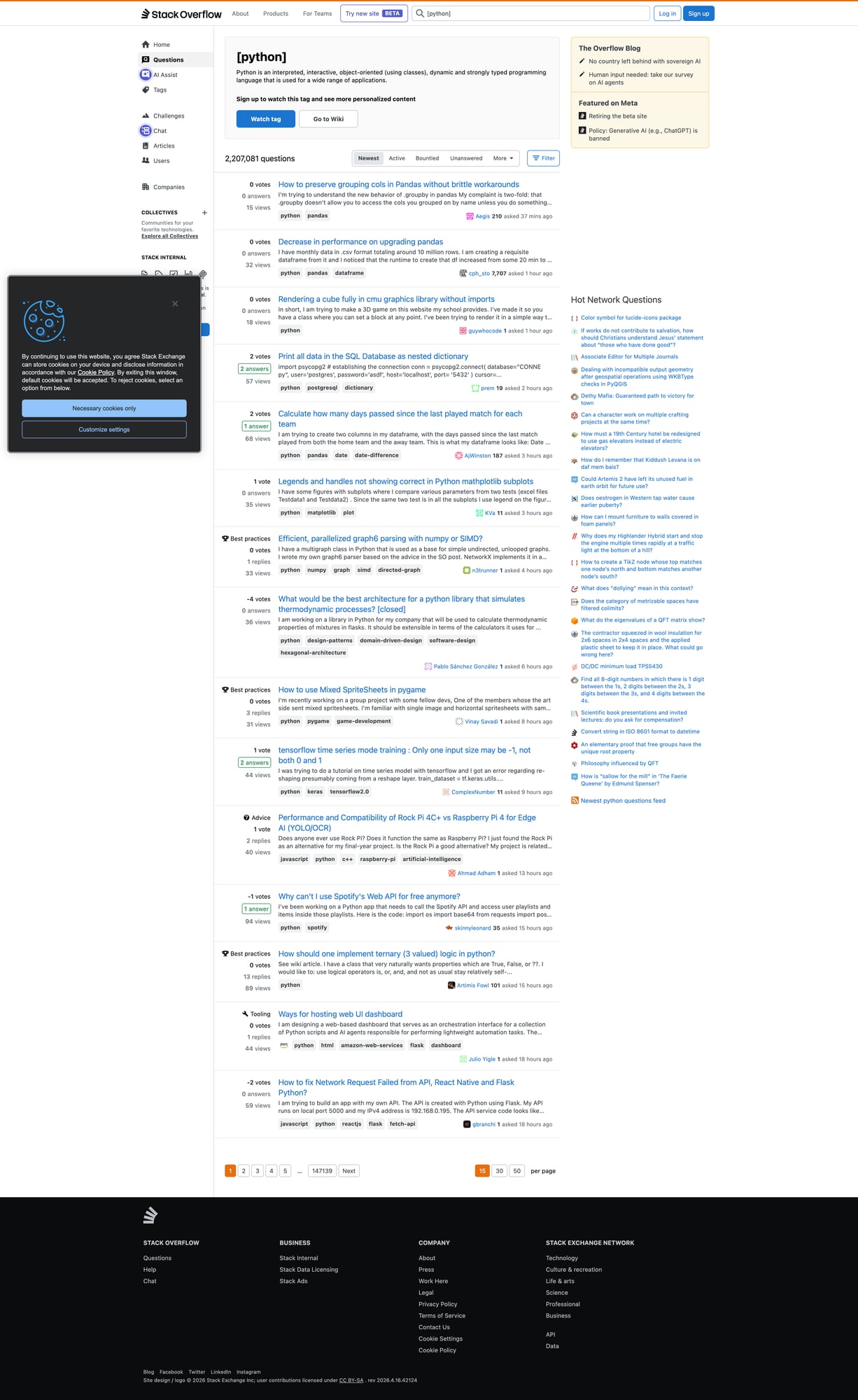
- Tag listing pages (question summaries)
Example:
https://stackoverflow.com/questions/tagged/python?tab=Newest&page=1&pagesize=15
- Question detail pages (full content)
Example:
https://stackoverflow.com/questions/12345678/some-question-slug
Fields to extract
From the tag listing:
- question URL
- question title
- summary stats: votes, answers, views
From the detail page:
- question title
- asked datetime
- question body text
- accepted answer text (if any)
- tags
Setup
python -m venv .venv
source .venv/bin/activate
pip install requests beautifulsoup4 lxml
Step 1: Build a polite, reliable fetch()
A crawler lives and dies by its network layer.
Rules:
- always use timeouts
- always send a real User-Agent
- retry on transient failures
- pace your requests
from __future__ import annotations

import random
import time
from typing import Optional

import requests

BASE = "https://stackoverflow.com"
TIMEOUT = (10, 30)  # connect, read

session = requests.Session()

DEFAULT_HEADERS = {
    "User-Agent": (
        "Mozilla/5.0 (Macintosh; Intel Mac OS X 10_15_7) "
        "AppleWebKit/537.36 (KHTML, like Gecko) "
        "Chrome/124.0.0.0 Safari/537.36"
    ),
    "Accept-Language": "en-US,en;q=0.9",
}


def fetch(url: str, tries: int = 3, sleep_s: float = 1.0) -> str:
    last: Optional[Exception] = None

    for attempt in range(1, tries + 1):
        try:
            r = session.get(url, headers=DEFAULT_HEADERS, timeout=TIMEOUT)

            # Basic handling for rate limiting
            if r.status_code in (429, 403):
                # backoff more aggressively
                time.sleep(sleep_s * attempt * 4)
                continue

            r.raise_for_status()
            # gentle pacing even on success
            time.sleep(sleep_s + random.random())
            return r.text

        except Exception as e:
            last = e
            time.sleep(sleep_s * attempt * 2)

    raise last
Step 2: Parse question summaries from a tag page
Stack Overflow’s tag listing pages include question summary blocks.
A commonly stable selector is a question link inside a summary container.
import urllib.parse
from bs4 import BeautifulSoup


def abs_url(href: str) -> str:
    return urllib.parse.urljoin(BASE, href)


def parse_tag_page(html: str) -> list[dict]:
    soup = BeautifulSoup(html, "lxml")

    out: list[dict] = []

    # Question summaries are typically in div.s-post-summary
    for q in soup.select("div.s-post-summary"):
        a = q.select_one("h3 a")
        if not a:
            continue

        href = a.get("href")
        url = abs_url(href) if href else None
        title = a.get_text(" ", strip=True)

        # Stats: votes/answers/views
        votes = q.select_one("span.s-post-summary--stats-item-number")
        # There are multiple numbers; we'll parse by labels if available.
        stats = {"votes": None, "answers": None, "views": None}

        # Newer SO markup uses items with titles like "5 votes".
        for item in q.select("div.s-post-summary--stats-item"):
            num = item.select_one("span.s-post-summary--stats-item-number")
            label = item.select_one("span.s-post-summary--stats-item-unit")
            n = num.get_text(" ", strip=True) if num else None
            u = label.get_text(" ", strip=True).lower() if label else ""
            if "vote" in u:
                stats["votes"] = n
            elif "answer" in u:
                stats["answers"] = n
            elif "view" in u:
                stats["views"] = n

        out.append({
            "url": url,
            "title": title,
            **stats,
        })

    return out
Step 3: Parse a question page (including accepted answer)
On the detail page, we want the question body and the accepted answer.
Accepted answers usually have a visual marker and a specific class.
We’ll extract:
- title
- asked datetime
- question text
- accepted answer text
- tags
from bs4 import BeautifulSoup


def textify(el) -> str:
    if not el:
        return ""
    # Keep line breaks for code blocks and paragraphs
    return el.get_text("\n", strip=True)


def parse_question_page(html: str, url: str) -> dict:
    soup = BeautifulSoup(html, "lxml")

    title_el = soup.select_one("h1 a.question-hyperlink") or soup.select_one("h1")
    title = title_el.get_text(" ", strip=True) if title_el else None

    asked_time = None
    time_el = soup.select_one("time[itemprop='dateCreated']") or soup.select_one("time")
    if time_el:
        asked_time = time_el.get("datetime") or time_el.get_text(" ", strip=True)

    q_body = soup.select_one("div.question div.s-prose") or soup.select_one("div.postcell div.s-prose")
    question_text = textify(q_body)

    tags = [t.get_text(" ", strip=True) for t in soup.select("a.post-tag")]

    # Accepted answer: try common patterns
    accepted = ""

    # Many pages have 'div.answer.accepted-answer' or a checkmark container.
    acc = soup.select_one("div.answer.accepted-answer div.s-prose")
    if not acc:
        # fallback: look for an answer with a green check (js-accepted-answer-indicator)
        for ans in soup.select("div.answer"):
            if ans.select_one(".js-accepted-answer-indicator") or "accepted-answer" in (ans.get("class") or []):
                acc = ans.select_one("div.s-prose")
                break

    accepted = textify(acc)

    return {
        "url": url,
        "title": title,
        "asked_time": asked_time,
        "tags": tags,
        "question": question_text,
        "accepted_answer": accepted or None,
    }
Step 4: Crawl a tag (paginate → fetch questions)
Now we can combine everything:
- fetch N tag pages
- collect question URLs
- fetch each question
- export JSONL
import json


def tag_url(tag: str, page: int, pagesize: int = 15) -> str:
    return f"{BASE}/questions/tagged/{tag}?tab=Newest&page={page}&pagesize={pagesize}"


def crawl_tag(tag: str, pages: int = 2, per_page: int = 15, max_questions: int = 30) -> list[dict]:
    seen = set()
    summaries: list[dict] = []

    for p in range(1, pages + 1):
        html = fetch(tag_url(tag, page=p, pagesize=per_page))
        batch = parse_tag_page(html)

        for q in batch:
            u = q.get("url")
            if not u or u in seen:
                continue
            seen.add(u)
            summaries.append(q)

        print("tag", tag, "page", p, "summaries", len(batch), "total", len(summaries))
        if len(summaries) >= max_questions:
            break

    details: list[dict] = []
    for q in summaries[:max_questions]:
        url = q["url"]
        html = fetch(url)
        item = parse_question_page(html, url=url)
        item.update({
            "votes": q.get("votes"),
            "answers": q.get("answers"),
            "views": q.get("views"),
        })
        details.append(item)
        print("fetched", len(details), url)

    return details


def export_jsonl(rows: list[dict], path: str):
    with open(path, "w", encoding="utf-8") as f:
        for r in rows:
            f.write(json.dumps(r, ensure_ascii=False) + "\n")


if __name__ == "__main__":
    rows = crawl_tag("python", pages=3, max_questions=25)
    export_jsonl(rows, "so_python_questions.jsonl")
    print("wrote", len(rows), "rows")
Where ProxiesAPI fits (honestly)
Stack Overflow is usually scrapeable with a single IP at small volumes.
You typically need proxies when:
- you’re crawling many tags (hundreds of pages)
- you’re refreshing frequently (e.g. hourly)
- you’re running multiple workers concurrently
- you hit 403/429 spikes
Add ProxiesAPI to requests
If ProxiesAPI provides you a proxy endpoint, you can wire it into requests like this:
PROXY = "http://YOUR_USER:YOUR_PASS@YOUR_PROXIESAPI_HOST:PORT"

r = session.get(
    url,
    headers=DEFAULT_HEADERS,
    proxies={"http": PROXY, "https": PROXY},
    timeout=TIMEOUT,
)
What it does well:
- reduce correlated failures by rotating IPs
- keep your fetch layer consistent when you scale workers
What it does not do:
- remove the need for pacing
- guarantee access if the site blocks based on behavior or fingerprints
QA checklist
- Tag pages return 15 summaries each
- Detail pages contain
questiontext -
accepted_answerisnullfor non-accepted questions - JSONL lines parse cleanly
- You’re not hammering the site (sleep + backoff)
Next upgrades
- store results in SQLite (incremental refresh)
- dedupe by question id (parse from URL)
- extract all answers (not only accepted)
- add a “stop on block page” detector so you don’t waste requests
When you move from scraping a handful of pages to thousands of questions, failures become inevitable. ProxiesAPI helps stabilize your fetch layer with IP rotation and consistent connectivity so your crawler can keep moving (politely) at scale.