
Scrape Stack Overflow Questions by Tag with Python (No API): Titles, Votes, Answers
If you’ve ever tried to research a topic deeply (say web scraping), Stack Overflow is basically the public notebook.
A simple scraper that collects titles + vote counts + answer counts + links is useful for:
- building a dataset of common problems
- trend analysis (what’s being asked now)
- generating internal FAQs
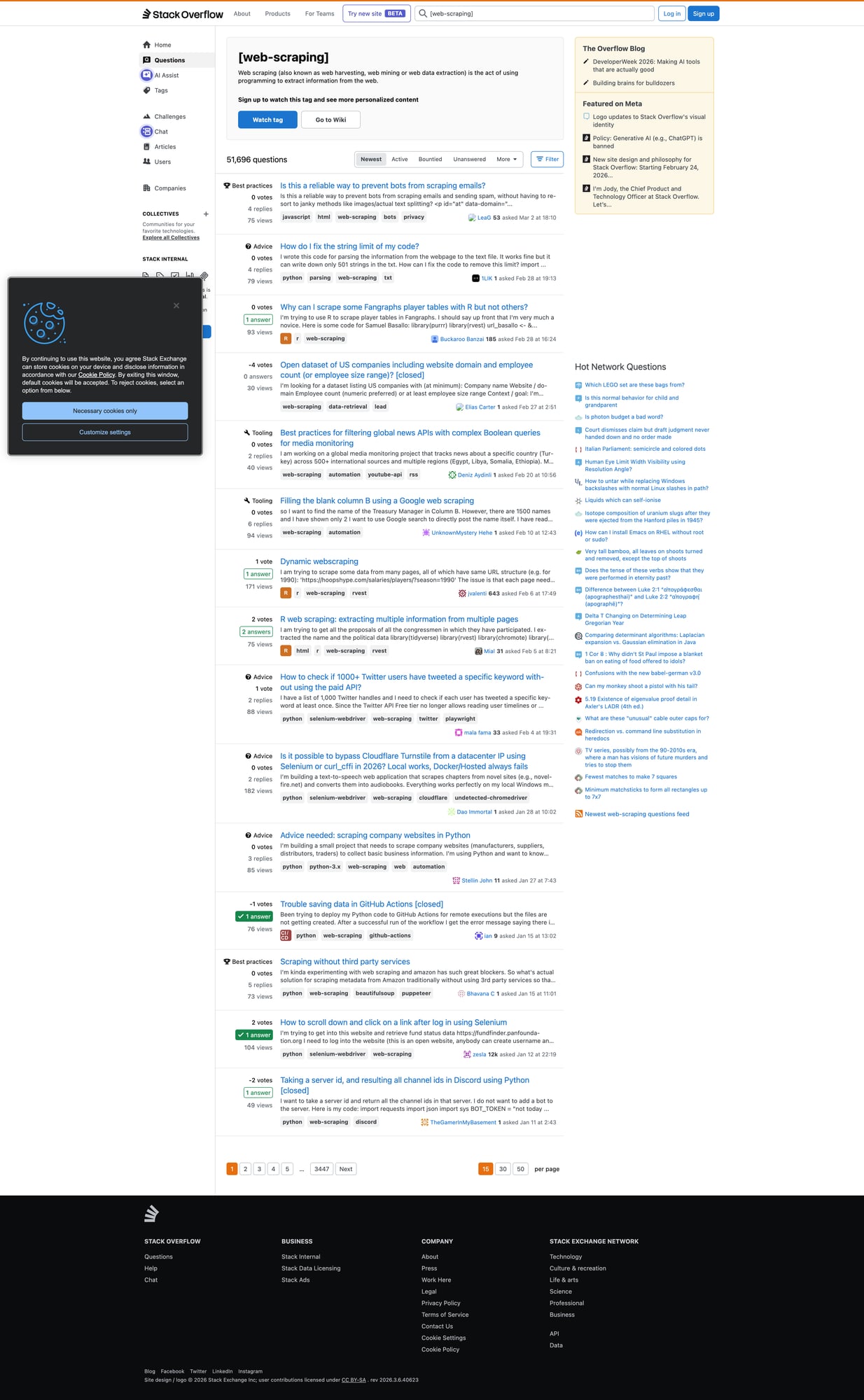
In this tutorial we’ll scrape the tag feed page (HTML) and export a clean dataset.
Note: Stack Overflow has an official API. This post demonstrates HTML scraping because many sites don’t have APIs — but if the API fits your use case, prefer it.
If you turn this into a scheduled crawler, reliability becomes the bottleneck. ProxiesAPI helps keep your request layer stable as you scale up.
Target page
We’ll use the “web-scraping” tag sorted by newest:
https://stackoverflow.com/questions/tagged/web-scraping?tab=Newest
Pagination is a standard page= parameter:
https://stackoverflow.com/questions/tagged/web-scraping?tab=Newest&page=2
Setup
python -m venv .venv
source .venv/bin/activate
pip install requests beautifulsoup4 lxml
Step 1: Fetch HTML (with a timeout + UA)
import requests

TIMEOUT = (10, 30)
UA = "Mozilla/5.0 (compatible; ProxiesAPIGuidesBot/1.0; +https://www.proxiesapi.com/)"

session = requests.Session()


def fetch(url: str) -> str:
    r = session.get(url, timeout=TIMEOUT, headers={"User-Agent": UA})
    r.raise_for_status()
    return r.text

html = fetch("https://stackoverflow.com/questions/tagged/web-scraping?tab=Newest")
print(len(html))
print(html[:200])
Step 2: Inspect the DOM (what to extract)
Each question appears as a “summary card” with:
- title link
- stats (votes, answers, views)
Selectors change over time, but the reliable approach is:
- select question summary containers
- inside each, select the title link
- parse the stats block
Step 3: Parse question summaries
import re
from bs4 import BeautifulSoup


def parse_int(s: str) -> int | None:
    m = re.search(r"(\d+)", s or "")
    return int(m.group(1)) if m else None


def parse_questions(html: str) -> list[dict]:
    soup = BeautifulSoup(html, "lxml")

    out = []

    # Stack Overflow commonly uses these containers; if it changes, update here.
    cards = soup.select("div.s-post-summary")
    for c in cards:
        a = c.select_one("h3 a")
        title = a.get_text(" ", strip=True) if a else None
        href = a.get("href") if a else None
        url = f"https://stackoverflow.com{href}" if href and href.startswith("/") else href

        # stats
        votes = None
        answers = None
        views = None

        stats = c.select("span.s-post-summary--stats-item-number")
        if len(stats) >= 1:
            votes = parse_int(stats[0].get_text(" ", strip=True))
        if len(stats) >= 2:
            answers = parse_int(stats[1].get_text(" ", strip=True))
        if len(stats) >= 3:
            views = parse_int(stats[2].get_text(" ", strip=True))

        out.append({
            "title": title,
            "url": url,
            "votes": votes,
            "answers": answers,
            "views": views,
        })

    return out


rows = parse_questions(html)
print("rows:", len(rows))
print(rows[0])
Step 4: Crawl multiple pages + dedupe
def crawl(pages: int = 3) -> list[dict]:
    all_rows = []
    seen = set()

    for p in range(1, pages + 1):
        url = "https://stackoverflow.com/questions/tagged/web-scraping?tab=Newest"
        if p > 1:
            url += f"&page={p}"

        html = fetch(url)
        batch = parse_questions(html)

        for r in batch:
            key = r.get("url")
            if not key or key in seen:
                continue
            seen.add(key)
            all_rows.append(r)

        print("page", p, "batch", len(batch), "total", len(all_rows))

    return all_rows


data = crawl(5)
print("unique questions:", len(data))
Export to CSV
import csv

with open("so_web_scraping_questions.csv", "w", newline="", encoding="utf-8") as f:
    w = csv.DictWriter(f, fieldnames=["title","url","votes","answers","views"])
    w.writeheader()
    w.writerows(data)

print("wrote so_web_scraping_questions.csv", len(data))
Production hardening (so this runs daily)
- Be polite: add a short delay between pages.
- Cache: don’t refetch the same pages repeatedly.
- Validate: reject rows with missing titles/URLs.
- Monitor: track failures over time.
Where ProxiesAPI fits
This kind of crawler becomes fragile when:
- you run it daily
- you scrape many tags
- you add detail-page fetching
At that point, the limiting factor is usually the network layer: reliability, throughput, and fewer random failures.
QA checklist
- Does page 1 parse 40–50 question cards?
- Does pagination increase unique question count?
- Are URLs correct and absolute?
- Does CSV contain sane numbers?
If you turn this into a scheduled crawler, reliability becomes the bottleneck. ProxiesAPI helps keep your request layer stable as you scale up.