
Scrape Yahoo Finance Earnings Calendar with Python (Dates, EPS Estimates, CSV Export)
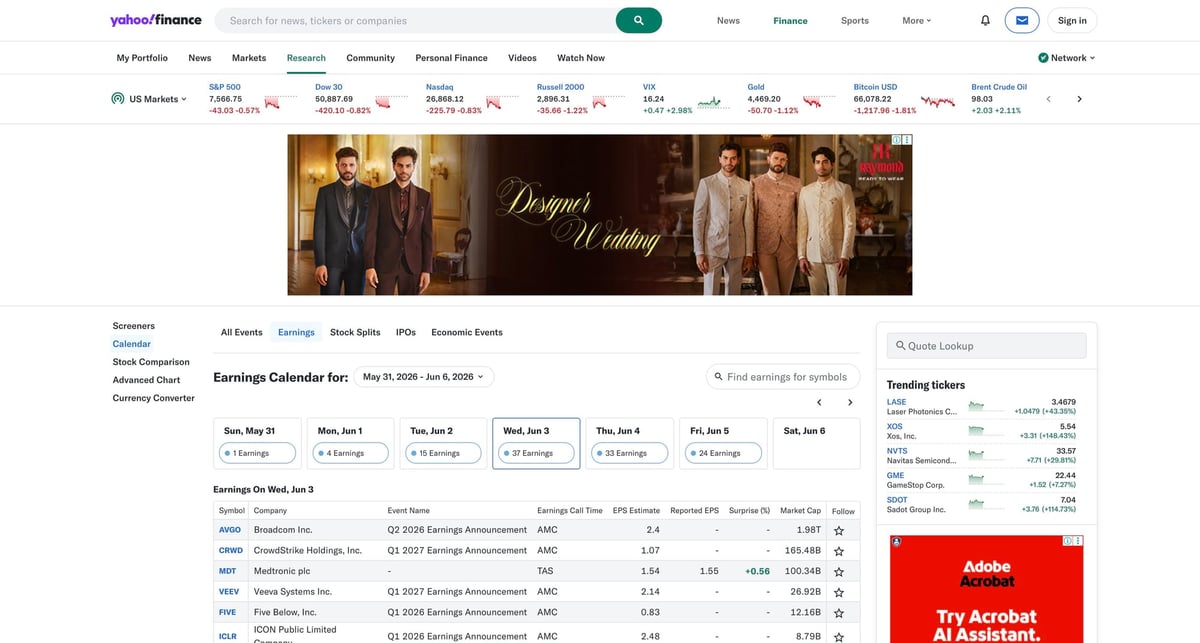
Yahoo Finance's earnings calendar is one of those pages that becomes useful the moment you stop reading it in the browser and start treating it like a dataset.
You can use it to build:
- a daily list of companies reporting earnings
- a watchlist filtered by ticker or market cap
- a surprise tracker using EPS estimate vs reported EPS
- a CSV snapshot you compare across days
The catch is that the page is browser-rendered and raw HTTP requests are inconsistent. In this environment, a direct fetch was rate-limited, so the reliable pattern is: render first, then parse the visible table.
If your Yahoo Finance scraper works locally but starts throwing blocks or unstable responses at scale, ProxiesAPI fits as the proxy layer. You keep the parsing logic and swap in a more reliable connection strategy.
The page we want
Yahoo Finance exposes the calendar at:
https://finance.yahoo.com/calendar/earnings
For date-specific pulls, add a day parameter:
https://finance.yahoo.com/calendar/earnings?day=2026-06-03
The rendered page shows a standard data table. The stable pattern to wait for is:
- table rows:
table tbody tr - header cells:
table thead th
I would not build this scraper around Yahoo's CSS utility classes. They change too often. A visible table selector is the better anchor.
Install the stack
python -m venv .venv
source .venv/bin/activate
pip install selenium pandas beautifulsoup4 lxml
You will also need a Chrome-compatible driver. Selenium 4.6+ can manage that automatically for most setups.
Step 1: Render the page in headless Chrome
This function opens the calendar, waits for the visible table, and returns the rendered HTML.
from __future__ import annotations

import os
from selenium import webdriver
from selenium.webdriver.chrome.options import Options
from selenium.webdriver.common.by import By
from selenium.webdriver.support.ui import WebDriverWait
from selenium.webdriver.support import expected_conditions as EC


def build_driver() -> webdriver.Chrome:
    options = Options()
    options.add_argument("--headless=new")
    options.add_argument("--window-size=1440,2200")
    options.add_argument(
        "--user-agent=Mozilla/5.0 (Macintosh; Intel Mac OS X 10_15_7) "
        "AppleWebKit/537.36 (KHTML, like Gecko) Chrome/125.0 Safari/537.36"
    )

    # Optional: route traffic through ProxiesAPI when you need a more stable IP layer.
    proxy_url = os.getenv("PROXIESAPI_PROXY_URL")
    if proxy_url:
        options.add_argument(f"--proxy-server={proxy_url}")

    return webdriver.Chrome(options=options)


def get_rendered_html(day: str) -> str:
    url = f"https://finance.yahoo.com/calendar/earnings?day={day}"
    driver = build_driver()
    try:
        driver.get(url)
        WebDriverWait(driver, 30).until(
            EC.presence_of_element_located((By.CSS_SELECTOR, "table tbody tr"))
        )
        return driver.page_source
    finally:
        driver.quit()
Why wait on table tbody tr instead of a text string? Because rows prove the data actually loaded.
Step 2: Parse the earnings table with pandas.read_html
Once the browser has rendered the page, pandas can usually parse the visible table directly.
from io import StringIO
import pandas as pd


def extract_earnings_table(html: str) -> pd.DataFrame:
    tables = pd.read_html(StringIO(html))
    for df in tables:
        cols = {str(c).strip() for c in df.columns}
        if {"Symbol", "Company", "EPS Estimate"} <= cols:
            return df.copy()
    raise ValueError("Could not find the earnings calendar table")
This is much less brittle than manually indexing every cell up front.
Step 3: Clean the columns you actually care about
Yahoo's rendered table can include extra columns depending on region and session state. Normalize the fields before you export.
import re


def clean_numeric(value):
    if pd.isna(value):
        return None
    text = str(value).strip()
    if not text or text == "-":
        return None
    text = text.replace(",", "")
    m = re.search(r"-?\d+(?:\.\d+)?", text)
    return float(m.group(0)) if m else None


def normalize(df: pd.DataFrame, day: str) -> pd.DataFrame:
    rename_map = {
        "Earnings Call Time": "call_time",
        "EPS Estimate": "eps_estimate",
        "Reported EPS": "reported_eps",
        "Surprise(%)": "surprise_pct",
        "Market Cap": "market_cap",
    }

    out = df.rename(columns=rename_map).copy()
    out["symbol"] = out["Symbol"].astype(str).str.strip()
    out["company"] = out["Company"].astype(str).str.strip()
    out["day"] = day

    for col in ["eps_estimate", "reported_eps", "surprise_pct"]:
        if col in out.columns:
            out[col] = out[col].map(clean_numeric)

    keep = [
        "day",
        "symbol",
        "company",
        "call_time",
        "eps_estimate",
        "reported_eps",
        "surprise_pct",
    ]
    keep = [c for c in keep if c in out.columns]
    return out[keep]
Step 4: Export a daily CSV
def scrape_earnings_calendar(day: str) -> pd.DataFrame:
    html = get_rendered_html(day)
    raw = extract_earnings_table(html)
    return normalize(raw, day)


if __name__ == "__main__":
    day = "2026-06-03"
    df = scrape_earnings_calendar(day)
    print(df.head(10).to_string(index=False))
    df.to_csv(f"yahoo_earnings_{day}.csv", index=False)
    print("saved", f"yahoo_earnings_{day}.csv", "rows:", len(df))
Typical output shape:
       day symbol               company call_time  eps_estimate  reported_eps  surprise_pct
2026-06-03   CRWD CrowdStrike Holdings     AMC          0.82          0.88          7.32
2026-06-03   HPE  Hewlett Packard Ent.     AMC          0.39          0.42          7.69
Fallback: parse rows with explicit selectors
If read_html stops finding the table, fall back to the rendered DOM.
from bs4 import BeautifulSoup


def extract_rows_with_selectors(html: str) -> list[dict]:
    soup = BeautifulSoup(html, "lxml")
    headers = [th.get_text(" ", strip=True) for th in soup.select("table thead th")]
    rows = []

    for tr in soup.select("table tbody tr"):
        cells = [td.get_text(" ", strip=True) for td in tr.select("td")]
        if len(cells) != len(headers):
            continue
        rows.append(dict(zip(headers, cells)))

    return rows
Those selectors are the important part:
table thead thtable tbody trtable tbody tr td
They track the visible structure, not Yahoo's styling classes.
Adding ProxiesAPI without rewriting the parser
This is the right mental model for ProxiesAPI here:
- Selenium still handles rendering
- your parsing logic stays the same
- ProxiesAPI only improves the network path
If you have a proxy endpoint from ProxiesAPI, set it as:
export PROXIESAPI_PROXY_URL="http://USER:PASS@proxy.proxiesapi.com:PORT"
Then Chrome uses it via:
options.add_argument(f"--proxy-server={proxy_url}")
That is a better fit than rewriting everything around a new parser.
Practical scraping advice
1. Pull one day at a time
Don't try to crawl months of history in one browser session. It is slower, harder to debug, and more likely to get you blocked.
2. Save raw snapshots when the format matters
If you are feeding this into a trading or alerting workflow, keep the CSV plus the raw HTML for the day.
3. Treat missing reported EPS as normal
Before the company reports, you will often have:
- estimate present
- reported EPS empty
- surprise empty
That is not a parser bug.
4. Validate the row count
Add a guard like:
if len(df) < 20:
    raise ValueError("Too few earnings rows; page may not have loaded correctly")
That catches soft failures early.
Final script
If you want one repeatable daily job, combine the four functions above into a cron-friendly script and run it once per morning or once per evening after close.
That gives you a clean earnings dataset with:
- ticker
- company
- call time
- EPS estimate
- reported EPS
- surprise percentage
Which is a lot more useful than a browser tab you refresh manually.
If your Yahoo Finance scraper works locally but starts throwing blocks or unstable responses at scale, ProxiesAPI fits as the proxy layer. You keep the parsing logic and swap in a more reliable connection strategy.