
Scrape Live Stock Data from Yahoo Finance with Python (Quotes + Key Stats)
Yahoo Finance is a convenient place to pull “live-ish” quote data and basic company stats without signing up for a paid market data feed.
In this tutorial you’ll build a practical Python scraper that:
- fetches Yahoo Finance quote pages through ProxiesAPI (optional, but recommended at scale)
- extracts a few quote fields (price, change, currency, market cap, etc.)
- pulls key stats from embedded JSON (more stable than guessing CSS classes)
- exports results to CSV
Scraping market pages is rarely “set and forget.” ProxiesAPI gives you a proxy-backed fetch URL so retries and rotation stay a small change in your network layer—not a rewrite of your parser.
What we’re scraping
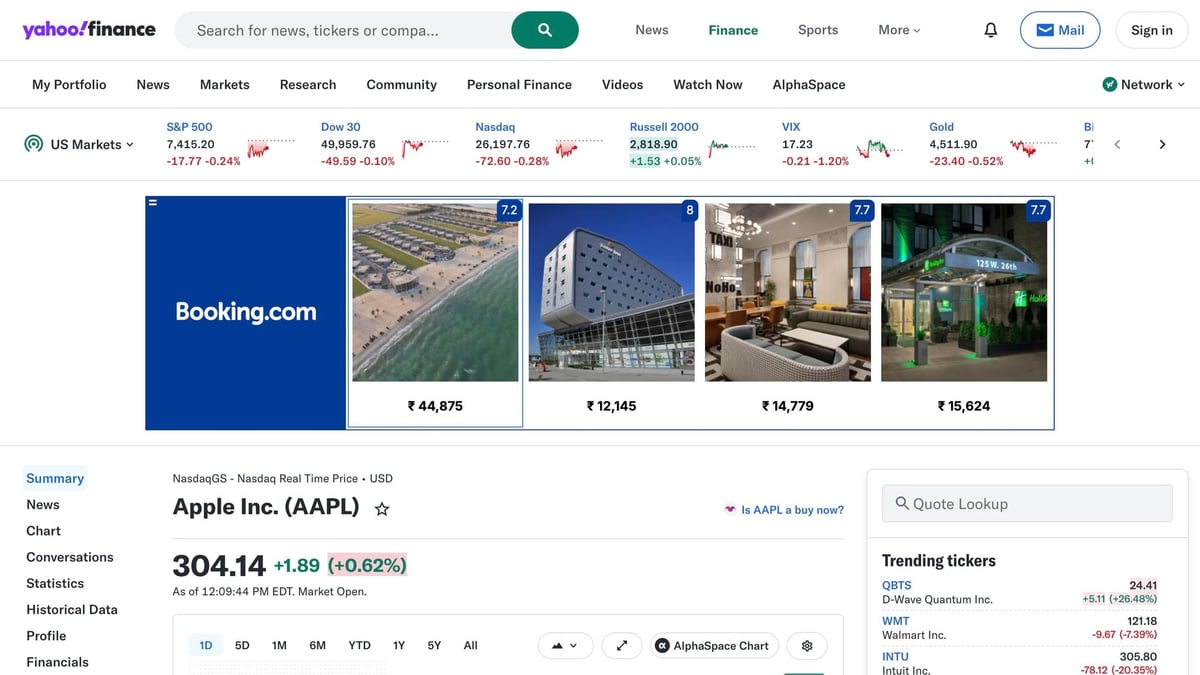
We’ll target quote pages like:
https://finance.yahoo.com/quote/AAPL/https://finance.yahoo.com/quote/MSFT/
A note on “live” data
Yahoo Finance updates certain UI widgets via JavaScript, but the initial HTML often contains a large JSON blob we can parse. That’s usually the most reliable way to extract “quote summary” fields without running a browser.
This approach won’t be as fast as a dedicated market data API, and it can break if Yahoo changes their page internals. Treat it as a scraping tutorial—build monitoring and fallbacks if it’s business-critical.
Setup
python -m venv .venv
source .venv/bin/activate
pip install requests lxml pandas
We’ll use:
requestsfor HTTPlxmlfor light HTML parsing (when needed)pandasfor a quick CSV export
Step 1: A resilient fetch layer (with optional ProxiesAPI)
ProxiesAPI works by fetching the target URL through their endpoint:
http://api.proxiesapi.com/?auth_key=YOUR_KEY&url=https://example.com
We’ll wrap it so the rest of the scraper stays normal requests.
import os
import time
import random
import urllib.parse
import requests

PROXIESAPI_KEY = os.environ.get("PROXIESAPI_KEY", "")
TIMEOUT = (10, 40)  # connect, read

session = requests.Session()


def proxiesapi_url(target_url: str) -> str:
    if not PROXIESAPI_KEY:
        raise RuntimeError("Set PROXIESAPI_KEY in your environment")

    return (
        "http://api.proxiesapi.com/?auth_key="
        + urllib.parse.quote(PROXIESAPI_KEY, safe="")
        + "&url="
        + urllib.parse.quote(target_url, safe="")
    )


def fetch(url: str, *, use_proxiesapi: bool = True, max_retries: int = 4) -> str:
    last_err = None

    for attempt in range(1, max_retries + 1):
        try:
            final_url = proxiesapi_url(url) if use_proxiesapi else url
            r = session.get(
                final_url,
                timeout=TIMEOUT,
                headers={
                    "User-Agent": (
                        "Mozilla/5.0 (Macintosh; Intel Mac OS X 10_15_7) "
                        "AppleWebKit/537.36 (KHTML, like Gecko) "
                        "Chrome/123.0 Safari/537.36"
                    ),
                    "Accept-Language": "en-US,en;q=0.9",
                },
            )
            r.raise_for_status()
            html = r.text
            if not html or len(html) < 50_000:
                raise RuntimeError(f"Suspiciously small HTML ({len(html)} bytes)")
            return html

        except Exception as e:
            last_err = e
            time.sleep(min(10, (2 ** (attempt - 1))) + random.random())

    raise RuntimeError(f"Fetch failed after {max_retries} attempts: {last_err}")
To run with ProxiesAPI:
export PROXIESAPI_KEY="YOUR_KEY"
Step 2: Extract the embedded JSON (no guessed selectors)
Yahoo Finance quote pages often contain a script assignment like:
root.App.main = {...};
Inside that JSON there’s typically a store-like structure with quote summary data.
We’ll locate the JSON blob, parse it, then navigate to the bits we care about.
import json
import re
from typing import Any


ROOT_RE = re.compile(r"root\.App\.main\s*=\s*(\{.*?\})\s*;\s*\n", re.S)


def extract_root_app_main(html: str) -> dict[str, Any]:
    m = ROOT_RE.search(html)
    if not m:
        raise RuntimeError("Could not find root.App.main JSON in HTML")
    return json.loads(m.group(1))
Pull useful fields safely
Yahoo’s schema changes over time, so use “get-with-default” patterns instead of hardcoding a deep path that will crash.
def deep_get(obj: Any, path: list[str], default=None):
    cur = obj
    for key in path:
        if not isinstance(cur, dict) or key not in cur:
            return default
        cur = cur[key]
    return cur


def norm_raw(value: Any):
    if isinstance(value, dict) and "raw" in value:
        return value.get("raw")
    return value
Step 3: Build a quote parser (price + change + a few stats)
For many tickers you’ll find relevant data under something like QuoteSummaryStore or QuoteStore inside the JSON.
This parser is intentionally defensive: it returns None for missing fields instead of crashing.
def parse_quote(html: str) -> dict:
    data = extract_root_app_main(html)

    # Common locations. Yahoo changes these; try multiple.
    quote_store = (
        deep_get(data, ["context", "dispatcher", "stores", "QuoteSummaryStore"])
        or deep_get(data, ["context", "dispatcher", "stores", "QuoteStore"])
        or {}
    )

    price = deep_get(quote_store, ["price"], {}) or {}
    summary_detail = deep_get(quote_store, ["summaryDetail"], {}) or {}
    quote_type = deep_get(quote_store, ["quoteType"], {}) or {}

    symbol = deep_get(price, ["symbol"]) or deep_get(quote_type, ["symbol"])

    return {
        "symbol": symbol,
        "short_name": deep_get(price, ["shortName"]) or deep_get(quote_type, ["shortName"]),
        "currency": deep_get(price, ["currency"]) or deep_get(summary_detail, ["currency"]),
        "regular_price": norm_raw(deep_get(price, ["regularMarketPrice"])),
        "regular_change": norm_raw(deep_get(price, ["regularMarketChange"])),
        "regular_change_pct": norm_raw(deep_get(price, ["regularMarketChangePercent"])),
        "market_cap": norm_raw(deep_get(summary_detail, ["marketCap"])),
        "previous_close": norm_raw(deep_get(summary_detail, ["previousClose"])),
        "open": norm_raw(deep_get(summary_detail, ["open"])),
        "day_low": norm_raw(deep_get(summary_detail, ["dayLow"])),
        "day_high": norm_raw(deep_get(summary_detail, ["dayHigh"])),
        "fifty_two_week_low": norm_raw(deep_get(summary_detail, ["fiftyTwoWeekLow"])),
        "fifty_two_week_high": norm_raw(deep_get(summary_detail, ["fiftyTwoWeekHigh"])),
        "volume": norm_raw(deep_get(summary_detail, ["volume"])),
        "avg_volume_3m": norm_raw(deep_get(summary_detail, ["averageVolume"])),
    }
Step 4: Scrape multiple tickers + export to CSV
import pandas as pd


def quote_url(symbol: str) -> str:
    sym = symbol.strip().upper()
    return f"https://finance.yahoo.com/quote/{sym}/"


def scrape_quotes(symbols: list[str]) -> list[dict]:
    rows = []
    for symbol in symbols:
        url = quote_url(symbol)
        html = fetch(url, use_proxiesapi=True)
        rows.append(parse_quote(html))
    return rows


if __name__ == "__main__":
    symbols = ["AAPL", "MSFT", "NVDA", "TSLA"]
    rows = scrape_quotes(symbols)

    df = pd.DataFrame(rows).sort_values("symbol")
    df.to_csv("yahoo-finance-quotes.csv", index=False)
    print(df[["symbol", "regular_price", "regular_change_pct", "market_cap"]])
You’ll end up with:
yahoo-finance-quotes.csv- a quick terminal summary
Debugging tips (what breaks first)
If you start seeing failures, it’s usually one of these:
- HTML too small: you’re getting a block page, consent page, or error page
- Missing
root.App.main: the quote page changed or the response is not the real quote HTML - Schema drift: a field moved; your parser should return
None, not crash
Quick sanity checks
Print the first few hundred characters of HTML when troubleshooting:
html = fetch(quote_url("AAPL"), use_proxiesapi=False)
print(html[:500])
If the HTML looks like “consent” or “access denied,” you’ll want:
- retries/backoff
- a proxy/unblock layer (ProxiesAPI)
- a smaller request rate (don’t hammer it)
Where ProxiesAPI fits (honestly)
ProxiesAPI doesn’t make Yahoo Finance “guaranteed.” What it does give you is a consistent fetch URL so your scraper can:
- retry without changing your parser
- reduce sudden IP-based throttling
- keep request logic centralized (fetch → parse → export)
If you’re scraping finance pages as part of a larger workflow, that architectural separation is the real win.
Scraping market pages is rarely “set and forget.” ProxiesAPI gives you a proxy-backed fetch URL so retries and rotation stay a small change in your network layer—not a rewrite of your parser.